
Multiplayer Space Platform Start: every team starts on its own space platform.
- Status: testing
- Requires: Factorio 2.1 with the Space Age expansion
- Based on: Space Platform Start by phiresky
- Community: Factorio Polska
Welcome to Space Together
Space Together is a multiplayer mod in which you do not start on a planet, but stranded on a space platform.
You get your resources from asteroids, research technologies, build thrusters and finally fly to your first planet.
Many teams play on one server at the same time. Each has its own platform, its own research and its own base, and
players can invite each other and merge teams. The server keeps itself tidy: the platforms of players who left the
game are protected from asteroids, and abandoned teams disappear after a while.
The mod builds on Space Platform Start. The rules of the
space start, and the technology changes that make it possible to finish the whole game this way, are the same as in
the original.
Before you start
- Start a new map with the mod. If you add it to a game in progress, it moves every player to the lobby.
- The mod replaces the original Space Platform Start, so the game will not let you enable both at once.
- Teams that nobody plays in are removed over time. The section "Cleanup of inactive teams" explains the rules.
- This is a test version, so bugs may happen.
Space Together is for you if:
- you play on a server with others and want every new player to be able to start from scratch, even after many days
of play; - you want to play alongside others, but at your own pace;
- you like the challenge of starting without a planet under your feet;
- you want to be able to join forces with other players at any time.
How the game starts
- When you join the server for the first time, you get your own team and your own space platform, named after you.
- The platform is at the location "Stranded in space": in Vulcanus orbit, but far from the planet. Sunlight and the
kinds of asteroids there are the same as at Vulcanus. - Next to the space platform hub lies the wreck of your spaceship with the starting items: an asteroid collector,
a crusher, an assembling machine 1, 8 inserters, 4 stone furnaces, 2 solar panels, 6 space platform foundations
and 8 firearm magazines. - Planets have to be discovered with a technology first. That includes Vulcanus, where you start, and Nauvis, which
gets its own discovery technology here.
What makes it a challenge
- You start in the hub and build remotely. Shift+Enter takes you out onto the deck and back into the hub, but the
edge of the platform is as far as you get. From the deck you build and open buildings across the whole platform,
while on planets the reach stays normal. - Every resource comes from asteroids: the collector catches the chunks and crushers break them down.
- Space is expensive: every bit of the platform is a space platform foundation.
- Asteroids can destroy your platform before you set up defenses. The bigger the platform, the more ammunition it
uses. - You make oil and oil products from coal made out of asteroids. This production chain exists in the base game, but
on a planet hardly anyone uses it. - Switching crusher recipes automatically with circuit network signals comes in handy.
- To fly away, you have to research and build thrusters, and they need processing units.
- Be careful what you deconstruct: one mistake can cost you valuable items.
Landing on planets
- Every team lands at its own site on a planet, far from the planet's centre. The team's first pod bound for
a planet gets the site; the team sees it in chat as a map marker. - Around the site the game generates that planet's usual starting area: ores, water, no enemies nearby
(no demolisher on Vulcanus, an island of your own on Fulgora and Aquilo). - Team members who die on that planet respawn at their landing site.
- Once the team builds a cargo landing pad on the planet, pods land on it, as in the base game.
Teams
- Each team has its own platforms, research, map and buildings. You do not see other teams' platforms.
- Turrets shoot at other teams too, and you cannot use other teams' buildings.
- The chat is shared: you see messages from players in other teams and in the lobby, with the team name next to each
player's name. - The team's founder is its host. The host takes in new players and can remove a member or hand the host role to
someone else. When the host leaves the team, the role passes to the member who has played the longest for the
team, preferring members who are in the game.
Playing together
- Invitations. In the "My team" tab, pick a player from the list and click "Invite". The invited player gets
a popup with "Accept" and "Decline" buttons. An invitation is valid for 10 minutes. - Joining with your own platform. If you play alone in your own team, accepting an invitation, or the host
accepting your join request, merges both teams. Your platforms and buildings go to the other team, and you move to
its platform. If you are on a planet, you stay there. You can teleport back to your old platform. Your research
and your explored map are lost, because the game cannot merge them. That is why you have to confirm the merge. - If your team has other players too, you have to leave it before you can join another team.
- Join requests. A player without a team asks a team to take them in from the lobby window. If you play alone
in your own team, pick a player of the other team from the list in the "My team" tab and click "Ask to join" next
to "Invite". The host's yes merges both teams as an invitation does, so you confirm the merge when you send the
request. The host gets a popup with the request and accepts or declines it. The host can also stop accepting
requests. - Leaving a team. The "Leave the team" button takes you to the lobby with your inventory. If you are the last
member, the team and its platforms disappear at once. The game asks you to confirm first. - A player removed from the team by the host goes to the lobby with their inventory.
Lobby
- The lobby is a small, safe area for players without a team. You end up here after leaving a team, after being
removed from one, after your team was removed, or when the server already has the maximum number of teams. - You can walk, chat and use the mod's windows here, but you cannot build or fight.
- The lobby window opens by itself. In it you can start your own team with a new platform, ask one of the teams to
take you in, answer an invitation, or simply wait until someone invites you.
Asteroid protection
A new starting platform is protected until your team researches "Logistic science pack": every dangerous asteroid
turns into chunks you can collect. There is no time limit here, so you can build your defenses at your own pace.
Researching logistic science starts the protection clock:
- For the first hour, asteroids still turn into chunks.
- During the second hour, small asteroids appear and medium ones turn into small ones.
- After that, all asteroids arrive, so have your defenses ready by then. They stay weaker until your research
brings their health back (see below).
- The clock only runs while someone from your team is in the game, so short sessions do not use up the protection.
- Only your team is told when a phase changes or the clock starts. The time left is shown in the "Platforms" tab.
- Asteroids at the starting platform are weaker at first: they have half their health and regain it as your team
progresses. Researching "Chemical science pack" gives them +20%, and the discovery of any planet another +30%. Your
team hears every change, and a weakened asteroid shows a health bar like a hit one. - While nobody from the team is in the game, your platforms are safe. On the starting platform every asteroid
turns into chunks as during the protection, and on the team's other platforms asteroids simply disappear. So
production on those other platforms that lives on asteroids stops until someone from the team comes back. - After teams merge, each starting platform counts its protection time separately. If the team you join has not
researched "Logistic science pack" yet, your platform waits for it again.
When a hub is destroyed
- A destroyed hub is the end of that platform, but not the end of the game.
- Players who were aboard and online respawn on another platform of the team. If the team has none left, it gets
a new starting platform with a new wreck and the full asteroid protection time. - Offline players lose nothing: when they come back, they go to the team's platform with their inventory.
- Players on planets stay where they are. When the team has no platform, the "New starting platform" button in the
"My team" tab creates one. - A platform deleted on purpose does not bring a new wreck.
New technology: Platform transfer
A team can have several platforms: built by the team itself, or brought in by a player who joined with their own
platform.
Until the team researches the Platform transfer technology:
- hubs do not provide materials to the team's other platforms, because that hub option is locked;
- cargo that flies to another platform anyway returns to the hub it came from.
This lock keeps a merge from giving an instant advantage: a platform brought into the team cannot be taken apart right
away and shipped to the home platform. The technology costs 100 red and 100 green science packs and requires
"Logistic science pack". Once it is researched, the team's platforms in the same orbit exchange materials.
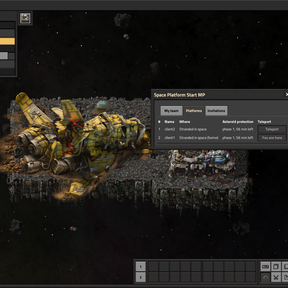
Team members move between the team's platforms with the "Teleport" button in the "Platforms" tab, also before the
research, since a backpack holds little. Teleporting only works from aboard a platform; from a planet you go back by
rocket, as usual.
Technologies and recipes
The changes from the original Space Platform Start make it possible to finish the game starting in space. Space
Together only adds the platform transfer technology and the tiny cargo bay to them.
New technologies
- Ice melting – 20 red science packs. Unlocks the chemical plant and melting asteroid ice into water, needed for
steam and later for oil. - Carbonic asteroid stone crushing – 20 red science packs. A new recipe: advanced carbonic asteroid crushing that
gives stone instead of sulfur. A renewable source of stone for furnaces. - Advanced metallic asteroid crushing – no science packs: it unlocks by itself once you have produced 100 iron
ore. It gives your first copper ore, without which you cannot make any science. - Space coal liquefaction – 100 red and 100 green science packs, requires "Fluid handling". Coal synthesis from
asteroid products and simple coal liquefaction into oil products. - Planet discovery Nauvis – 1000 each of red, green, blue and space science packs, requires "Space platform
thruster". Discovers Nauvis as a destination. - Platform transfer (new in Space Together) – 100 red and 100 green science packs, requires "Logistic science
pack". Described above. - Tiny cargo bay (new in Space Together) – 20 red and 20 green science packs, requires "Logistic science pack".
Unlocks the tiny cargo bay (below).
Changed technologies
- Space platform – researched from the start and unlocks the space platform foundation right away.
- Space science pack – is researched when you build a lab.
- Space platform thruster – also requires "Processing unit" and "Electric engine", the technologies for the
thruster's ingredients. Ice melting moved to a technology of its own. - Advanced asteroid processing – 200 red and 200 green science packs, requires "Fluid handling". Unlocks advanced
carbonic and oxide asteroid crushing, which give sulfur and calcite. Metallic crushing has its own technology. - Oil processing – is researched when you craft calcite, and requires "Space coal liquefaction". The chemical
plant moved to "Ice melting". - Advanced oil processing – requires "Oil processing" and needs no blue science packs.
- Coal liquefaction – 200 red and 200 green science packs, requires "Advanced oil processing".
- Logistic system and Landing pad unloading bay – require "Chemical science pack".
Recipes and buildings
- The asteroid collector and the crusher use the ingredients of an electric mining drill.
- Space platform foundation: 6 per craft instead of 1.
- Coal synthesis: 3 coal per craft.
- Stone furnaces, steel furnaces and boilers can be built on space platforms.
- The spaceship wreck can be deconstructed.
- Tiny cargo bay (new in Space Together) – a 2×2 cargo bay for early space platforms, made from 20 iron plates,
10 copper plates and 4 electronic circuits. It adds 10 slots to the hub inventory (the cargo bay adds 20) and
connects to the hub and to other cargo bays like the cargo bay does. It has no hatch, can only be built on space
platforms, and comes in normal quality only.
Mod windows
You do everything with the mouse, in the mod's windows.
- The "Team settings" button in the top left corner of the screen opens the Space Together window,
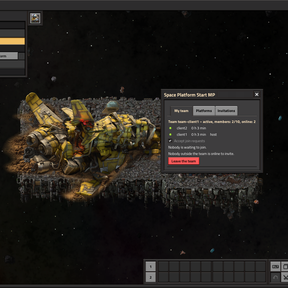
and Esc closes it. The window has tabs: - My team – the team's members, who is in the game and how long each has played for the team. Here you invite
players, ask another team to take you in, leave the team, and create a new starting platform when the team has
none. The host can also remove members, hand over the host role, take join requests and rename the team here. - Teams – the other teams in one list: size, state and members. The switch shows only the players in the game
now or everyone, with the offline ones marked red. - Platforms – the team's platforms: where they are, how much asteroid protection is left, and the teleport
button. - Invitations – invitations to other teams and your join request.
- Info – a short guide for players, in English.
- The welcome window shows the same guide once, after the intro. Later you find it in the "Info" tab.
- Invitation and request popups appear when someone invites you, and for the host also when someone asks to join.
A closed popup is not lost, nor is one that disappears during the intro: you answer an invitation later in the
"Invitations" tab, and the host answers a request in the "My team" tab. - Before changes that cannot be undone, such as merging teams or the last member leaving, the game asks if you are
sure.
Cleanup of inactive teams
A server holds a limited number of teams, so abandoned teams are removed. A team is only judged while nobody from it
is in the game. The rules:
- Rule A: the team played less than 15 minutes – it is removed 5 minutes after the last member left.
- Rule B: it played less than 3 hours – it is removed after 48 hours with nobody in the game.
- Rule C: it played 3 hours or more – it is removed after 72 hours with nobody in the game.
Also good to know:
- What counts is the time played in this team. The hours are game time on the server: while the server is off or the
game is paused, the clock stops. - Before a team is removed, there is a one-minute countdown. If someone from the team joins the game in that time, the
removal is cancelled. - When a team is removed, its platforms disappear and its buildings on planets stay behind, owned by no one. Members
keep their inventory: when they come back, they are in the lobby and can start over or join another team. - The welcome message shows the server's rules.
Abandoned bases
- When a team is removed, its buildings on planets are left to no one. Areas with at least 200 of them get a white flag
on the map of every team, and the chat says where they lie. - A player standing in a marked base claims it with the "Claim abandoned base" button on the "My team" tab. The
buildings of the base and its closest surroundings become the player's team's and keep working. - A flag goes when fewer than 200 buildings are left. A team that removes the flag from its map does not get it back.
Credits and license
- Space Together – Rithien.
- Based on Space Platform Start – phiresky.
- The lobby, join requests and team cleanup are modelled on
Oarc Multiplayer Spawn – Oarcinae.