

Smarter biter AI with adaptive resistance, breach reinforcement, scheduled raids, wall regen, and overhaul-mod compatibility.
Large total conversion mods.

Hi, I was away from my pc for a few days, so I couldn't respond to your request to try the new version.
I updated to the latest version and the UPS cost seems to be spiking back consistently into the 20-30 ms range. I tried to uninstall/reinstall, or even roll back to a previous version that was better for me, but it doesn't seem to go away this time.
Maybe the mod is re-scanning the map again? But it's been quite a while now (30+ minutes)
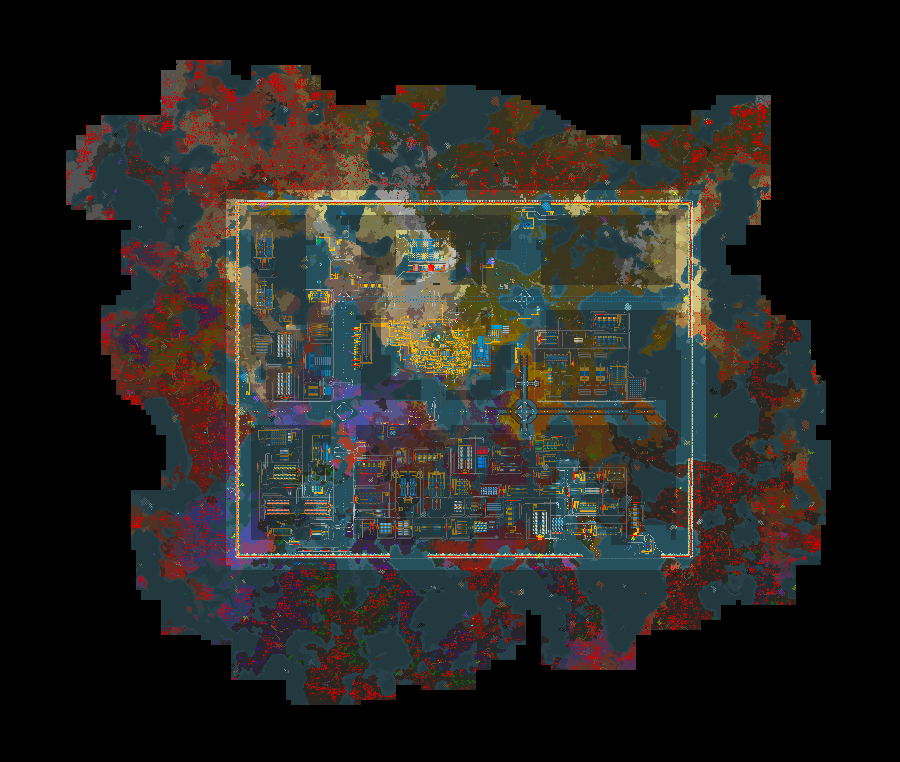
How large is your map? It also Scanns other surfaces now
What you can do it uninstall save the game reinstall to get rid of wrongfully spawned biters. Maybe thats why
Before uninstall: F4 → "show-time-usage", and tell me whether the big row is Script update (us) or Pathfinder / Entity update
My map is pretty big (screenshot attached, max zoom out).
The pathfinder seems fine and entity update is always around 4-5 ms. Script update is the one doing some stuff.
I have to mention that after trimming all the other surfaces with the Space Exploration trimming, the script update spikes are mostly down to 8-11 ms.
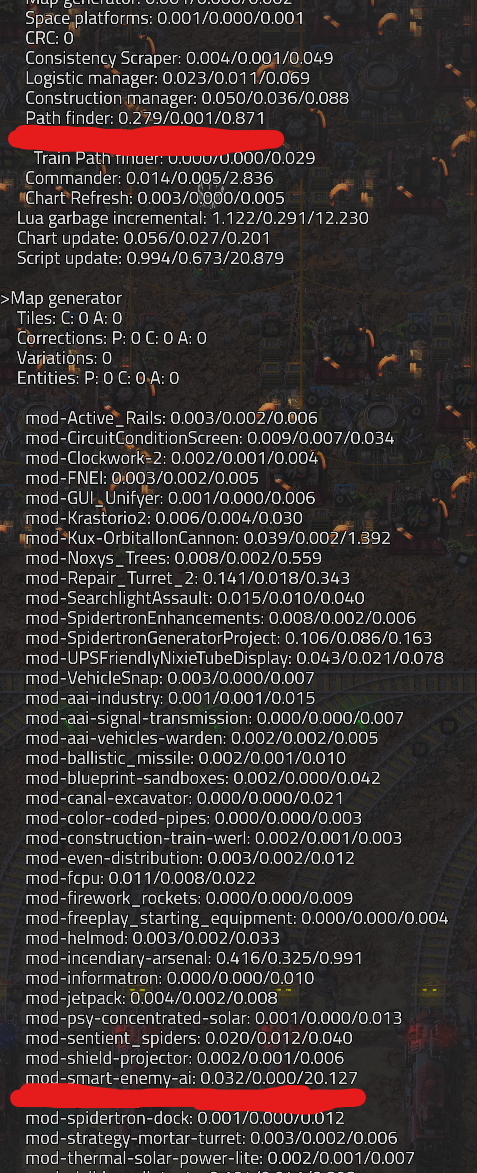
Update: after completely uninstalling and reinstalling (after trimming the surfaces), the time usage is a bit better again, with peaks between 2-7 ms, with infrequent 20-30 peaks
Could you run this command "/c helpers.write_file("sea-budgets.txt", serpent.block(remote.call("smart-enemy-ai","diag_performance_budgets")), false)" and post the content of …/Factorio/script-output/sea-budgets.txt.
Else you can disable Ressearch PRessure while playing and check if spike is gone.
Absolutely! Here it is:
(For the record, research pressure has been off all this time)
{
declared = {
pathing = {
cache_max_entries = 256,
max_async_requests_per_tick = 8
},
raid_scheduler = {
candidate_classify_per_slice = 64,
candidate_drain_per_slice = 16,
existing_target_chunk_scan_per_slice = 6,
target_registry_dirty_per_slice = 8,
target_registry_scan_per_slice = 8,
target_select_per_slice = 64
},
research_pressure = {
max_chunks_per_event = 20,
max_oversample_per_surface = 3,
max_queued_jobs = 5,
slice_cadence_hz_at_60ups = 5,
slice_cadence_ticks = 12
},
spawner_registry = {
bootstrap_mode = "sliced_snapshot_then_drain",
drain_chunks_per_slice = 16,
max_drain_chunks_per_second = 32,
slice_cadence_hz_at_60ups = 2,
slice_cadence_ticks = 30,
snapshot_chunks_per_slice = 2000,
ups_class = "registry maintenance, runs only during bootstrap (N_chunks/SNAPSHOT_SLICE snapshot + N_chunks/DRAIN_SLICE drain ticks per surface; both strictly bounded)"
}
},
measured = {
["on_chunk_generated.per_tick"] = {
avg_work = 1.1764705882352942,
last_tick = 58883030,
last_work = 1,
max_work = 6,
slice_count = 119,
total_work = 140
},
["raid_scheduler.candidate_classify"] = {
avg_work = 63.255605381165921,
last_tick = 58880292,
last_work = 62,
max_work = 64,
slice_count = 223,
total_work = 14106
},
["spawner_registry.bootstrap_drain"] = {
avg_work = 15.987154150197629,
last_tick = 58831704,
last_work = 3,
max_work = 16,
slice_count = 1012,
total_work = 16179
},
["spawner_registry.bootstrap_snapshot"] = {
avg_work = 1437.5652173913043,
last_tick = 58831884,
last_work = 0,
max_work = 2000,
slice_count = 23,
total_work = 33064
}
}
}
Bootstrap was finished 14min ago. How is the spike doing? if its gone was likely the bootstraper
Second option could be
Set Raid Intensity → off (it's a runtime-global, flip it in-game). Play a few minutes, watch the mod-smart-enemy-ai row in F4:
20–30 ms spikes stop → confirmed. It's the raid selection pipeline, and by elimination (every other raid phase is sliced and within budget) it's the raw-candidate build.
Spikes remain → not raids. Then it's the per-surface scheduler loop and I'll instrument that instead.
Turning off the raid intensity has the following effects:
What does that tell you?
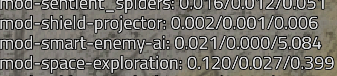
Raid selection must be bugged somehow is some part not sliced and i have to check
Thank you very much help me alot as always!
Hunting some biters in my code now
Could you Please run this a last time? Could take some time cuz it will run all chunks.
/c local d=remote.call("smart-enemy-ai","diag_spawner_registry")
game.print("multiplanet="..tostring(settings.global["smart-enemy-ai-multiplanet-raids"].value).." fallbacks="..serpent.line(d.stats.fallback_calls))
for sidx,s in pairs(d.surfaces) do
if s.is_offensive or (s.std_count_stored or 0)>0 or s.bootstrap_done==false then
local nm=game.surfaces[sidx] and game.surfaces[sidx].name or "?"
game.print(nm.." off="..tostring(s.is_offensive).." boot_done="..tostring(s.bootstrap_done).." std="..tostring(s.std_count_stored).." pend="..tostring(s.bootstrap_pending_chunks))
end
end
Then it should be clear.
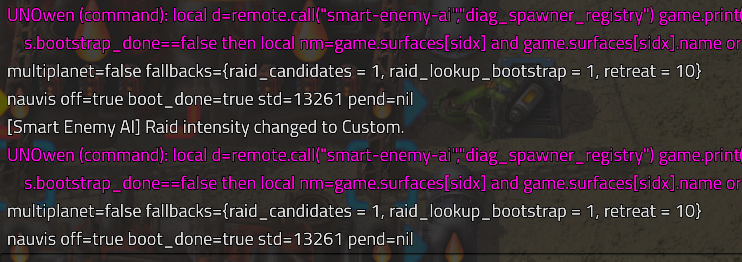
You can see the output below, I ran it with raids on and off just to be sure but that doesn't make a difference.
There was no lag in running the script.
This command reproduces what the gatherer does:
/c local s=game.player.surface local pos=game.player.position
local p=game.create_profiler()
local r=s.find_entities_filtered{type="unit-spawner", position=pos, radius=1024}
local n=0 for _,e in pairs(r) do if e.valid then local f=e.force.name local x=e.position.x n=n+1 end end
p.stop()
game.print({"", n.." spawners gathered+read in 1024r: ", p})
If it lags now, i have the component
I ran the command a few times, Duration is always in the 35 ms range. Does that seem to be what we're looking for?

Ok so your map is so spawner dense, that the raid gatherer has to scan1200 nests, their paths etc... Takes 36ms thats your spike.
Please check out the new version, maybe we did it!
I regret to say, there's still large peaks.
I reinstalled. While the new countdown for the first raid was ticking down, there was almost no lag. As soon as the count hit 0:00, and new raids started to spawn, then the script update for the mod peaks similarly as before.
Just to be sure, does removing and reinstalling the mod leave stuff behind? It's not like multiples of the same script are being ran at the same time, right?
:(
Reinstall just forces Bootstraper again
Is scanning all the spawners necessary? Maybe you could cache a few positions, or select a currently existing spawner at random.
Assuming that's still the problem, of course
I’ve tried this for several hours now. This is the best I can do for now.
The scan is necessary; otherwise, I can’t guarantee that the selected spawner has a walkable path to the selected target cluster.
Do you need to scan all of them though? You could take a random direction and take the first spawner that has a valid path, and stop there.
But what if in this direction there is no spawner with walkable path? then ill have to scn another direction. But i have an idea now