Enemy AI Enhancement


Smarter biter AI with adaptive resistance, breach reinforcement, scheduled raids, wall regen, and overhaul-mod compatibility.

Overhaul
5 days ago
2.0
1.35K
Combat Enemies

g Switching from Rampant, no raids

a month ago

Hi, I've decided to switch from the Rampant AI to this, because Rampant UPS impact is just too much.
After installing, the panel shows up and the biters are adapting to damage types, but the "Next raid" never triggers. Can this mod not be used on an ongoing save, or does the prior Rampant mod install mess things up maybe?

a month ago

Just to be clear, what I mean is that the panel just says "Next raid 0:00" forever. Starting a new game makes the raid countdown start no problem.

a month ago

Oh, lol
So, I had set all settings to "hard" before even loading my save. When I set them back to normal, then the raid countdown triggered. Then I could set them back to "hard".
I also want to say that the first raid doesn't seem to take into account that my current evolution is already at 0.9892. I'll see what happens after this countdown finishes.
Anyway, I'm happy to have gotten it working!

a month ago
(updated a month ago)

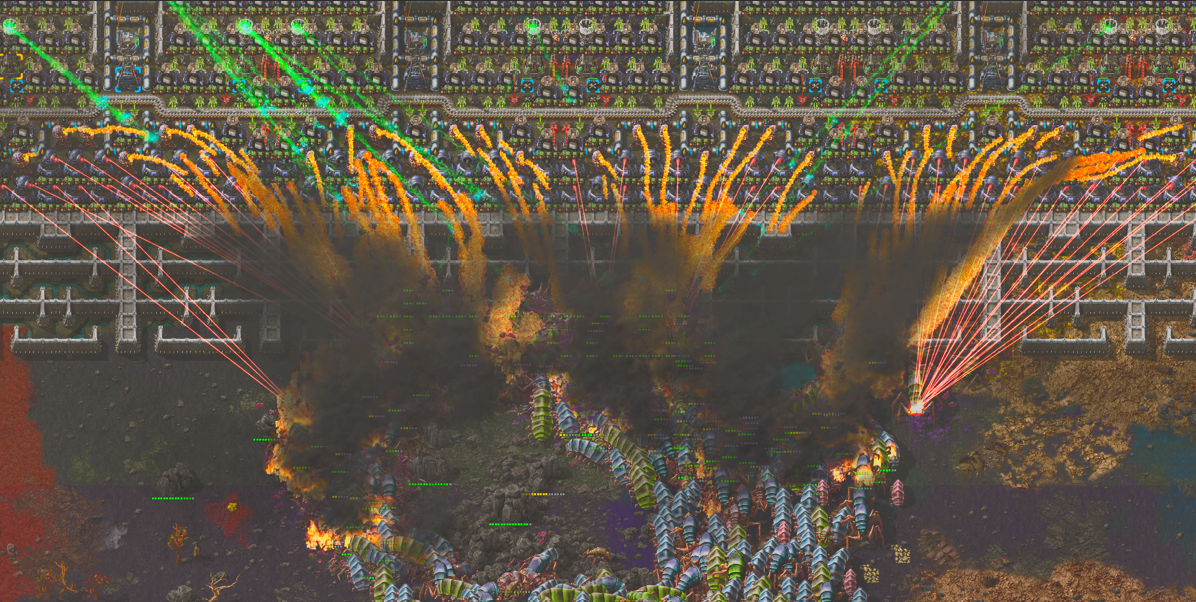
No no you are good. That was no setting issue. the mod first clusteres your whole base, to not impact ups the mod does this overtime which takes time based on map size. So if you install this mod on a already bigger size save sadly you have to wait for it to load else it will impact ups. Check the screenshot to understand the clustering

a month ago
(updated a month ago)

Well that certainly is a big raid! I like the times big raids more than a constant stream. Might turn the size down or cooldown up because a big combat lag every 3 minutes is also just a bit too much.
Everything seems to work fine!

a month ago
(updated a month ago)

No no you are good. That was no setting issue. the mod first clusteres your whole base, to not impact ups the mod does this overtime which takes time based on map size. So if you install this mod on a already bigger size save sadly you have to wait for it to load else it will impact ups. Check the screenshot to understand the clustering

So I understand that you're spreading the workload, but in my pretty large base, your mod is consistently making stutters (20 - 30 ms for a tick or so). Will this go away eventually or am I just screwed because of the large base?

a month ago

Ui thank you for that report! it would be nice if you could provide me with that save if possible to test. FOr a chick test you can hit F4 and check what spikes.

a month ago

Also could you narrow it down? Is a research done? Did a turret get destroyed?

And for the raids yes you might change to custom and turn up the raid timer.

a month ago

Maybe try with research pressure off

a month ago

I'm willing to hand over my save file, but unfortunately I have a fairly large and customized mod pack, with a lot of private changes, so I would have to upload all those mods as well.
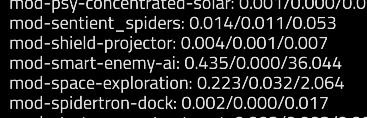
You can see how the mod is spiking ms usage in the screenshot below. I did some testing myself and the culprit is the scheduler, the one that runs every 6 ticks. If I disable that function in control.lua, then there is almost no time usage.
What's strange is that the first number is always very low, which is good, but it's the longest time used that's always 20-30, sometimes even more. It's constant, and not triggered specifically by an attack or turrets firing

It's not the research pressure or any of the other features, as disabling them had no effect.
So I'm not sure how I can help more, there's something your scheduler is doing that is taking a lot of time on large maps with a ton of biters.
I will be testing some more and if anything comes up I'll let you know.

Just as a sanity check, starting a new game has of course almost no time usage.

a month ago

Your observation helped alot! Might not need the savegame!

a month ago

With Mod Settings → Map → Raid Intensity = Off the max should be near 0. I think its the raid scheduler its the only unsliced scheduler and could eatup performance on biter dence saves

a month ago

You're right, turning Raid Intensity off makes the game a lot more stable and almost no time usage for the mod.
Rarely there's still a smaller spike (10-12 ms), but it's very infrequent and not something that bothers me. Also not sure what could be causing that.
Glad I could help at least, I really love the way you're slicing up the workload over several ticks.

a month ago

Could you please test with Mod Settings → Map → Raid Intensity = Off
/c local d=remote.call("smart-enemy-ai","diag_spawner_registry") game.print("bootstrap_pending="..tostring(d.bootstrap_pending)) log(serpent.block(d))
/c log(serpent.block(remote.call("smart-enemy-ai","diag_performance_budgets").measured))

So maybe ill be able to catch that 12 ms hikup also

a month ago

Here's the log output for those two commands:

2304.853 Script local d=remote.call("smart-enemy-ai","diag_spawner_registry") game.print("bootstrap_pending="..tostring(d.bootstrap_pending)) log(serpent.block(d)):1: {
bootstrap_pending = false,
stats = {
bootstrap_duration_ticks = 68550,
bootstrap_end_tick = 57224064,
bootstrap_start_tick = 57155514,
fallback_calls = {
raid_candidates = 1,
raid_lookup_bootstrap = 1,
retreat = 3
},
stale_pruned = 0
},
surfaces = {
nauvis = {
bootstrap_done = true,
chunk_count_actual = 3699,
chunk_count_array = 3699,
chunk_count_in_sync = true,
chunk_count_stored = 3699,
total_spawners = 13269
}
}
}

2318.901 Script log(serpent.block(remote.call("smart-enemy-ai","diag_performance_budgets").measured)):1: {
["raid_scheduler.candidate_classify"] = {
avg_work = 62.090277777777779,
last_tick = 57465222,
last_work = 43,
max_work = 64,
slice_count = 144,
total_work = 8941
},
["spawner_registry.bootstrap_drain"] = {
avg_work = 15.969271290605795,
last_tick = 57224034,
last_work = 3,
max_work = 16,
slice_count = 2278,
total_work = 36378
},
["spawner_registry.bootstrap_snapshot"] = {
avg_work = 5196.8571428571431,
last_tick = 57207234,
last_work = 8947,
max_work = 15801,
slice_count = 7,
total_work = 36378
}
}

a month ago

I've installed the latest version with the new optimizations, the time usage is a lot more stable. Max time usages now hovers around 0.5 ms most of the time. Occasionally, will jump to 2-5 ms, and very infrequently there's still a 12 ms spike.
This is enough for me to enable the features and do some actual playing/testing. If anything comes up, I'll let you know.
Also do let me know if I can help you with some testing.

a month ago

Thanks alot for your help!
ill try to fix the 12ms spike also

a month ago

could you try 10.6.4 and check if the 12ms spike is fixed?

This thread has been locked.