
Remote View Favorites
Pin where TAB opens Remote View. Jump with Alt+1–3.
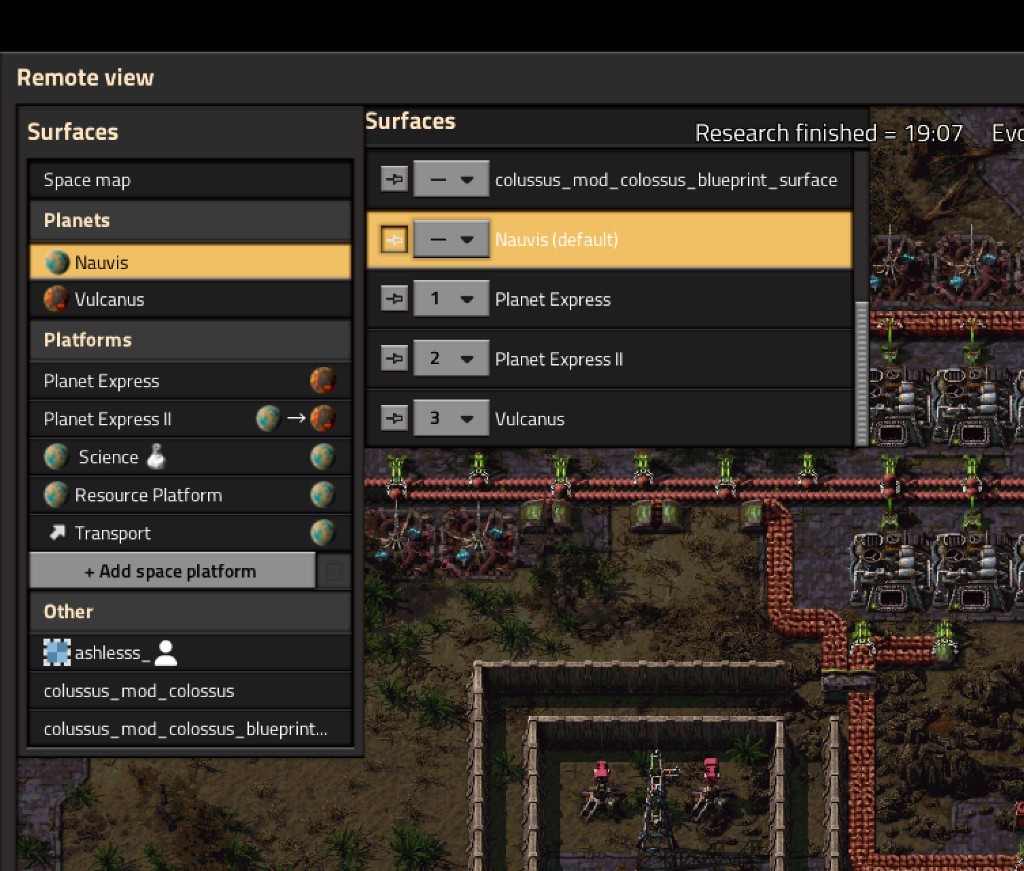
Factorio Remote View normally opens on the surface your character is standing on. This mod lets each player pin one default surface. Toggle map (default TAB) then opens Remote View there instead.
Assign numbered favorites in the pin list to jump to a surface: enter Remote View if you are walking around, or switch surfaces if you are already looking around.
Built for Factorio 2.1. Space Age is supported but not required. Nothing about recipes, combat, or progression is changed.
How to use
- Press TAB (or your Toggle map binding) to enter Remote View.
- Click the CRT icon in the top-left button cluster if the list is hidden.
- In the Surfaces list, click the pin next to a surface to set the TAB default.
- Use the small drop-down on a row to assign slot 1–9 or 0.
- Exit Remote View, move wherever you like, and press TAB again — Remote View opens on the pinned surface.
- Press Alt+1, Alt+2, or Alt+3 to jump to that slot.
Click the same pin again to clear the default and restore vanilla TAB behavior. Set the drop-down back to — to clear a slot.
The pin and slots are per player. In multiplayer, each person keeps their own.
Shortcuts
Alt+1, Alt+2, and Alt+3 are bound by default.
Slots 4–9 and 0 exist but have no key until you assign one in Settings → Controls → Mods → Remote View Favorites. Pick a surface in the pin list first, then bind the matching Favorite control.
TAB still uses the pin. Numbered keys do not replace it.
Why a separate list?
The vanilla surface selector in the upper left is engine UI. Mods cannot add buttons to it. This companion list is the supported way to pin a surface and assign jump slots without replacing the vanilla selector. It uses the same dark HUD look: bordered list, separators between rows, and a highlight on your pinned default.
Settings
Per player, in Settings → Mod settings:
- Open Remote View on pinned surface — turn the TAB override on or off
- Show pin list in Remote View — hide the companion list if you do not need it
TAB always follows your Toggle map key binding. If you rebound that control, the mod follows the new key.
Jump keys are rebound in Settings → Controls, not Mod settings.
Compatibility
- Factorio 2.1
- Vanilla and Space Age (planets and space platforms that appear in the surface list)
- No extra dependencies
- Works with Dynamic HUD and similar mods: the companion pin list follows the vanilla surface selector’s visibility (
show_surface_list). The CRT toggle uses the shared mod-gui top cluster.
If the pinned or slotted surface is deleted or no longer exists, that assignment is cleared and the key does nothing. The mod does not error in that case.
FAQ
Does this teleport my character?
No. Only the Remote View camera changes.
Does it affect other ways of opening Remote View?
The TAB pin applies only to Toggle map. Numbered favorites also enter Remote View when pressed from the character. Opening Remote View from an entity, Factoriopedia, and similar stays vanilla.
Can two players pin different planets?
Yes. Defaults and favorite slots are stored per player, not per force.
Why don't Alt+4 through Alt+0 do anything?
They are unbound on purpose. Assign a slot in the pin list, then bind Favorite 4 (through Favorite 10 (0)) in Settings → Controls.