
RailWave
RailWave is a simple automated train network for dispatching trains based on supply and demand.
It supports trains of different configurations, manages depot dispatching, sets station limits and priorities, handles train interrupts, and can route trains through centralized fueling.
Disclaimer: RailWave is an early test version built primarily for personal use. Features, behavior, and compatibility may change as the mod develops.
How To Use Railwave
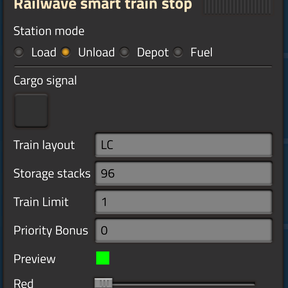
Railwave mod adds a smart train stop that can be used for many station roles.
Place a station, open the UI, and choose the station mode:
- Load
- Unload
- Depot
- Fuel
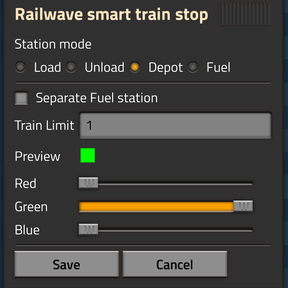
Depot Station
Use Depot stations as the home base for idle trains.
Depot settings:
- Separate Fuel station
- Turn this on if you want Railwave to send trains to universal Fuel stations.
-
Leave this off if trains are fueled at depots or at other stations.
-
Train Limit
1means one train can use this Depot station.- Use a higher value if you build a stacker before the Depot station.
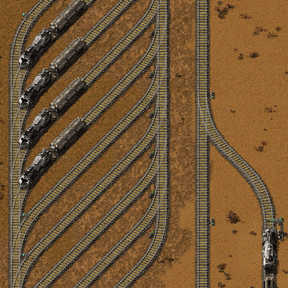
- A stacker should have a bypass lane.
- Railwave can choose a train that is not currently at the Depot stop.
- That train must be able to leave the stacker without being blocked by the Depot stop.
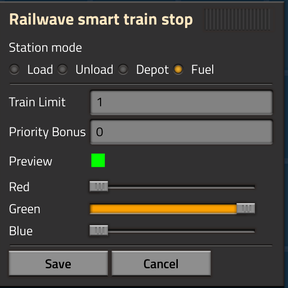
Fuel Station
Fuel stations are optional.
Use them only if Separate Fuel station is enabled on Depot stations.
Fuel station settings:
- Train Limit
- Use
1for a simple Fuel station. -
Use a higher value if the Fuel station has a stacker.
-
Priority Bonus
- Use this when you have multiple Fuel stations.
- Positive values make the station more preferred.
- Negative values make the station less preferred.
Fuel station wiring:
- A Fuel station detects the stopped train layout.
- It sends virtual signals for locomotive positions.
- Example:
LC3sendsA = 1. - Example:
LCLC3sendsA = 1andC = 1. - Use these signals to enable fuel inserters only at locomotive positions.
- This prevents fuel from being inserted into cargo wagons.
Train Layout
Train layout tells Railwave what kind of train can use a station.
Letters:
L= locomotiveC= cargo wagonF= fluid wagon
You can write the layout in full:
LCCLLCCCCLCCL
You can also use shorthand:
LC2meansLCCL2C4meansLLCCCCLC2LmeansLCCL
Important:
- Layout order matters.
LCCLis different fromLLCC.- Railwave converts layouts to shorthand for station names.
- Stations with different layouts are treated as different train networks.
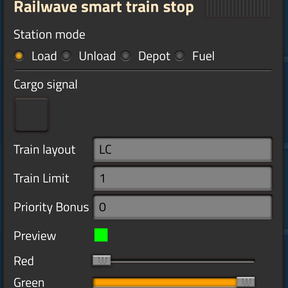
Load Station
Use Load stations for places that provide cargo.
Load station settings:
- Cargo signal
-
Select the item or fluid this station provides.
-
Train layout
- Enter the train layout this station accepts.
-
Example:
LC2,L2C4,LF,LF3. -
Train Limit
- Maximum trains allowed at this station.
-
Include stacker capacity if you want the stacker counted.
-
Priority Bonus
- Optional.
- Positive values make the station more preferred.
- Negative values make the station less preferred.
Load station wiring:
- Connect storage to the Railwave station with red or green wire.
- The station reads available cargo from the circuit network.
- Use the same cargo signal you selected in the station GUI.
Unload Station
Use Unload stations for places that request cargo.
Unload station settings:
- Cargo signal
-
Select the item or fluid this station accepts.
-
Train layout
- Enter the train layout this station accepts.
-
Example:
LC2,L2C4,LF,LF3. -
Storage stacks
- Enter the total storage size in stacks.
-
If you use multiple chests, add all chest stacks together.
-
Train Limit
- Maximum trains allowed at this station.
-
Include stacker capacity if you want the stacker counted.
-
Priority Bonus
- Optional.
- Positive values make the station more preferred.
- Negative values make the station less preferred.
Unload station wiring:
- Connect storage to the Railwave station with red or green wire.
- The station reads current stored cargo from the circuit network.
- Use the same cargo signal you selected in the station GUI.
Basic Setup
- Build at least one Depot station.
- Add trains with
Depotas their normal schedule station. - Build Load stations for supplied items.
- Build Unload stations for requested items.
- Make sure Load and Unload stations use the same train layout.
- Wire storage containers to Load and Unload stations.
- Railwave will assign trains automatically.