
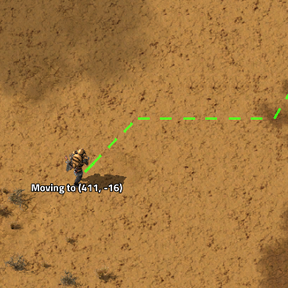
Control Factorio with mouse only. Hit Kruise Kontrol and let it take care of your problems.
Providing the player with new tools or adjusting the game interface, without fundamentally changing gameplay.
Version: 0.1.4
Date: 2026-07-02
  Changes:
    - Fixed issue with not reloading guns from inventory in combat
    - Fixed issue with not switching guns when out of ammo in combat
    - Added remarks describing combat actions
    - Added shortcut that checks for enemies nearby and starts combat mode if enemies are found
    - Added shortcut to cycle gun slots for characters and vehicles
    - Fixed issue where failed line of sight check results in running when there are other targets
    - Added flee threshold that sets when character tries to run out of combat. Default to 0 as you can't out run biters without exoskeleton. Better die fighting than die running. Still can flee manually by setting move command.
    - Moved fish eating (healing) to general logic so it does not happen only in active combat, but anytime
    - Added settings that enables ghosts on building destruction. Helps with rebuilding after attack which can be tedious with just mouse
Version: 0.1.3
Date: 2026-06-29
  Changes:
    - Updated fuel logic to use 1/2 stack of fuel by default with option to change it to 0,25/0,5/0,75/1 in player settings
Version: 0.1.2
Date: 2026-06-28
  Changes:
    - Added take/fill planner
    - Added quality support for item manipulation
Version: 0.1.1
Date: 2026-06-26
  Changes:
    - Moved flip planner to separate mod so it can be used independently, but is recomended
Version: 0.1.0
Date: 2026-06-26
  Changes:
    - Updated check if recipe can be crafted to version 2.1
    - Added support for quality buildings
    - Added logic to insert requested items (added via remote view or blueprint) after placing a building
    - Added remark for missing items when trying to build ghosts so reason for lack of action is clear
    - Added command to insert requested items to building
    - Added chaining for insert requests
    - Added vehicle enter/exit shotcut
    - Added cancel action shortcut