
Mouse Kontrol
Control Factorio using only mouse. Move character, build ghosts, enter vehicle and other actions using only mouse and few updated bindings.
Adds new action, that can be bind to mouse button. Activity action triggers depends on what you click on. Also adds shortcuts to toolbar, that can be used perform common actions by clicking on them so save mouse buttons for binding other actions.
Enjoy Factorio with just mouse so you can do anything else with other hand, eat, pet a cat or anything else. Can also be used as accessibility tool in case of injury or anything else.
Character automation can also help reduce tedium of early game without relying on given power armor with bots or similar things. Character still needs to move there and place buildings by hand, it just do it automatically and quite fast after giving command. Automatic movement and path finding between building is also nice for relaxing gameplay. Includes vehicle driving with (reasonable) obstacle avoidance. Take/Fill planner helps with grabing items from buildings and filling multiple machines with ingredients without having to micro manage each building and items.
Dedicated action and alternative binds should not break or limit keyboard usage in any way so you can switch between using any not using keyboard anytime without any constrains.
Builds on Klonan's Kruise Kontrol mod and few others.
Features
Following actions are supported based on what you click on.
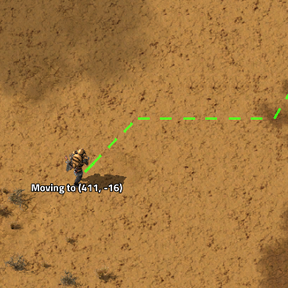
- Movement - Clicking on terrain will plan path and move character to target destination.
- Follow - Clicking on followable entity will make character follow it.
- Ghost building - Clicking on building ghost will build it, if building is in inventory or nearby container.
- Automatic crafting - If materials for crafting required building are in inventory or nearby conainer, character will craft or move to container, take items and craft. After crafting, bulding will contnue.
- Automatic item fetching - When buildings are in nearby containers, character will move to container, take items and return to building.
- Filling building - Clicking on building requesting items (turret requesting ammo, assembler items for crafting etc.) will insert requested item if enough of them is in inventory or nearby container.
- Request can be added to building in remote view by clicking on building and adding item from remote inventory or they can be present in blueprints when ghost building has them (building with request will not carry over request to blueprint).
- Refueling - Clicking on entity missing fuel will try to refuel it. Inserts 1/2 stack of burnable fuel by default. Fraction can be changes in player settings (0,25/0,5/0.75/1)
- Repair - Clicking on damaged entity will try to repair it if repair packs are in inventory.
- Upgrade - Clicking on building marked for upgrade will upgrade it if required building is available. Will chain to other nearby buildings.
- Deconstruction - Clicking on building marked for deconstruction will mine it. Will chain to other nearby buildings.
- Mining - Clicking on mineable resource will start mining it. Includes tree cutting. Cutting tree will attempt to also cut nearby trees.
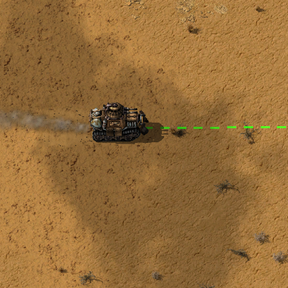
- Vehicle driving - Vehicle path finding works on larger distances. If trying to move too close might not find the path due to turning radius.
- Combat - Clicking on enemy will engage combat mode, attacking enemies in area while back paddeling.
- Cancel action - If you need to cancel current action, click on Cancel action shortcut. You can also click on terrain nearby characeter to move there, which will stop current action.
- Eating fish - checks periodically and when below 75% health, eats fish (or other healing item). Few biters ambushing you, lightning, walking through poison won't kill you as easily if you have a fish or two.
Shortcuts
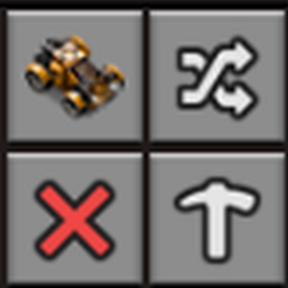
Shortcuts are clickble buttons on rigt side if toolbar. Unwanted shortcuts can be hidden in menu that can be openned by clicking on three dots next to the shortcuts.
- Vehicle enter/exit - To save additional button binding for mouse, shortcut can be used to enter nearby vehicle or exit one you are currently driving.
- Cancel action - Cancel current action.
- Flip planner - On click puts flip planner to hand. Works as other planner, upgrade, delete etc., allows drawing area over buildings. Drawing with left click will flip buildings horizontally. Drawing with right click will flip buildings vertically. Works on buildings and ghosts. Allows flipping wihtout keyboard and works on multiple entities as once.
- Take/Fill planner - On click puts take/fill planner to hand. Works as other planner, upgrade, delete etc., allows drawing area over buildings. Drawing with left click will
take items from output inventory of selected entities (chest, assembler, furnace etc.). Drawing with right click will fill recipe requirements. Filling will attempt to insert one stack of required items. This separate mod with recomended dependency.
- Engage nearby enemies - checks for nearby enemies and start attacking them. Added as clicking on fast moving biters is not as easy as at seems.
- Cycle guns - cycle to next gun slot. Works for character and vehicles. Another keyboard only feature available for mouse.
Settings
- Enable ghost on death - enables building ghosts. This is usually opened after researching robots, but with mouse only it is tedious to rebuild many diferent buildings after attacks. With ghosts you can rebuild easily. You still need buildings and loose content of chests etc. so it does not feel like chating.
- Fuel stack fraction - fraction of fuel stack that is inserted when refueling.
- Retreat health threshold - % of healts when character starts running out of combat. Disabled by default as you can't outrun biters early.
- Throw cooldown ticks - cooldown between throwing same item again. Each unique item is tracked separately. This allows throwing multiple different kinds of throwables without spamming first one found. Can throw grenades, capsules, combat robots.
Quick showcase
Movement, building, biter assault
Bindings and tips
- Mouse Kontrol action (Controls, Mods section) - mouse middle button. Used often so most convenient button is used without changin default left and right mouse behaviour.
- Rotate - user often, but difficult to handle via mod, bind as alternative to mouse side button or mouse wheel (r by default).
- Mouse wheel is used for zoom in and out by defaul. If you have mouse over building and use wheel, it will try to rotate it, with mouse on terrain, it will zoom. If you can get used to this, it opens another button or two on mouse for other useful actions.
- Pipete and clear cursor - used often, bind both as alterative to mouse side button (q by default).
- Open inventory - either do not bind and click on character button on toolbar or bind as alterative to second mouse button (e by default).
- Ctrl, Shift and Alt modifiers - only viable option I have found is on screen keyboard. These are useful for bulk item moving, planner/blueprint modifiers etc. Difficult to handle in mod.
Credits
Kruise Kontrol was orignally created by Klonan (https://mods.factorio.com/mod/Kruise_Kontrol), later updated by EliteHunter (https://mods.factorio.com/mod/Kruise_Kontrol_Updated) and ahicks (https://mods.factorio.com/mod/Kruise_Kontrol_Remote). All mentioned mods are under MIT license.
AI disclosure
I have used free AI chatbot for coding assistance as I dont have much experience in Lua scripting and it would take me long time to get familiar with everything.