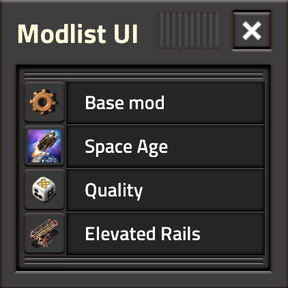
Want Modlist UI in your native language?
Take this template and submit a translation for the natural language you see here.
Shorter sentences and naturally used technical terms are preferred where possible.
Template:
# locale/en/modlist-ui.cfg

[shortcut-name]
modlist_ui_toggle=Toggle Modlist UI

[mod-list]
by_author=__1__ by __2__
ver_version=Ver. __1__

footer_thumbnails_disabled=Thumbnails disabled. Hover for more info.
footer_thumbnails_disabled_tooltip=This message only appears if thumbnails are disabled. Thumbnail loading is disabled by default so the game can still start if generated thumbnail data is outdated.\n\nYou can re-enable thumbnails in \n[font=default-bold]Settings[/font] > [font=default-bold]Mod Settings[/font] > [font=default-bold]'Startup' Tab[/font] > [font=default-bold]Modlist UI.[/font]
footer_precise_pin=Hover pinned mod thumbnail to pin above/below it.

mod_counts_caption=Mods: __1__ / __2__ / __3__
mod_counts_tooltip=[font=default-bold]Total Mods:[/font] __1__\n[font=default-bold]User Pinned:[/font] __2__\n[font=default-bold]Search Results:[/font] __3__

thumbnails_disabled=[font=default-bold]Thumbnails Disabled[/font]\n\nSettings > Mod Settings >\n'Startup'-Tab > Modlist UI\n to enable thumbnails.
thumbnails_version_match_only=[font=default-bold]Factorio-version\nmatching thumbnails only[/font]
thumbnail_unavailable=[font=default-bold]Thumbnail Unavailable[/font]

pin_pickup_tooltip=Click to Pin Mod\n[color=gray]Ctrl+Shift+Click to precise-pin[/color]
unpin_tooltip=Click to Unpin Mod\n[color=gray]Ctrl+Shift+Click to reorder[/color]
pin_drop_above=Pin above
pin_drop_below=Pin below
pin_cancel=Cancel

mini_title=Modlist Mini
mini_toggle_tooltip=Show or hide the Mini Widget.\n[font=default-bold]Ctrl+Shift+Click[/font] to reset it to the default position.\n[color=gray]Change this default in [font=default-bold]Settings[/font] > [font=default-bold]Mod Settings[/font] > [font=default-bold]Per Player[/font] > [font=default-bold]Mini Widget Default Position[/font][/color]
mini_open_main_tooltip=Open the main Modlist UI focused on __1__.
mini_no_mods=No mods

header_version=Version
header_title=Title
header_author=Author
header_category=Category
header_branch_21=[img=virtual-signal/up-right-arrow]
branch_21_available=Factorio 2.1 version available!
branch_21_unavailable=No Factorio 2.1 version available.

caption_search_mods=Search mods
caption_unknown=Unknown
caption_no_description_available=No description available.
caption_footer_version=__1__ __2__ by __3__

tooltip_drawer_copy_modlist=Open copyable modlist export.\n[font=default-bold]Ctrl+Shift+Click[/font] to author a copyable info.json dependency skeleton.
tooltip_drawer_settings=Per-Player Settings

settings_cancel_changes=Cancel Changes
settings_cancel_changes_tooltip=Discard changes made and restore values from when Settings was opened.
settings_reset_all_tooltip=Reset all settings to their defaults. Live-preview settings may take effect immediately; Cancel Changes restores the values from when Settings was opened.
settings_apply_changes=Confirm
settings_apply_changes_tooltip=Keep the current settings and return to the Modlist.\n[font=default-bold]Ctrl+Shift+Click[/font] confirms the current settings and keeps Settings open.
settings_live_preview_badge=LIVE
settings_live_preview_badge_tooltip=Changes to this setting are previewed immediately.\nCancel Changes restores the value from when Settings was opened.

view_title_settings=Per-Player Settings
view_title_export_modlist=Export Modlist
view_title_export_dependencies=Export Dependency info.json

[mod-setting-name]
modlist_ui_thumbnail_mode=Thumbnail mode
modlist_ui_default_sort_field=Default sort column
modlist_ui_default_sort_dir=Default sort direction
modlist_ui_mini_default_position=Mini Widget default position
modlist_ui_mini_width=Mini Widget width
modlist_ui_mini_rotation_seconds=Mini Widget rotation interval

[mod-setting-description]
modlist_ui_thumbnail_mode=[font=default-bold][color=red]Default: No Thumbnails[/color][/font]\nControls how thumbnails load during startup. Text metadata always remains available.\n\n[font=default-bold]No Thumbnails[/font] - Safest.\n[font=default-bold]Version Matched[/font] - Loads thumbnails only from mods matching current Factorio branch, i.e. 2.0 or 2.1.\n[font=default-bold]Latest Available[/font] - Loads newest available thumbnail regardless of Factorio branch.\n\n[color=gray]Keep installed mods up to date. See the mod-page FAQ if thumbnail loading causes startup problems.[/color]
modlist_ui_default_sort_field=[font=default-bold]Default: None[/font]\nChoose the default sort-by column when Modlist UI opens.\n[color=gray][font=default-bold]None[/font], or a neutral non-directional column-sort state represents an assumed [font=default-semibold]Mod Load Order[/font].[/color]
modlist_ui_default_sort_dir=[font=default-bold]Default: Ascending[/font]\nChoose the default sort-direction for the chosen column.\n[color=gray]A neutral non-directional column-sort state represents an assumed [font=default-semibold]Mod Load Order[/font].[/color]
modlist_ui_mini_default_position=[font=default-bold]Default: Quickbar-Left[/font]\nChoose the Mini Widget default position.\n[color=gray][font=default-bold]Ctrl+Shift+Click[/font] the [▶] button to reset Mini Widget to the selected default position.[/color]
modlist_ui_mini_width=[font=default-bold]Default: 280 px[/font]\nSets the Mini Widget width from 160 to 400 pixels.\n[color=gray]At the automatic [font=default-bold]Above ToolEquip[/font] position, the widget instead matches ToolEquip's 188 px width. A manually positioned widget uses this setting.[/color]
modlist_ui_mini_rotation_seconds=[font=default-bold]Default: 3 seconds[/font]\nHow long each mod remains visible before the Mini Widget rotates to the next.

[string-mod-setting]
modlist_ui_thumbnail_mode-off=No Thumbnails
modlist_ui_thumbnail_mode-version=Version Matched
modlist_ui_thumbnail_mode-latest=Latest Available

modlist_ui_default_sort_field-none=None
modlist_ui_default_sort_field-version=Version
modlist_ui_default_sort_field-title=Title
modlist_ui_default_sort_field-author=Author
modlist_ui_default_sort_field-category=Category

modlist_ui_default_sort_dir-asc=▲ Ascending
modlist_ui_default_sort_dir-desc=▼ Descending

modlist_ui_mini_default_position-top_left=Top Left
modlist_ui_mini_default_position-bottom_left=Bottom Left
modlist_ui_mini_default_position-above_toolequip=Above ToolEquip
modlist_ui_mini_default_position-quickbar_left=Quickbar Left