
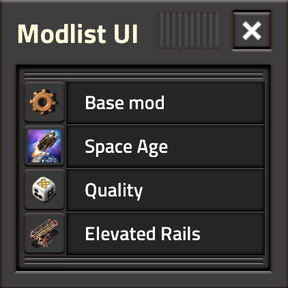
Display and share active mods in-game or on stream in one interface. Search, sort, and pin, plus copy tools to export modpack dependencies.
Providing the player with new tools or adjusting the game interface, without fundamentally changing gameplay.
Version: 2026.10.10
  Info:
    - Updated factorio_modportal_blob.
Version: 2026.09.24
  Bugfixes:
    - Fixed soft-crash related to runtime-global setting changes from other mods/commands.
  Info:
    - Updated factorio_modportal_blob.
Version: 2026.09.20
  Info:
    - Amended description.
    - Updated factorio_modportal_blob.
Version: 2026.09.10
  Features:
    - Added a Per-Player settings drawer with Apply/Cancel handling, per-setting reset controls, Reset All, and LIVE preview for settings that can update immediately.
    - Added adjustable Mini Widget width; automatic ToolEquip-width matching when using the Above ToolEquip default position.
    - Added drawer-specific titlebar labels for Settings and Export views.
    - Added a sortable Factorio 2.1 Upgrade Available column for Factorio 2.0 players.
  Info:
    - Refactored, split and consolidated functionality across scoped runtime window modules and shared helpers.
    - Updated factorio_modportal_blob.
Version: 2026.08.30
  Features:
    - Added the Minilist Widget, a small draggable rotating display of active mods. Clicking the displayed mod opens the main Modlist UI focused on that entry.
    - Added a Per-Player setting for the Minilist Widget's default snap-to position, with display/UI-scale-aware placement, persistent manual positioning, and Ctrl+Shift+Click position reset.
    - Minilist's default positioning survives across display resolution, GUI scale, display density, and Remote View changes.
    - Expanded the footer Mod Count to show total mods, user-pinned mods, and current search results.
  Changes:
    - Thoroughly reworked GUI layout and styling around a 4px sizing basis for cleaner and more consistent scaling.
  Bugfixes:
    - Fixed vertical GUI jitter when opening or closing the export drawer at different UI scales.
    - Fixed stale visual toggle states on the Search button.
    - Fixed text metadata selection being incorrectly affected by thumbnail loading mode.
  Info:
    - Refactored shared layout/helper utilities and removed redundant or dead code.
    - Updated factorio_modportal_blob.
Version: 2026.08.20
  Features:
    - Added mod pinning, precise-pinning, and reorder-pinning for selected mods to stay in a dedicated pinned section above the official Wube Software mods.
  Changes:
    - Updated Modlist UI to use the new factorio_modportal_blob.lua metadata file and branch-aware blob structure.
    - Changed thumbnail matching behavior so "Version Matched" now matches the current Factorio branch, such as 2.0 or 2.1, instead of exact mod versions.
    - Renamed thumbnail loading wording around "Latest Available" to better reflect the new branch-aware metadata behavior.
    - Increased Mod-List/Authoring window height to 80% of the screen height for better visibility of mod entries.
    - Changed Mod-Authoring JSON into full info.json
  Info:
    - Performed code cleanup and tightening across metadata loading, thumbnail handling, pinning state, and UI rendering.
    - Updated factorio_modportal_blob.
Version: 2026.08.00
  Features:
    - Regular Modlist UI updates for Factorio 2.0 and 2.1
    - Dependency Array Authoring. Use [Ctrl+Shift+Click] on the copy button to switch the copy-modlist mode.
    - Thumbnail placeholders for various modes.
    - Category column and accordion badge
    - Copy-Pasteable URL bar in accordion
  Info:
    - Updated portal_blob.
Version: 2026.07.17
  Info:
    - Updated portal_blob.
Version: 2026.07.10
  Info:
    - Updated portal_blob.
Version: 2026.07.02
  Bugfixes:
    - Amended hardcoded Wube Software mod list to include the missing standalone "Recycler" mod.
  Info:
    - Updated portal_blob because might as well.
Version: 2026.07.01
  Features:
    - 2.1! Simple update of the Factorio version. Most of the work has been done for version 2026.06.30 / Factorio 2.0
Version: 2026.06.30
  Features:
    - Search! With Modlist UI open, press the search button/loupe, or Ctrl-F, you can search for mods by name, title, author, or description or even version.
    - Settings! There is now a Mod Settings dropdown for thumbnail loading startup-safety. No thumbnails by default to prevent crashes, but can be relaxed to show them.
    - Defaults! There are also Per-Player settings for a default sort column and sort order. My favorite is to sort by Author ascending, but you do you.
  Info:
    - The portal_blob.lua file will now be getting weekly updates. See the mod page for more info.
    - Various code refactors/optimizations.
Version: 2026.2.28
  Features:
    - Metadata! Now each mod's proper title, name, version, author, and description are displayed in various columns and/or the accordion.
    - Thumbnails! If a mod has a thumbnail in its folder, it'll be shown in the entry's mini-icon and the accordion.
    - Buttons! So many things can be clicked. Any column's entries can be clicked to open the accordion.
    - Sorting! Click the column headers to sort by that column in a tri-state Ascending/Descending/None sort.
    - Visual Delight! Look at the absolute alignment of everything. Do you have any friggin' idea- *punches wall*
  Bugfixes:
    - Code refactors and changelog typos.
Version: 2026.2.15
  Features:
    - Snazzy mod-portal style "ticket-stub" mod-tooltip with richer info and thumbnail.
  Bugfixes:
    - Code revamp. Removed need for external mod hook. Now you get `author`, `title`, and `description` for every 2.x mod.
Version: 2026.2.12
  Features:
    - Added a copy-list button for easy-ish sharing.
    - Added a tiny footer with active mod count.
    - Added the changelog.txt I forgot to include during initial release. 😅
  Bugfixes:
    - Code consolidation & function abstraction.
Version: 2026.2.6
  Major Features:
    - Initial release.