

Malderan's Storage Alerts
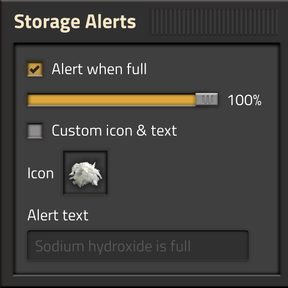
Get a heads-up before your storage backs up. Open any chest or fluid tank, tick Alert when
full, and Storage Alerts pings you — map alert + alarm, just like a programmable speaker — the
moment it reaches the level you set.
Features
- Per-entity, opt-in — open a storage chest, logistic chest or fluid tank and a small panel
docks to its window. Tick Alert when full to watch just that one. Nothing is watched until
you say so, so it stays quiet and cheap even in a sprawling base. - Adjustable threshold — a slider sets the trigger level per entity (default 100%). Fluid
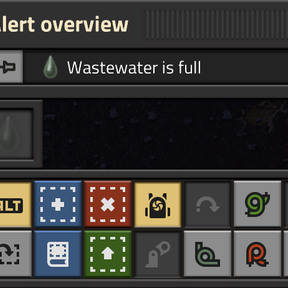
tanks use their exact fill level (fluid-network aware); chests use how many slots are full. - Speaker-style alert — on crossing the threshold it raises a persistent map alert (blip +
alert-list entry) and plays a one-shot alarm through the game's Alerts volume channel, then
re-arms automatically once the entity drops back below. - Smart icon & label — the alert shows the tank's fluid, or a chest's item when it holds only
one type, with text like "Water is full" (falling back to the entity's name). Flip on
Custom icon & text to override either — the fields preview the automatic values first, so you
edit from a sensible starting point. - Works with modded storage — chests and tanks are matched by type, so modded containers and
tanks (Bob's, Angel's, etc.) are covered automatically. - Choose your alarm — pick from the programmable-speaker alarms, buzzers, ring, siren or the
vanilla alert sting. The choice is per player.
Usage
- Open a storage chest, logistic chest or fluid tank.
- In the panel on the right, tick Alert when full and drag the slider to your threshold.
- (Optional) tick Custom icon & text to set your own alert icon and message.
Settings
- Alert sound (per player) — which alarm plays. Default Alarm 1.
- Check interval (ticks) — how often watched entities are checked. Lower = more responsive,
slightly more CPU. Default 30 (≈ twice a second). - Default threshold (%) (per player) — the slider's starting value for newly-enabled alerts.
Default 100.
Dependencies
- flib
>= 0.16.0
Support
- Questions and bug reports: Malderan's Factorio Discord or the
issue tracker.
License
MIT © Malderan