
🔬 True Logistics – Simulation Logger for real Factorio consultants (LogSim)
“What you cannot measure, you cannot control.”
— Tom DeMarco
Turn your factory into a data-driven logistics laboratory.
LogSim treats your Factorio factory not as a puzzle to be eyeballed, but as a complex production and logistics system to be measured, audited, and analyzed.
Instead of relying on intuition, momentary visual cues, or colored lights, LogSim provides timestamped, reproducible, machine-readable data — the same way real logistics and production consultants work.
💼 The Business Intelligence & Simulation Perspective
In real-world production, optimization is never based on “watching machines”.
It is based on auditable data, repeatable experiments, and quantifiable effects.
LogSim follows this professional analytics philosophy:
📊 Raw Data Auditing
- Precise timestamps (tick-level)
- Explicit machine states:
RUN,IDLE,NOIN(starved),FULL(blocked) - Inventory snapshots instead of visual guesses
🔬 Controlled Experiments & A/B Testing
- Freeze your factory
- Clear belts, buffers, machines, pollution
- Optionally reset Factorio statistics
- Restart under identical initial conditions
Perfect for layout comparisons, throughput experiments, and teaching.
🔗 Supply Chain Transparency
- Track exactly when, where, and why your logistics chain starves or blocks
- No assumptions, no guessing — only facts
⚖️ LogSim vs. Bottleneck (They are not competitors)
Use both. Seriously.
-
Bottleneck
Your real-time dashboard.
Shows where a problem exists right now. -
LogSim
Your analytics and simulation suite.
Explains how long the problem existed, why it happened, and provides raw logs for Excel / Python / R analysis.
Use Bottleneck to spot the fire.
Use LogSim to analyze the cause — and prevent it permanently.
🚀 Key Features
⚡ Advanced Power Analysis
- Accurate per-second power tracking
- Supports multiple isolated electric networks
- Optional global electric network for unified analysis
🏭 Pollution Tracking
- Continuous pollution monitoring
- Per-surface compatible (Space Age / multi-planet ready)
🔧 Machine State Logging
- Explicit states instead of vague indicators
- Timestamped and reproducible
📦 Inventory & Buffer Monitoring
- High-precision tracking of registered chests and tanks
- Transparent buffer behavior across the supply chain
🧹 Simulation Reset (Clean-Room Testing)
- Clear:
- belts
- machines
- buffers
- ground items
- pollution
- Optional reset of Factorio statistics
- Protected entities remain untouched
🌍 Multi-Surface Support
- Designed for Space Age and multi-planet factories
- Per-surface protocol lines
🧮 Asset Analysis: Fixed Assets & Working Capital (NEW)
LogSim now goes beyond operational metrics and enters logistics economics.
🏗 Fixed Assets – Blueprint Inventory
Open any blueprint and extract:
- Machines
- Infrastructure
- Tiles
- Footprint (area)
- Full production cost breakdown:
- raw materials
- production time
- energy consumption
This represents your installed capital (Anlagevermögen).
🔄 Working Capital Portfolio (NEW)
Under the fixed-asset inventory, LogSim now computes a Working Capital Portfolio:
- Automatically detects all items that exist or can exist in your factory:
- Items in registered chests and tanks
- Items in machine input/output/fuel buffers
- Items that machines are configured to produce
- Each item appears once (portfolio view)
- For each item, LogSim calculates unit costs (per 1 item):
- production time
- energy consumption
- raw material requirements
Quantities are intentionally not multiplied here.
Your protocol already logs quantities per second — allowing precise time-based valuation later.
This mirrors real-world practice:
- Production programs and bills of material include parts with zero current stock
- Items may be produced internally or purchased externally
- The portfolio defines what capital can be tied up, not just what currently is
🛠 How to Use
Register Entities
- Hover over any machine or chest
- Press SHIFT + R
- A marker appears and the entity is registered
Protect Critical Assets
- Press SHIFT + P
- Protected entities are excluded from simulation resets
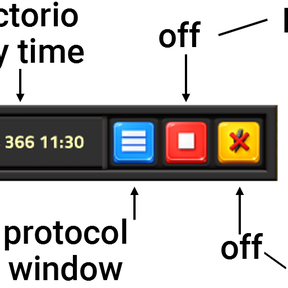
Activate / Pause Protocol Logging /prot on -or- /prot off
Analyze Data
- Press SHIFT + B to open the Log Buffer
- Logs are exported as compact, machine-readable strings:
Run Experiments
- Use the Reset UI to create standardized test runs
- Compare layouts objectively
⌨️ Hotkeys (Default)
| Key | Action |
|---|---|
| Shift + B | Toggle Log Window |
| Shift + R | Register Entity |
| Shift + U | Unregister Entity |
| Shift + P | Protect Entity |
⌨️ Commands
| Command | Description |
|---|---|
| /prot on | Activate 1-second protocol logging |
| /prot off | Pause logging |
| /gp on | Create a global electric network |
| /gp off | Destroy the global electric network |
| /info on | Verbose setup / debug messages |
| /info off | Quiet mode (recommended) |
📈 Performance & Scalability
Designed for large-scale factories and teaching scenarios:
- Default sampling: once per second (configurable)
- Optimized string handling (
table.concat) - Marker updates only when needed
- Minimal UPS impact even with many registered entities
🎓 Background & Motivation
LogSim is part of a broader exploration of using Factorio as a serious logistics and systems simulation platform — for consulting, research, and teaching.
More background and examples:
https://martins-wahre-logistik.blogspot.com/2026/01/using-factorio-as-logistics-simulation.html