
Improved Display Panel
English
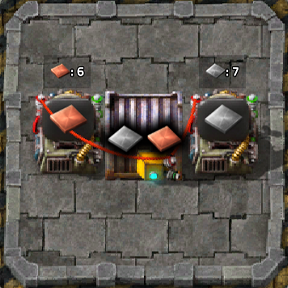
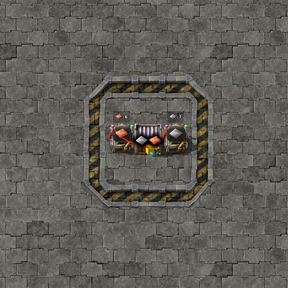
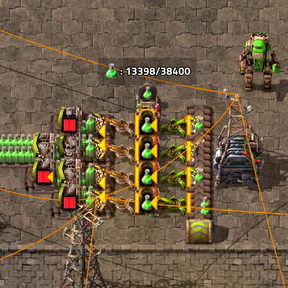
A Factorio 2.1 mod that displays live circuit-network signal values in standard display-panel messages.
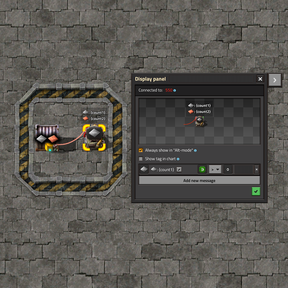
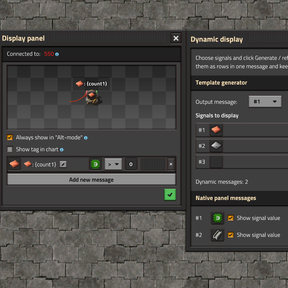
The companion interface starts collapsed as a square button next to the native display-panel window. Click it to open the signal picker, and use the close button in the title bar to return to the compact button. The expanded window is independent and can be moved by dragging its title bar, so it does not resize the native panel.
Usage
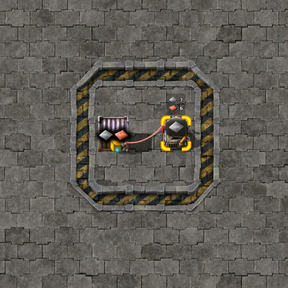
- Connect a display panel to a red or green circuit wire.
- Open the panel and select the target message in the mod interface on the right.
- Choose any number of concrete circuit signals. A new empty selector appears automatically after each selection. To reorder rows, click one striped handle to pick up its row, then click the destination row's handle to place it.
- Click Generate / refresh, then close the panel window.
The generator replaces the selected message text with a multi-line template:
[item=iron-plate]: {count1}
[item=copper-plate]: {count2}
If the panel has no messages, the generator creates the first one with an Anything > 0 condition. Existing message conditions are preserved, so Anything, Everything, or Each can control when the complete block is shown.
Values are read from the red and green networks enabled in the panel settings. Every concrete Factorio 2.1 circuit signal type is supported: items, fluids, virtual signals, entities, recipes, space locations, asteroid chunks, and qualities. Anything, Everything, and Each remain condition operators and cannot be displayed as individual values. There is no fixed limit on the number of generated rows; use the striped reorder handles and the red trash buttons to manage them.
Manual templates
Templates can also be written manually:
[item=iron-plate]: {count1}
[fluid=water]: {count2}
[virtual-signal=signal-A]: {count3}
{count1} refers to the first supported rich-text signal tag, {count2} to the second, and so on. Quality can be specified like this:
[item=iron-plate,quality=rare]: {count1}
If a numbered placeholder has no matching tag or the prototype does not exist, the mod displays ?.
Plain {count} reads the left-hand signal from the native message condition. It therefore requires a concrete signal and cannot represent Anything, Everything, or Each. Numbered placeholders are independent of the condition.
The Show signal value checkbox remains available for quickly adding a single {count} placeholder. Turning it off removes dynamic placeholders instead of leaving a frozen number in the text. Dynamic templates are preserved when copying settings and in blueprints.
Русский
Мод для Factorio 2.1, выводящий актуальные значения сигналов логической сети в сообщениях стандартной дисплей-панели.
Интерфейс мода по умолчанию свёрнут в квадратную кнопку рядом со штатным окном display panel. Нажмите её, чтобы открыть выбор сигналов; крестик в заголовке вернёт интерфейс к компактной кнопке. Раскрытое окно независимо от штатной панели, перемещается за заголовок и не изменяет её размеры.
Использование
- Подключите display panel красным или зелёным проводом.
- Откройте панель и в интерфейсе мода справа выберите сообщение для вывода.
- Выберите нужные конкретные сигналы логической сети. После каждого выбора автоматически появляется следующая пустая строка. Для перестановки нажмите на полосатый маркер исходной строки, затем на маркер строки назначения.
- Нажмите «Создать / обновить», затем закройте окно панели.
Генератор заменит текст выбранного сообщения готовым многострочным шаблоном:
[item=iron-plate]: {count1}
[item=copper-plate]: {count2}
Если в панели ещё нет сообщений, генератор создаст первое с условием Любой > 0. У существующего сообщения условие сохраняется, поэтому для показа всего блока можно использовать «Любой», «Все» или «Каждый».
Учитываются выбранные в настройках панели красная и зелёная сети. Поддерживаются все конкретные типы сигналов Factorio 2.1: предметы, жидкости, виртуальные сигналы, сущности, рецепты, космические локации, обломки астероидов и качества. «Любой», «Все» и «Каждый» остаются операторами условий и не могут отображаться как отдельные значения. Количество строк не имеет заданного ограничения; меняйте их порядок полосатыми маркерами, а удаляйте красными кнопками с корзиной.
Ручные шаблоны
Шаблон также можно написать вручную:
[item=iron-plate]: {count1}
[fluid=water]: {count2}
[virtual-signal=signal-A]: {count3}
{count1} относится к первому поддерживаемому тегу сигнала, {count2} — ко второму и так далее. Качество можно указать следующим образом:
[item=iron-plate,quality=rare]: {count1}
Если для нумерованного маркера нет соответствующего тега или прототип не существует, мод выводит ?.
Обычный {count} берёт значение левого сигнала штатного условия сообщения. Поэтому ему нужен конкретный сигнал: он не может однозначно представлять «Любой», «Все» или «Каждый». Нумерованные маркеры от условия не зависят.
Для быстрого добавления одиночного {count} остаётся флажок «Показывать значение». При его выключении динамические маркеры удаляются, а не превращаются в застывшие числа. Динамические шаблоны сохраняются при копировании настроек и в чертежах.