
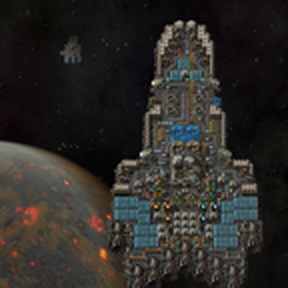
Shows your other space platforms in the background of the platform you are on.
Small changes concerning balance, gameplay, or graphics.

Cool, are there plans to make the graphics more "true to life" later in development? I understand the limitations but some things like fusion generators that don't keep their rotation or tiny cargo bays look silly for now.

Hey, while I don't have a direct roadmap as I just wanted to make something small for myself - I am always happy to update it given feedback. The latest patch fixes fusion generators and cargo bays (drawing in general) to look better with the latest patch. I am planning also to work a bit on lamp glows and shadows soon enough.
Let me know if there is anything else you notice!
Yep, bays and generators do look nice now, thanks! If you want my opinion on priority - I think underground belts are an obvious choice. Using belt placeholders in place does look jarring quite often. Maybe some kind of approximation of the platform edges too. Some generic module placeholder on beacons instead of a dark spot would look nice. And keep the correct inserter orientation. Then maybe curved pipe and belt connections if you feel ambitious. That's probably enough for a good basic approximation, I wouldn't go much further. Especially keeping in mind the performance. idk if it can be improved.
Also an interesting feature to have would be a "seamless" transfer to the other platform if you zoom at it all the way!
Hey! Sorry for the late reply, some things got in the way.
I did all of it for 0.4.6. Underground belts are drawn as real undergrounds. Inserters face the right way and show their arm. Beacons show their actual modules now instead of a dark spot etc.
Your seamless zoom idea is in too in 0.4.7. In remote view, zoom all the way into a parked ship and you continue on that platform at the same spot. I will only just ship it off by default to not be disruptive to other players.
Cool, tested it now, it does look much better! Guess there's only the ambiguos direction of undergrounds and some quirks with pipe graphics left that are really noticeable. Or finding a way to somehow improve the performance load. Not that it's horrible, but not nothing. And I don't know if it's even possible. The zoom transition is also quite nice, thanks! You might want to add this feature to the mod page description so people won't miss out on the option.
I did ran into some problems with the transition though. First time it's really seamless, but begins switching to high zoom on second viewing of each ship. I highly suspect that it's a mod conflict issue but until I know the specific mod I'll leave a list of possible candidates:
https://mods.factorio.com/mod/seamless-remote-view
https://mods.factorio.com/mod/PersistentZoom
https://mods.factorio.com/mod/further-zoom
Hey! pretty sure the zoom thing is further zoom, its smooth scroll keeps going for a bit after you get moved to the other ship so it zooms you right back in. ill make it wait till you stop scrolling before switching, should fix it with any zoom mod. and yeah ill add it to the mod page good call ^_^
for the undergrounds and pipes can you post a screenshot of the ones that look off? easier to see what you mean. and for performance is it fps or ups that drops? how many platforms do you usually have parked together
Hi again, I'll message you later if the fix doesn't work.
As for the pipes and undergrounds I thought it was pretty obvious when viewed so I didn't try to explain. If you look closely, seems like the underground exits are rotated 180 degrees, and all pipes to ground use the same graphics just rotated, while normally their different orientations have separate sprites.
https://drive.google.com/file/d/1QGuixL1bqY5lj1W0YIn55sl_NycOOgKD/view
The performance on my main save and system is okay, but it still costs 1.5ms out of 2ms from all other mods and out of 7ms total. If I was struggling with a bigger mega-base that 1.5ms extra would count. Yet again, I have no idea what optimizations can take place here. I assume if there was a way to bake all elements of a single ship into one image it would be better but I doubt it could be done by a simple mod.
https://drive.google.com/file/d/1Wl8NrZMV09ZGocw1Rq8AzExT5LhDL_pv/view
Great work on the graphics and the performance is much better when the ships float option is turned off, but please, PLEASE make the ship update frequency a configurable setting (from every tick to like 1 second or whatever), it's just TOO choppy to comfortably use. Performance only matters with big bases and weak systems but the visual lag is for everyone regardless.
Hello, the choppiness was my fault because I had to change how to draw stuff, and it made it look steppy. In 0.4.9 I have added a float smoothness setting which you can choose from. It applies at once with no reload. Let me know if it still feels off even at the smoothest settings.
Oh, yeah, I understand it's a tradeoff, that's why asked for a setting and not a fix. I tried the settings, smooth is indeed smooth enough for me, anything other than that is a definite NO. Maybe, like maybe if the ships also drifted slower it would be tolerable. But, I was curious so I opened you code to check how often the different settings work. It's not a very intuitive system you have there, so maybe I understand why didn't want to expose the variables directly. Either way, I checked your settings function
geom.FLOAT_STEP = {smooth = 0, balanced = 1 / 32, light = 1 / 8}
Don't understand the exact logic but I experimented a bit and got
geom.FLOAT_STEP = {smooth = 0.005, balanced = 0.01, light = 0.015}
That's around what I find tolerable. 0.005 is indistinguishable from 0 but costs two time less the UPS. 0.01 is almost the same and 0.015 where it's starts feeling choppy but gives you around two more times in performance. Don't know the exact numbers but around that. I don't think going much higher than that gets you any noticeable performance gains. 0.02 is already rather close to disabled float in ms I think.
Upd:
Actually I was even too optimistic. 0.01 look ok for some ships, but other already get noticeably choppy. Maybe it's related to their size or shape, idk
Oh, and a different question. What's with the yellow dots on the ship? Is it to be like sidelights or something similar? Feel like they are too dim for that.
And another small thing. Don't know if it's fixable but the engines show a pixel gap between them occasionally. Maybe if they had a bit of a texture overlap...
Oh, I had a late thought that you might be interested in checking how the T.H.U.D mod did their "fake" platform rendering. I think it's basically the same principle. There's some potential of reused code probably. Or maybe it's the other way around and Claudia can use some of your code instead, lol, I'm not sure.
Forgot to mention that I'm using a 1440p monitor with NVIDIA Smooth Motion enabled to get 120fps so that might take a role what I find "smooth enough".
I measured the float cost with 10 big parked ships (107k sprites), script ms per tick:
Float off - 0.1
Light 0.17
Balanced 0.45
Smooth 5.2
So smooth is about 10x balanced, which is why its not the default. I will have a look at making smooth cheaper. Happy to hear any suggestions!
Well I already gave most my suggestions. Idk how big are the ships in my test exactly but you can see them in the screen above.
Do you mean the costs with the default values? The numbers I got were around
geom.FLOAT_STEP = 0.000 -> 1.20ms
geom.FLOAT_STEP = 0.005 -> 0.60ms
geom.FLOAT_STEP = 0.010 -> 0.40ms
geom.FLOAT_STEP = 0.015 -> 0.35ms
geom.FLOAT_STEP = 0.020 -> 0.30ms
Float = OFF -> 0.20ms / 0.25ms
I see, these line up with what I have.
I think what is missing is that step size should follow your zoom, which it does not right now. That would explain why it looks choppy for you. I'll try a step that stays about 1 screen pixel at any zoom and only moves ships that are on screen. Hopefully that will look like smooth for close to balanced's cost.
That sounds like it may work, though I think there's a point in doing sub-pixel movement to get even smoother motion. But I suppose if the movement is precisely pixel-perfect it can look good. This is already out of my expertise...
I tested it and you were right about sub-pixel movement. Ships are drawn indeed at sub-pixel positions, so any step bigger than smooth is visibly less smooth.
"only onscreen ships" turned out to be unsafe in multiplayer, since zoom and screen size are not synced between players.
So, in 0.5.0 with this information, now its a different approach: The floor is now drawn in much bigger pieces (as cost is per sprite), and now it is about half as many sprites per ship. In my test with 10 big ships, Smooth went from about 2.4-3.2ms to 0.9ms, so Smooth is now the default. Arrivals and departures got cheaper too.
I hope this new version feels better, let me know!
Everything works fine, not sure about the performance, maybe I haven't tested with big enough ships but in similar conditions looks around the same. Still kind of sad there's no setting version between smooth and balanced, that what I personally would prefer to use. Values between 0.005 and 0.015 are what I find the most relevant, like I said before (checked again and the point stands). At least until there's a system to dynamically adjust the value based on the player zoom, as you suggested. My only other suggestion is to maybe try scaling the ship floating "rate" with slower update times instead. So the visual jump between positions won't get much higher, but the time between updates will, still reducing the load.
Other than this whole float thing I don't have any wishes for the mod, the graphics look pretty finished to me. As I already said, there are small pixel gaps between engines and platform edges sprites, maybe that. If that's only on my side I can include some screenshots. Actually... wait, noticed one more thing. As you may know, solid wall blocks are rendered as vertical lines in you mod, and that's fine to me. But horizontal walls look kinda wrong and that's bothering me. So this is another thing. Okay, there may be some small thing here and there still, like the shadows of small asteroids suggesting the other ships are very small close (hide the shadows?), and I think I saw a coming ship pass on top of a parked one while being rendered farther (smaller). Not sure what other feedback I can give, good luck!
Hey, added 3 more options to have the values you might be looking for :). Unfortunately because (as far as I know) I can't have a slider, it has to be a dropdown menu. If you still can't find your perfect value in the dropdown, let me know and I can adjust
The horizontal walls are on my list. For the pixel gaps at the engines a screenshot would help a lot, I could not catch them on my side yet. :(
The gaps are hard to catch, really? It's rather noticeable in front of a bright planet. A little surprising, here's a couple of screenshots and a gif in that case: https://drive.google.com/drive/folders/1RQhE6jQHBd4okJXIXEDKpVk9MzVssJ5p
(There are also similar gaps in the platform lower borders but it's less bad)
As for the menu, I'm not quite sure about your issue... Of course you've added the values I asked for, no problem with that. But they don't really look like they belong to the dropdown. Why do you want it to be a limited choice option in the first place? Are you vibecoding the changes there? Like I don't have any problems with that, it's just easier to change manually I think. Yes, there are no sliders as far as I know too, never seen one. But mods can also just use a plain number value with unlimited precision. It may be a bad UI practice for casual games, but most Factorio players (and modders) seem fine with that as far as I know.
No reason not to add a dropdown with like 10-20 numbered options to simulate a slider or just make it a number window with some allowed range and let the players use whatever value they wish. Just add the recommended settings in a tooltip and good to go.
hey, thank you for the screenshots. I don't play nowdays anymore so it helps to see exactly how you experience it, I also do use AI to help now.
In 0.5.2 I have moved to a plain number, the old dropdown choice is now turned into the matching number the firs ttime the save loads. I have also fixed the edge pieces under the platform and their gaps. Thank you for all the detailed feedback so far, it has been helpful to iron out the bugs
Thank you for the changes, glad I wasn't too annoying.