

Point at a machine and see how well it really runs, what exactly is holding it back, and what to build to fix it.
Factory Insight measures your machines while you play and follows every problem to its source - through inserters, belts, chests, pipes, the suppliers behind them, and the power network.
The inspector - hover any machine
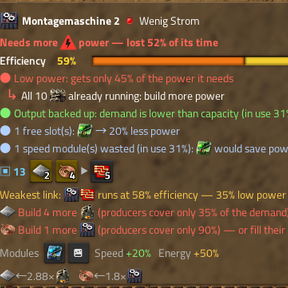
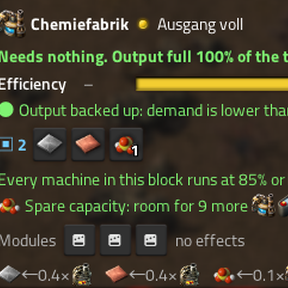
- One-line verdict: "Needs more copper cable", "Needs nothing - more capacity than demand", "Runs flat out - build more of these".
- Efficiency while needed, with one coloured bar showing where the last minute went: working, waiting for ingredients, power/fuel, output full, idle. A machine that is simply not needed right now is not marked as a problem.
- Output per minute: what the machine - and the group of machines doing the same job next to it - really made in the last minute, and what it could make at full speed ("Group of 3: inserter 10.2/min (max 324/min)"). The label over each group in the world shows it too.
- One chain of reasons, ending at the root cause - all on one panel, nothing to open: "only 0/s green circuits arrive" → because the 2 circuit assemblers wait for copper cable → because 9 of 11 cable assemblers wait for copper plate → because the furnaces wait for ore → root cause: the belt carries at most 30/s but the line wants 37.5/s → fix: feed it from a second belt. Click any icon to jump there; the numbers are in the tooltips.
- Measured, not estimated: the inserters around the machine and the belts it picks from are counted for real ("0.9/s of copper plate arrive here, 2.5/s are needed"; "this inserter is busy 100% of the time and moves 0.83/s").
- Whole belt lines, trains and robots: "8 machines want 20/s but this belt carries 15/s", "the last 3 machines on the line run dry", "all trains for this stop are stuck being filled at [station]", "no iron plate anywhere in the logistic network", "all 50 robots are busy".
- How long it lasts: a drill tells how long the ore in its reach lasts at its current pace; a machine fed from a chest nobody refills, or burning fuel nobody refills, tells when that runs out; a lab tells how research runs as a whole.
- Power, properly: knows steam, solar (and the time of day) and accumulators - "runs on 40 solar panels, 0% right now: it is night and there are no accumulators", how much power is missing ("wants 450 kW, can sustain 84 kW") and exactly what to build for it.
- Module advice: speed modules where a machine runs flat out, productivity where it is short of ingredients, efficiency where the power network is overloaded - and a hint when speed modules sit in a machine that is hardly used.
- Understands modules, beacons, productivity, quality, mining productivity, pumpjack yield, fluids and the classic "refinery blocked because heavy oil is full".
- Works on assemblers, furnaces, chemical plants, refineries, centrifuges, rocket silos, mining drills, pumpjacks, labs, boilers, steam engines and turbines, inserters and belts - and on modded machines, since everything is read from the game's prototypes.
Train doctor - hover a locomotive, wagon or train stop
The game says "train cannot find a path". Factory Insight says why, and where. It searches the rail network itself, section by section, and names the exact spot - marked in the world, one click to jump there:
This rail signal is one-way AGAINST the train (route to Iron Unload): add one opposite, or remove it
Iron Unload is reached from the wrong direction: the stop must be on the train's right
Track to Iron Unload is broken: dead end 29 tiles from the stop
Iron Unload is only reachable backwards: no locomotive faces that way
No stop named "Iron Unlaod" exists on this surface
It proposes the fix too. The exact tile where the missing partner signal belongs is computed, previewed in the world and placed as a ghost with one click (or the wrong signal is marked for removal) - and every plan is proven first by running the route search again with the change applied. It tells a single misplaced signal from a whole one-way track for the other direction. Hover any signal: one-way or two-way, block free or busy, and whether a plain rail signal guards a junction entrance (deadlock risk - one click orders the chain signal).
Signal planner - from zero (ALT + G). Point at any rail, stop, signal or train: the mod reads the whole network, works out where trains will drive, gives parallel tracks a direction each, finds every fork, merge and crossing, and shows every rail and chain signal where it belongs - chain in front of junctions, rail behind them where a whole train fits, blocks on long runs, pairs of chain signals on two-way track. One click places it all as ghosts. Existing signals are kept, upgraded or marked for removal. Tested by building unsignalled networks, applying the plan and letting trains run.
Train sizing, limits and one walkthrough. The mod records what every train really does - driving, waiting, loading, unloading, how full the station chests are - and tells per route what limits it: trains, the source, demand, or the platform. It spots trains that never load or never unload, reports missing train limits when trains really queue (one click sets them) with the size of the waiting bay they need, and turns everything about a stuck train into one numbered list: what to fix first, and after which step it moves again.
Deadlocks - explained and predicted. A head-on on a two-way track is explained ("plain rail signals let a train in from each end") with one click to upgrade the signals along that stretch to chain signals. In the background every rail signal of your network is checked: rail signals on track used in both directions and rail signals at junction entrances are listed as deadlock risks in the overview - before anything gets stuck - with one click to order all the upgrades. A deadlock raises an alert.
Also: which train occupies the block a waiting train wants (and what that train is doing), deadlocks (trains waiting for each other in a circle), full destinations with their limits, locomotives without fuel. The factory overview has a Trains section listing every train in trouble with its reason.
Automatic production blocks
Inspecting a machine also finds its production block by itself: what feeds it, what it feeds, and all machines doing the same job on the same lines - by following the real belts (however long), chests and pipes. The block is outlined in the world with the game's own selection brackets, and you get ratio advice for it:
Build 1 more cable assembler (producers cover only 86% of the demand)
Spare capacity: room for 5 more red-circuit assemblers
Factory overview - ALT + P
A small see-through window about your whole factory. Every section folds away with a click.
Research - "why is my research slow?" in one row: how fast all labs together really research, which science pack holds them back, and the chain from that pack up the factory to the root cause, with the number of machines to build:
Research at 62%: held back by chemical science pack
[chemical science] ◀ [red circuit] ◀ [plastic] Build 2 more chemical plants for plastic: the 3 you have run flat out
Running out soon - forecasts from what is really being used up:
25 min - 38k ore left, -26/s (20 drills, 3 already dry)
3 min - fuel of 24x stone furnace is going down and nothing refills it
2 locomotives almost out of fuel
Watchlist - point at a machine and press SHIFT + ALT + I: the machine and the machines doing the same job in its block are watched. When the group drops below your limit (default 80%) you get one of the game's own alerts - only you - with the reason ("waits for copper plate").
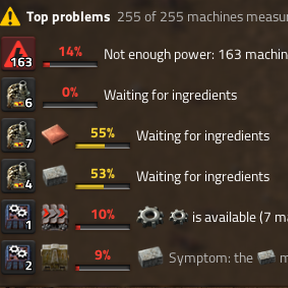
Top problems - what costs the most output right now, telling root causes from symptoms:
Make more petroleum gas: all makers already run flat out
Copper plate is available but doesn't arrive: fix the transport
Not enough power: 149 machines run slow
Click any row to jump to the worst machine.
Alerts
Forecasts that come within your warning time (default 30 minutes, and once more at 5 minutes) raise an alert in the game's own alert bar, visible to you only, with a click-to-map location - so a drying ore patch or a furnace line about to run out of coal is no longer a surprise. Alerts, their sound, the warning time and the watchlist limit are per player settings.
Also included
- Status overlay (
ALT + O): a status light on every machine around you, with the measured efficiency where something really holds it back. - Area analysis (
ALT + Z): drag over any part of your factory for made vs. used per item, "build N more" / "M are not needed", and inserters that are too slow. ALT + Ipins the machine under the cursor so you can walk away and keep watching it.
Multiplayer
Everything this mod shows - panels, overlay, highlights - is per player. Other players see nothing unless they use the hotkeys themselves, and anyone can switch it off entirely for themselves under Settings → Mod settings → Per player. The mod adds no items, recipes, technologies or entities, so the game plays exactly like vanilla.
Settings (per player)
Language (automatic / English / Deutsch), inspector position (inside the game's own entity panel / right column / bottom left / free), see-through or solid background, what reacts to hovering, how far the automatic block search goes, overlay radius, highlighting on/off, alerts on/off, alert sound, warning time for forecasts, watchlist limit.
Performance
Only machines somebody is looking at are measured, spread evenly over ticks, and forgotten a few minutes later. The factory-wide survey only runs while the overview is open, at a slow pace. For the forecasts the mod looks at your drills and burner machines in the background, one map cell per tick, twice a minute (only while somebody has alerts switched on or the overview open). Machines are found once and then kept up to date from the build events - no repeated searching of the map. Measured on a mid-size base: about 0.03 ms per tick.
Known limits
- Inserter maximum throughput on belts is an estimate (shown with "~") until the measurement has run for a few seconds.
- The "inside the game's own panel" position writes into the machine's status line, which the game shares between players: someone hovering the very same machine at the same moment sees it too.
- Tested on the base game. Space Age is not tested yet (stacked belts, recyclers, spoilage, space platforms) - reports welcome.
- Available in English and German; the mod's language can be chosen independently of the game language (per player setting).