
Custom Starting Loadout
Choose what you start with, organise reusable loadouts, and keep your carried items when you die.
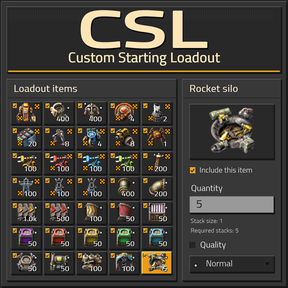
Custom Starting Loadout (CSL) is a visual in-game editor for starting items. It reads items and available qualities from your loaded mods, so you can build a loadout for vanilla or modded games without writing a separate mod.
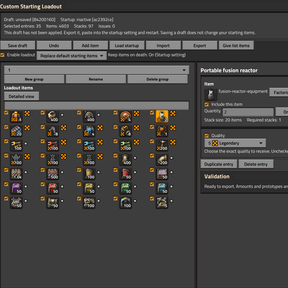
Loadout editing
- Choose items with Factorio's native item selector
- Set quantities and exact qualities, including qualities added by other mods
- Keep different qualities of the same item as separate entries
- Include or exclude individual entries without deleting them
- Switch between compact and detailed views
- Check item counts, required stacks and validation messages
- Save drafts, undo changes, and import or export configurations
Groups and starting items
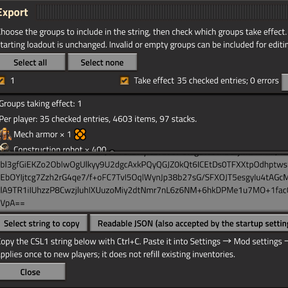
Organise items into named groups and choose which groups to include in an export. Multiple valid groups can take effect together; inactive groups remain available for later editing.
Choose either Replace default starting items or Add to default starting items.
Replace mode controls vanilla Freeplay starting items, including crash-site supplies. In other scenarios, CSL adds the configured items without removing scenario-owned items.
The starting loadout is granted once to newly created players. Installing CSL in an existing save or changing the startup configuration does not refill existing players' inventories.
How to use
Open with the shortcut button, Ctrl + Shift + L or /csl.
Edit → Validate → Choose export groups and effective groups → Export CSL1 → Paste into Startup settings → Restart Factorio → Start a new game
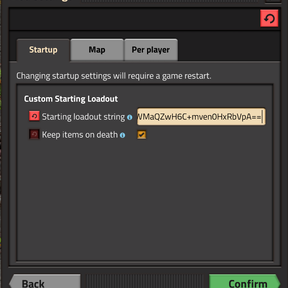
Paste the exported string into Settings → Mod settings → Startup → Starting loadout string.
Saving or importing a draft does not apply the starting loadout or grant items. If no groups take effect, starting items remain unchanged.
Give items immediately
Administrators can use Give list items to distribute the checked entries from the currently selected group:
- Give to yourself
- Give to a specific player
- Give to all players in the save
Review the recipients and items, then confirm one delivery. This action uses the selected quantities and qualities and does not require an export or restart.
“All players” includes online and offline players. Players without a character are skipped; items that do not fit are dropped at the recipient's feet.
Keep items on death
The Keep items on death startup setting is enabled by default and can be disabled.
CSL retains carried items, weapons, ammunition, cursor items and armour with its equipment, then restores them after respawn. If the inventory is full, retained overflow stays stored. Free some space and use /csl-recover to retrieve it.
Compatibility and interface
- Factorio 2.0 and 2.1
- Quality and Space Age optional; base-only games supported
- Uses vanilla and mod-added items and available qualities
- English and Simplified Chinese
- Manual item delivery restricted to administrators
Custom Starting Loadout — 自定义开局物品
自由选择开局物品,整理可重复使用的配装,并在死亡后保留随身物品。
Custom Starting Loadout(CSL)是一个游戏内可视化初始物品编辑器。它会读取当前 Mod 环境中的物品与可用品质,让你无需另外编写 Mod,就能为原版或 Mod 游戏配置自己的开局物资。
配装编辑
- 使用 Factorio 原生物品选择器添加物品
- 设置数量与具体品质,包括其他 Mod 添加的品质
- 同一种物品的不同品质可以作为独立条目保存
- 勾选或取消勾选条目,无需删除即可决定是否包含
- 切换紧凑视图与详细视图
- 查看物品总数、所需堆叠数及校验提示
- 保存草稿、撤销修改,以及导入/导出配置
物品组与开局配置
将物品整理为不同名称的组,并选择哪些组包含在导出配置中。多个通过校验的组可以同时生效;未启用的组仍可保留,供之后编辑。
开局物品支持两种模式:替换默认开局物品或追加到默认开局物品。
替换模式控制原版自由游戏的初始物品,包括坠毁飞船中的物资。在其他场景中,CSL 会追加配置物品,保留场景自身提供的物品。
初始配装只向新创建的玩家发放一次。在已有存档中安装 CSL,或修改启动配置,都不会为已有玩家重新补发背包物品。
使用方法
通过快捷按钮、Ctrl + Shift + L 或 /csl 打开。
编辑 → 校验 → 选择导出组与生效组 → 导出 CSL1 → 填入启动设置 → 重启 Factorio → 开始新游戏
将导出的字符串粘贴到 设置 → 模组设置 → 启动 → 开局物品配置字符串。
保存或导入草稿不会应用初始配装,也不会发放物品。如果没有任何生效组,开局物品保持不变。
即时发放物品
管理员可以使用 发放清单物品,将当前选中组内已勾选的条目发放给:
- 自己
- 指定玩家
- 存档中的所有玩家
查看接收者与物品清单后,确认一次发放。物品使用设置的数量与品质,无需导出或重启。
“所有玩家”包括在线和离线玩家。没有角色的玩家会被跳过;背包装不下的物品会掉落在接收者脚边。
死亡保留物品
死亡不掉落物品启动设置默认开启,也可以关闭。
CSL 会保留随身物品、武器、弹药、鼠标光标中的物品,以及护甲和其中的装备,并在重生后返还。若背包空间不足,未放入的物品会继续保存在暂存区;腾出空间后,使用 /csl-recover 取回。
兼容性与界面
- Factorio 2.0 / 2.1
- Quality 与 Space Age 均为可选依赖,支持仅安装 Base 的游戏
- 使用原版及其他 Mod 添加的物品与可用品质
- 支持 English / 简体中文
- 即时发放物品仅限管理员使用