






Blueprint Share
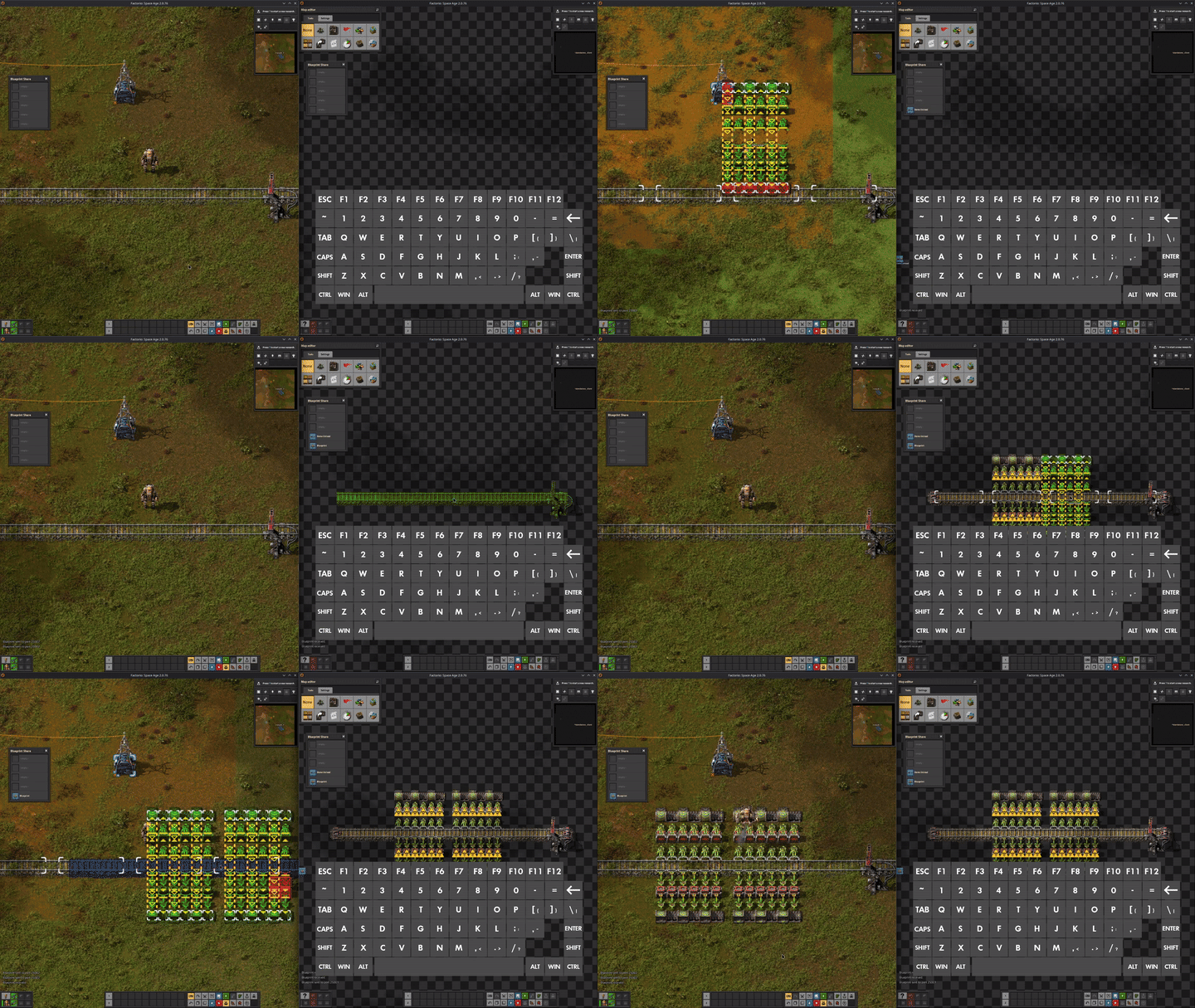
Send blueprints, blueprint books, deconstruction planners, and upgrade planners between two Factorio instances on the same machine, over localhost UDP. Handy when running a regular save and a map editor side-by-side.
Requires Factorio 2.1 or newer.
Quickstart
Two-way sharing between a Steam copy and a second standalone copy:
- Get a second copy. Steam runs only one instance at a time. Download a standalone build of the same version from https://www.factorio.com/download (free for anyone who owns Factorio) and extract it outside the Steam install.
Windows: grab the ZIP package, not the installer. The installer shares
%APPDATA%\Factoriowith the Steam copy, so only one can run at a time. - Use port
25001for the Steam copy and25002for the standalone. Change them only if another app is already using those ports. -
Set the launch flag on each copy so it listens on its own port:
- Steam copy - right-click Factorio -> Properties -> Launch Options, enter
--enable-lua-udp=25002. - Standalone (Linux) - launch from a terminal as
./factorio --enable-lua-udp=25002. - Standalone (Windows) - create a shortcut to
bin\x64\factorio.exeand append--enable-lua-udp=25002to the Target field. Or launch from a terminal:factorio.exe --enable-lua-udp=25002. - Standalone (macOS):
- Put
factorio.appin its own folder, e.g.~/Applications/Factorio-Standalone/. - Create a
config.cfgnext to it with the contents below, or download the ready-mademacos/config.cfgfrom this repo:
; version=13
[path]
read-data=__PATH__executable__/../data
write-data=__PATH__executable__/../../../factorio-data - From that folder, run
open ./factorio.app --args -c "$PWD/config.cfg" --enable-lua-udp=25002(the-cpath must be absolute). Factorio will createfactorio-data/alongsidefactorio.appfor saves, mods, and config.
- Put
- Steam copy - right-click Factorio -> Properties -> Launch Options, enter
-
On the standalone, set Mod settings -> Per player -> Blueprint Share -> Destination port to
25001. The Steam copy needs no change - its default already points at25002.
One-way only: Both sides need --enable-lua-udp, but only the receiver's value matters for routing - the sender's value is its source port only.
Usage
- Ctrl + B - Send the blueprint, book, or planner currently in your cursor.
- Ctrl + Shift + B - Toggle the Inbox window. Items received while Auto-receive is off land here. Left-click a slot to put that item in your cursor, right-click to remove it. Larger transfers show a progress bar while they arrive. Capacity is configurable.
- Ctrl + R - Force-drain the UDP buffer. Only needed while the game is paused or in the Map Editor (the auto-poll is suspended in those states). Imports the item to your cursor regardless of the Auto-receive setting.
Settings
Per-player settings live under Mod settings -> Per player -> Blueprint Share. Max transfer size is map-wide - find it under Mod settings -> Map -> Blueprint Share.
| Setting | Default | Description |
|---|---|---|
| Destination port | 25002 |
UDP port to send to. Must match the other instance's --enable-lua-udp=<port>. |
| Auto-receive blueprints | on |
Place incoming blueprints in the cursor automatically. |
| Inbox capacity | 5 |
Slots in the inbox window (1–16). |
| Show inbox button | on |
Show the inbox button in the top-left corner of the screen. |
| Log level | Info |
In-game message verbosity. Quiet hides all messages. Debug shows full diagnostics. The mod log file always records full output. |
| Max transfer size (KiB) | 512 |
Reject incoming and outgoing transfers larger than this. 0 removes the limit. |
Limitations
- Localhost only. No LAN or internet sharing - Factorio binds UDP to
127.0.0.1. - Very large books may briefly freeze the game. Books of any size transfer fine, and the inbox shows a progress bar while they arrive. Sending or receiving a very large book can pause the game for a moment at each end.
- One transfer at a time. If two items are sent to the same instance at once, only the first goes through.
- Map Editor / paused game. Auto-receive needs the tick running. Either unpause (Tools -> Time -> Speed -> Play) or press Ctrl + R to import manually.
- Headless servers. Receiving is disabled when no players are connected.
Troubleshooting
- Invalid payload. - The other instance sent a packet the mod couldn't decode. Usually means a different, unrelated process is sending UDP to your port. Change the port.
- Could not send... - The OS rejected the send. Check that the destination port is valid and that no firewall rule is blocking localhost UDP.
- Cannot send ...: exceeds the N KiB limit. - The item is larger than the Max transfer size setting. Raise the limit (or set it to
0for no cap) or send a smaller item. - Rejected incoming transfer: exceeds the N KiB limit. - The other instance tried to send something larger than your Max transfer size. Same fix - raise the limit on the receiving side, or have the sender break the item up.
- ... is still being sent. - A previous send from this player hasn't finished yet. Wait for it to complete before sending another item.
- Version mismatch warning - The other instance is on a different Factorio version, or has a different version of this mod installed. Minor differences usually import fine; major version gaps may fail with
Import failed. - Import failed. - The payload arrived but couldn't be imported into the cursor. Usually a Factorio or mod version mismatch between sender and receiver.
- Blueprint is in preview. - The library blueprint hasn't finished syncing with the server. Wait for the sync and resend.
- Nothing happens on receive - Confirm the destination instance was launched with
--enable-lua-udp=<port>. If a previous transfer stalled, wait a moment and try again. - Two copies fighting over the same saves/mods/config - Both installs share the same user data directory. You may see
Couldn't create lock file Factorio\.lock: 32 Is another instance already running?when starting the second copy. See the Factorio Wiki for per-platform write paths and how to make a copy portable.