
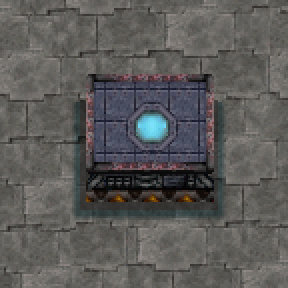
How do I craft a balancer part?
By default each Belt Balancer part costs 4 iron plates, 2 iron gear wheels, and 2 transport belts (1 second to craft). A startup setting, Balancer part recipe, offers six options: Default, Cheap, Fast belts, Express belts, Splitter and Express splitter. The setting's tooltip lists what each one is made of. Every option substitutes sensibly in overhaul packs: where an option names something your mods do not have, the next thing it offers is used instead, so what you craft can be a shorter list than the one shown.
If none of the options suits you, a second setting under it, Balancer part ingredients, takes a list you write yourself: the amount, then the item's internal name, separated by commas, as in 2 iron-plate, 1 splitter. Internal names are the ones the game uses in its own data and in rich text, and the tooltip on the recipe setting lists every option written that way, so you can copy one and edit it. The field applies whenever it does not say default; while it says default, the option picked above is what you get. A list you write is taken as written, nothing is substituted for a name you typed. The word none is also accepted and makes a part cost nothing to craft.
Changing what a part costs edits the mod's one recipe, so an assembling machine already set to make parts loses whatever is in its input slots that the new list does not use. Empty the machine first if it holds something you would miss.
What research do I need?
One technology, Balancers, unlocked right after Logistics (the yellow-belt research). Its cost is copied from whatever Logistics costs in your game, so it stays reasonable in overhaul mods too. A startup setting, Balancer research cost, can price it like Logistics 2 or Logistics 3 instead; the cost and its place in the tech tree both follow the chosen tier.
Three settings under it reprice the research one field at a time: the science packs, written the same way as the recipe list (1 automation-science-pack, 1 logistic-science-pack, science packs only), how many units of science it costs, and how many seconds one unit takes in a lab. The pack field applies whenever it does not say default, and each number applies whenever it is not 0, so a field you leave alone is decided by the tier picked above. The three fields never move where the research sits in the tree; that is still the tier you picked.
How do I build a balancer?
Place parts next to each other in any shape, then run belts into and out of the edges. A belt pointing in is an input, a belt pointing out is an output. A belt laid across a part's free face, with nothing behind it, is also an output, and it turns away from the balancer, so a corner no longer needs a tile of straight belt first. Each part connects to one belt, so a 4-input, 4-output balancer is eight parts: a column of four carrying the inputs and a column of four carrying the outputs. Parts with no belt against them are fine; they just join the shape. Laying a second belt against a part that already has one is refused with the reason on screen, and the belt goes back to your inventory. A belt can be laid over any part, and dragging a belt across a balancer replaces every part it crosses, the way it does across a row of splitters. There is no window to open on a balancer. The one thing you can set is which outputs have priority, and that is a keypress on the part (next question).
Can I give an output priority?
Yes, since 0.3.4 (0.2.4 on Factorio 2.0). Point at a balancer part and press Alt/Optioj + P to give its belt priority, and press it again to take it away. A part with priority carries a mark, so you can read a balancer's priorities off the machine. The keybind is under Settings > Controls with this mod's name on it, if ALT/Option + P is taken on your keyboard.
A priority output is filled before the balancer's other outputs, and the outputs without priority still split what is left evenly. Give one output of a four-output balancer priority and feed the balancer two belts: that output gets a full belt and the other three get a third of a belt each. Feed it four belts and all four outputs are full. Several priority outputs share evenly among themselves before anything reaches the rest.
The priority belongs to the part, so flagging a part that has no belt yet is remembered for the belt you lay against it later. It is stored on the part itself, so it survives a blueprint and an update of the mod.
Three things are refused, each with a message on screen, and in every case the balancer keeps running as it was:
- Priority on an input. The current version gives priority to belts leaving a balancer. A part whose belt feeds the balancer cannot have it yet.
- A balancer that is too big. A priority output takes more room inside the machine than an even one, and the limit is 32 belts on the balancer's busiest side. Build the balancer smaller than that, or split it in two.
- A balancer that is too full. Some changes build a smaller machine than the one standing, and while the balancer holds more items than the smaller one could take back, the change is refused so that nothing spills. Let it empty and press the key again.
For other mods and scenarios: remote.call("better-belt-balancer", "set-part-priority", surface_index, x, y, on) sets a part's priority and returns whether the flag ended up as asked.
Can a belt turn as it leaves a balancer?
Yes, since 0.3.3 (0.2.3 on Factorio 2.0). A belt across a part's free face with nothing behind it is that part's output and curves away, carrying both lanes exactly as a straight output does. Two consequences follow. A belt that merely starts beside a working part is now that part's output, so a part that already has a belt will refuse it and hand it back; lay such a line one tile further out, or give it a belt behind it, and it is left alone as before. A belt running past a balancer is unchanged: a belt something else already feeds is left alone.
The rule is a map setting, Belts may turn as they leave a balancer, on by default. It needs no restart, and every balancer in the save is re-checked when you change it. A save made before this version keeps its old behaviour: on its first load the setting is turned off for that save, and a chat message says so with a map ping for each balancer the new rule would change. Turn it on when you are ready.
Exit belts with turns are a really finicky feature -- file a report here on the mod portal and disable the function in mod settings if it causes you problems!
How big can a balancer be?
Any shape, up to 64 belt connections per side (64 inputs and 64 outputs). Since each part carries one belt, a balancer needs at least as many parts as it has belts. A balancer with a priority output is limited to 32 belts on its busiest side.
Why one belt per part? It used to allow more.
Factorio 2.1 fixed the engine behaviour that let several of this mod's hidden belt interfaces share one tile, so on 2.1 every balancer part connects to exactly one belt. On Factorio 2.0, a map setting (Allow multiple belts per balancer part, off by default) restores the old compact layouts. A 2.0 save that already uses them keeps working: the mod turns the setting on for that save at first load and says so in chat. Turning the setting off while such balancers are standing is refused, with a chat message listing every one of them as a clickable map ping. Keep in mind that multi-belt layouts cannot exist on 2.1 at all, so builds that rely on the setting will need rebuilding if the save ever moves to 2.1.
What happens to my save when I upgrade from Factorio 2.0 to 2.1?
Update this mod together with the game (2.1 clients are offered the 2.1 release automatically). On the first load, every balancer built one belt per part keeps working as-is, priorities included. Balancers using multiple belts per part cannot run on 2.1: their parts and belts stay where they are, whatever items they held are placed on the ground beside them, and each force gets one chat message listing every affected balancer as a clickable map ping, with the map revealed around each one. Rebuild them one belt per part and they come back. Your settings travel with you: the two cost options are kept by name, and the written fields and research numbers are read exactly as you left them. One warning: never load and then save the map with the mod missing entirely -- Factorio deletes a missing mod's entities, and that loss is permanent.
What is the biggest balancer actually tested?
A 64 input, 64 output balancer (about 1,150 internal components) was benchmarked saturated with express belts: every one of the 64 outputs delivered 99.2% of a full express belt, balanced to within 0.3% of each other. Smaller shapes (4x4, 8x8, 9x9, and asymmetric ones like 3 to 5) deliver full belt throughput per output with a spread of 0.15% or less. A stress save with 404 balancers running at once, including that 64x64, showed effectively zero ongoing script cost.
Does it actually balance under weird conditions?
Yes, and this is the mod's main advantage over chest-based balancers. If only one input is fed, every output still gets an equal share. If an output is blocked, its share redistributes to the others. A slow belt on one output does not throttle the rest. With priority set, the same holds inside each group: priority outputs share evenly among themselves, and so do the rest.
What happens to items inside when I edit or remove a balancer?
Editing a running balancer (adding or removing a belt or part, or changing a part's priority) keeps the items inside the machine; nothing spills. A priority change that would leave the machine too small for what it is holding is refused until it has emptied, for the same reason. Mining a part or an attached belt puts whatever the balancer can no longer hold into your inventory, like mining a vanilla machine. Items are never deleted.
Does it work with Space Age and Quality?
Yes. Balancers work on space platforms, stacked belts come back stacked after edits, mixed-item (sushi) belts are handled, and parts built at higher qualities work normally.
Does it keep up with faster belts from other mods?
Yes. The balancer's internals match the fastest belt any installed mod defines, with no cap, so modded belts above vanilla speeds are never throttled. (In the base game and Space Age its internals already run well above turbo belts, so nothing changes there.)
Can I migrate from Belt Balancer 2 or 3?
Yes. Uninstall the old mod with this one installed and every old balancer part in your save is converted automatically on the next load, keeping its position, health, and quality. Your old blueprints and item stacks keep working. On Factorio 2.0 the converted balancers keep running (the multiple-belts setting turns on for that save automatically). On Factorio 2.1, converted balancers built one belt per part run immediately; ones with several belts on a part get the same rebuild checklist described above. The only loss is the handful of items the old mod held in its internal buffer (up to a few per balancer), which cannot be recovered.
Does it slow down my game?
A finished balancer runs no script at all. Balancing is done by real (hidden) splitter entities the game engine simulates natively, so the per-tick cost is close to zero. Priority is the same: it is decided once, when the balancer is built, and becomes ordinary splitter priorities inside the machine. In head-to-head benchmarks it is roughly 45x cheaper per balancer than Belt Balancer 2/3.
Why did you build this?
I was inspired by this video where an older belt balancer mod caused major UPS issues and had to be pulled from the save.