
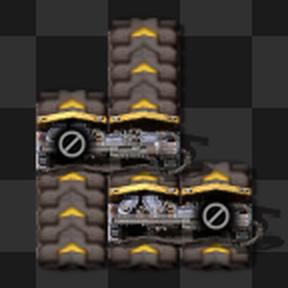
Auto Splitter Block

A Factorio MOD that automatically sets splitter output filters to block the unused side when only one output has a compatible transport entity.
Features
- When a splitter has a transport entity on only one output side, the other side is automatically blocked using an output filter.
- The filter is cleared when both outputs become occupied or both become empty.
- Responds to placement and removal by players. Optionally also by robots and space platforms (disabled by default).
- Re-evaluates the block filter when a splitter or its output-side transport entity is rotated or flipped.
- Splitters with user-configured filters or connected to circuit networks are left untouched.
Block Filter Item
The item used for blocking is configurable in MOD settings (startup): No item (default) or Deconstruction planner. When installed, Null Item and Null add their items to the choices.
Automated Builds
Entities built by construction robots or space platforms are ignored by default, to avoid overwriting filters set by blueprints. To auto-block on space platforms, enable "Enable for automated builds" in MOD Settings > Map; it applies to all robot construction on the map while enabled.
Compatible Transport Entities
- Transport belts (same direction or sideloading, but not opposite)
- Underground belts (inputs: same rules as transport belts; outputs: sideloading only)
- Splitters (same direction only)
- Loaders (same direction only; not loaders that take items out of a container)
- Lane splitters (same direction only)
- Linked belts (input side only, same direction only)
All tiers are supported.