
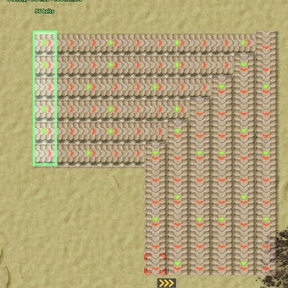
Plan a whole belt run in a couple of clicks: several lanes at once, around corners, forwards or backwards, placed as ghosts you can undo in one go.
This is a beta. It works and it is tested, but it has not had many hours on it in a real save yet. Please report anything that looks off.
What it does
You mark where the belts start and how wide the bundle is, then click where you want them to reach. The tool lays every lane, keeps them parallel, and re-anchors at the far end so the next click carries on from there.
- Several lanes at once. The opening gesture sets the width, and every lane keeps its spacing for the whole run. Pointing at any row the bundle already covers extends it straight, so a wide bus carries on from wherever across its width you click.
- Corners. Click off to one side and the run heads out along its own axis, then turns once. The lanes turn at staggered points, so the bundle comes out of the corner still parallel and still the same width — and the anchor turns with it, so you can just keep clicking.
- Backwards. Press R and the belts face the other way, so you can build a run from its destination back towards its source.
- Splitters. Shift + right-drag finishes a run with a row of splitters instead of belts, pairing lanes 1-2, 3-4 and so on.
- Ghosts only. Nothing is built for real and nothing is taken from your inventory. One press of undo removes an entire run — landfill, felled trees and all.
- Undo that keeps up. While the tool is in hand, undoing a run also steps the anchor back to where that run started, so your next click lays it again; redo steps it forward.
- A preview that means it. What you see under the cursor is drawn from the same list the click commits, so it is not an impression of the result, it is the result. Blocked tiles are outlined in red before you commit to anything.
- It tells you the cost. The label at the cursor and the tool window both say what the click will place — belts, splitters, landfill, trees and rocks to fell, cliffs to blow up, buildings of yours to remove — and how many items a second the bundle will carry.
- Landfill over water, as tile ghosts — or whatever the terrain's own cover is: foundation on lava and Fulgora's oil ocean, ice platform on Aquilo, platform foundation in space. The water itself is never modified.
- Cliffs, if you say so. Switch on Blow up cliffs and cliffs in the way are marked for deconstruction the way a deconstruction planner marks them; the switch is greyed out until cliff explosives are researched.
- Any belt you can build. Tiers are read from the prototypes, so modded belts are picked up automatically. Tiers your force has not researched yet are greyed out and skipped, so you are never handed a ghost nobody can build. Shift+B steps through them without leaving the tool; Ctrl+Shift+B steps back.
- Quality. Where quality is in play, the tool window shows a row of qualities and the game's own quality-cycling controls step through them while the tool is held; the ghosts are placed at that quality and the label says so. Without quality the row is not there and nothing changes.
- Remote view. It works from the map too: zoom in until entities can be selected and the tool picks the pointer up again. A run you started on foot carries on from the map, as long as you stay on the same surface.
How to use it
Take the tool with Alt+B or from the shortcut bar.
- Click where the belts should start. The marked area then follows your pointer as a line one tile deep — its length is how many lanes wide the run will be, and the short side is the direction it sets off in.
- Click again to accept it. Dragging a 1×N rectangle instead does both at once.
- Click where you want the belts to reach. Every click continues from where the last one ended.
Controls:
- Alt + B — take the tool
- Left click — start a run, set its width, extend it
- R — flip which way the belts face
- Shift + B / Ctrl + Shift + B — next / previous belt tier
- Alt + mouse wheel — next / previous quality, where quality is in play (the game's own quality controls, so whatever you have them bound to)
- Shift + right-drag — end the run with splitters
- Right-drag — cancel
- Undo / redo — remove or restore a run, and move the anchor with it
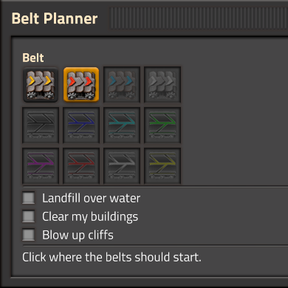
The tool window, open while the tool is held, has the belt tier, the quality where there is one, and three switches: Landfill over water, Clear my buildings and Blow up cliffs.
There is a Tips and Tricks entry with all of this in it, if you would rather read it in game.
What it deliberately will not do
The point of this tool is to be predictable rather than clever, so it never guesses on your behalf:
- It will not tunnel for you. Anything in the way stops the run and names it, instead of picking an underground length you did not ask for.
- It will not touch your factory unasked. Trees, rocks and plants are always cleared, the same as stamping a blueprint over them. Your own buildings are only marked for deconstruction if you switch Clear my buildings on in the tool window, and cliffs only if you switch Blow up cliffs on; otherwise the run is refused and tells you what is in the way and which switch would fix it.
- It will not wander. The belts go where you drew them and nowhere else.
Settings
- Maximum tiles per click (map setting) — a run is planned in a single tick, so this caps how much work one click can ask for. Anything over the limit is refused rather than executed.
- Landfill over water (per player) — the value the switch in the tool window starts at. Change it in the window to change it now.
- Blow up cliffs (per player) — likewise, for the cliff switch. It only does anything once cliff explosives are researched; until then cliffs stop the run.
Made with AI
The code in this mod was largely written by Claude, Anthropic's AI. I directed it, made the design calls, and tested it in game, but I would rather say so here than have you work it out from the commit history.
For what it is worth, it ships with a headless test suite of around two hundred assertions that runs against real Factorio before every build, and a fair number of them exist because they caught something. That is not a substitute for the mod being played, though, which is exactly why it is marked beta.
Compatibility
- Factorio 2.0. Works with Space Age: lava, the oil ocean, Aquilo's ice and space platforms each get their own cover tile, Gleba's plants are cleared like trees, and quality is offered when the quality mod is present.
- Requires flib.
- Belt tiers come from the prototypes, so any mod adding an ordinary belt family works without a patch. A tier's splitter is matched by throughput; if a modded belt has nothing matching, the splitter gesture just says so rather than guessing. Whether a tier is researched is read from the recipes that make its item, so a modded recipe chain is respected too.
- The tool is cursor-only. There is no recipe, nothing is added to your inventory or to Factoriopedia, and if you remove the mod you are left with plain vanilla ghosts.
Known limitations
- Factorio does not tell mods where the mouse is, so the preview works it out indirectly. It usually keeps up, but after a very large jump it can take a moment to catch up. On the zoomed-out map nothing can be pointed at, and the tool window says so.
- In multiplayer, other players on your force may notice stray selection boxes near where you are pointing while you have the tool out. That is the cursor tracking, and it cannot be hidden from them — visibility in Factorio is a property of the force, not the player.
- There is no underground gesture. Anything a belt cannot cross stops the run.
Feedback
Bug reports are very welcome. Most of all, tell me about anything the preview shows that the click then does not build — that is the one thing this tool is meant to guarantee.