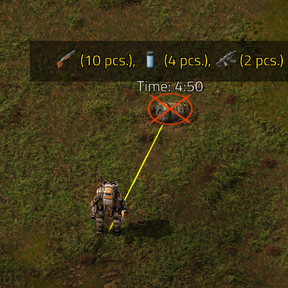
Mods introducing new content into the game.
I was wondering if it'd be possible to add in text box configs to allow adding (or removing) specific items and/or groups/subgroups to the loot list. As it is currently impossible to customize the mod in the way I intended, like excluding a group which is just a ton of item variants (like frozen or cargo crates) but allowing items like assembly machines at the same time.

Hi, "I'm currently fine-tuning the blacklist/whitelist feature and would love your input on how matching should work.
Which approach would you prefer?
Option 1: Partial Match (Sub-string)
Searching "belt" matches anything containing those letters, such as transport-belt, fast-transport-belt, but also toolbelt-equipment.

Option 2: Exact Match
Searching "belt" only matches items, groups, or subgroups named exactly "belt". To match specific belts, you'd need to use their full prototype names (e.g., transport-belt) or target the subgroup name.

Option 3: Hybrid (Exact by default + Wildcard *)
Exact matching by default, but allowing pattern matching if you use wildcards (e.g., *belt* matches everything with "belt", while transport-belt matches only that exact item).
Option 1 should NOT be chosen though, due to the possiblity of one item's name being entirely contained within another item's name, thus adding/subtracting both items at the same time with no way to specifically choose the shorter named item over the other item.
Option 3 would be the most versitile, but Option 2 would be plenty for most mod pack developers, since sometimes wildcards can cause undesired additions/subtractions, but more casual players would likely want to use wildcards for ease of use, without as much care for balance. Only case I can see being an issue with Option 3 is if it's somehow possible for someone to name their item/sub/group with an asteriks in their name
In short, Option 2 would be plenty for most people, but Option 3 would let more casual players more easily customize their experience, despite possible mis-additions/subtractions.
You can check new version 1.1.0. Let me know if it's working correctly.
It seems to be working, but could use a couple tweaks! (was running around a world with the creative mod and super fast chest respawns for testing purposes)
The tests I did:
(standard) Inserters only (black list: "", white list: "inserter")
Subgroup Inserters only (black list: "", white list: "g:inserter")
Though it does seem to be impossible to quickly add a group/subgroup but exclude one item from that last. (Currently with how the priority works, the whitelist applies over the blacklist.)
For example in testing it is impossible to allow all "g:speed-module", but exclude "speed-module-2", without instead adding speed 1 and speed 3 in the whitelist instead without the 2. This could be fixed by either adding ANOTHER black list section that overwrites the overwrite, OR a toggle that BOTH purges the pre-exsting pool (or just disables the random pool) and swaps it so the whitelist applies BEFORE the blacklist if creating a list from scratch.
Regardless, even with just the options provided in this update, it can be used to create any spawnlist one would want! (Just might take some more time to do so)
Thanks for the quick update!
It seems to be working, but could use a couple tweaks! (was running around a world with the creative mod and super fast chest respawns for testing purposes)
The tests I did: * (standard) Inserters only (black list: "", white list: "inserter")
Subgroup Inserters only (black list: "", white list: "g:inserter") *Though it does seem to be impossible to quickly add a group/subgroup but exclude one item from that last. (Currently with how the priority works, the whitelist applies over the blacklist.)
For example in testing it is impossible to allow all "g:speed-module", but exclude "speed-module-2", without instead adding speed 1 and speed 3 in the whitelist instead without the 2. This could be fixed by either adding ANOTHER black list section that overwrites the overwrite, OR a toggle that BOTH purges the pre-exsting pool (or just disables the random pool) and swaps it so the whitelist applies BEFORE the blacklist if creating a list from scratch.
Regardless, even with just the options provided in this update, it can be used to create any spawnlist one would want! (Just might take some more time to do so)
Thanks for the quick update!
I tested it this way:
I entered * in the blacklist and nothing dropped. Then I added a specific item and group to the whitelist, and only those items dropped. When I entered certain groups and items in the blacklist, they didn't drop, but random items did. Of course, the whitelist was empty.
Additionally, as described, you can use "g:module" and all items from that group will be included.
Yeah in the current implimentation, there is no easy way to impliment all of one group, but excluding a specific item, in cases where the groups are small, it's not a huge issue to add each group member individually (except the undesired one) but if the group has a TON of items in it, like:
All "intermediate-products" EXCEPT "copper-ore", you'd have to add each individual item in intermediate-products except the exclusions.
A more practical application of above is a pack wanting everything in a group, but there's a super cheaty item in that group they want to not give out.
Thank you for your implimentations on this so far, but say you wanted to allow everything in the group "production" except the subgroup, "assembling-machines", but you want to allow the item "assembling-machine-1" despite it being in the disallowed subgroup.
In this hypothetical there are countless items in each group/subgroup (say you have like bob's leveled machines) so you want to avoid having to type/allow 99 items because 1 of the 100 in that sub/group you didn't want.
The most user-friendly way I can think (without implimenting some sort of GUI item selector) about letting this level of precision would be the following configs:
"Enforce Custom Loot Table" // Checkbox that If True, does what blacklist everything does currently. If false, it'd continue with no additional operations, keeping the base loot themes, but letting the additions/subtractions below modify it.
"Groups/Subgroups Added" // Adds Initial groups/subgroups
"Subgroups/Items Removed" // Lets exceptions to the above be removed.
"Items Added" // Lets the last order of exceptions, TO the exceptions be re-added.
Since items are sorted between three different levels of organization "group"/"subgroup"/"item", the simplist way to discriminate through them is the above add, remove, add, like nesting dolls.
I’ve made a few adjustments and achieved this result; let me know if this is what you were looking for, and I’ll publish the new version.
*, item-name-1
And this to the whitelist:
g:machine-items
Result:
Only items from the machine-items group drop, but item-name-1 does not.
So it purges the list, adds the whitelist, then makes sure the extra blacklist stuff is not included? If that's the case, I think it'd work.
For a test, would
Blacklist: "*,g:speed-module"
Whitelist: "g:modules,speed-module-2"
make the list every module except speed modules 1 and 3?
It won't work in the current version of the mod, but here is the result from the one I'm testing:
Drop Result:
WILL DROP:

    speed-module-2 (exact whitelist override)

    All other modules (efficiency, productivity, quality, etc. matching g:*module*)

WILL NOT DROP:

    speed-module-1, speed-module-3, and all other speed modules (blocked by g:speed-module)

    Everything else in the game (blocked by *)
but you have to use "" as the group in the whitelist
, g:speed-module
g:'module', speed-module-2 (here * - I don't know why this isn't visible here.)
I've published version 1.1.1. Check if it works correctly now. Remember to correctly enter "*" in the module group.
I have a module group mod, so I forgot that wasn't an official thing, but doing what I did above, and did get Speed 2s, (and other module types) but no speed 1s/3s as expected, so I think it's in working order!
I've been making my current mod pack in mind for a group of friends here soon, and the mod has been working well in multiplayer, so I'll make sure to mention if any buggery happens when we start here in a few days or so. I'm usually the mod pack creator in various games we play, since I have experience in testing and balancing things, might officially post my first Factorio mod pack somewhere, but only got packs officially out for Minecraft atm, but we shall see.
I'll likely need to learn some lua and stuff of my own for custom recipes and stuff before I'm completely satisfied with a publishable pack, heh.
I'm just learning LUA and using AI support, so there may be some bugs. I'll wait for a response as the tests go, and if anything goes wrong, I'll try to fix it.
In addition, I use my own mod to display all item groups and the items in each one, so there may be differences between mod packages. This is especially true for those that change the names of the groups.
I'm not sure if it's possible to add some hints to the settings that would guide players toward simply entering and filling out both lists.
I'm working on it now; once I publish them, all the descriptions will be in English.