

Ever wondered how many assemblers a single belt can actually feed?
You are staring at a fresh iron-gear block, you know one belt of iron plate will not be enough, and the only way to find out is to alt-tab to a calculator — or guess, build it, and watch the last three machines starve.
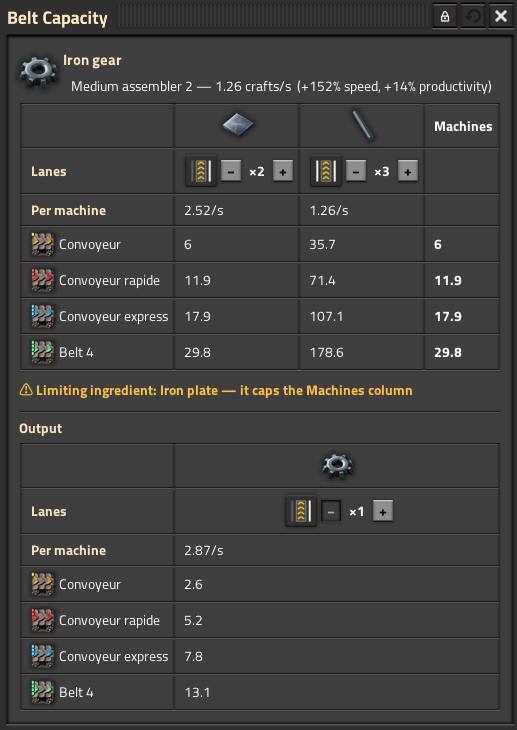
Belt Capacity Helper answers it in place. Open the machine, press Alt + N, and read the number for every belt tier you own.
Why it is accurate
The numbers come from the machine in front of you, not from the recipe prototype. crafting_speed and productivity_bonus are read straight off the entity, so what you see already accounts for:
- the recipe currently set, and the machine's tier
- every module in it, and every beacon reaching it
- the machine's quality
- your researched productivity and speed bonuses
Nothing is recomputed by hand, so nothing drifts when the game updates.
Reading the table
One column per solid ingredient, one row per belt tier. Each cell is how many machines that ingredient alone could feed at that tier.
A machine only runs when all its ingredients arrive, so the Machines column on the right is the lowest value in the row — your real answer. The ingredient that caps it is called out underneath.
Matching your actual bus
Two controls per column, because the raw belt throughput is rarely what reaches the machine:
- Lane button — one lane or the full belt. Click the belt icon to flip it. A bus where iron plate gets a dedicated belt but copper cable shares one is a single click away.
- Stacking stepper (
− ×2 +) — how deep items ride on that belt. Capped by the item's own stack size, so an item that cannot stack stays at ×1 and its tooltip says why.
Your settings are remembered per recipe, so coming back to green circuits brings your bus layout back with it.
Planning ahead
The padlock in the title bar keeps the stepper within what you have researched, so the figures always match your save. Open it and you can push stacking past your research to answer "if I unlock this, how many machines then?" — with a standing warning so planning numbers are never mistaken for real ones.
Works with your mods
Belt tiers are discovered from the runtime prototypes, never hardcoded. Any mod that adds a belt shows up in the table on its own, with its own icon and throughput — Space Age, Bob's Logistics, Nullius, Ultimate Belts, whatever you run. Hidden and unbuildable belts are filtered out.
If a mod adds so many tiers that the list gets long, a setting hides the ones you have not researched yet.
Fluids
Fluid ingredients are listed with their rate in units/s, but never translated into belt counts — pipe throughput depends on the run length, which is a different question. They are shown rather than dropped, so a refinery recipe never looks like it is missing half its inputs.
Settings (per player)
- Open automatically — show the window as soon as a crafting machine is opened, no keypress. Off by default.
- Only show unlocked belts — hide belt tiers you have not researched. On by default.
- Show fluid rates — list fluid ingredients and products. On by default.
The shortcut is rebindable in Options → Controls → Mods, and there is a toolbar button if you would rather not use a key at all.
Notes
- Works on assemblers, furnaces and rocket silos. A furnace that has never smelted anything has no recipe yet, so the window will say so rather than show zeros.
- English and French.