



Deprecated: Custom runtime tooltips is an official scripting feature in Factorio 2.1.
Tooltip Library
If you are adding Tooltip Library as a dependency to a mod to replace existing custom entity status logic, see "More Information" below.
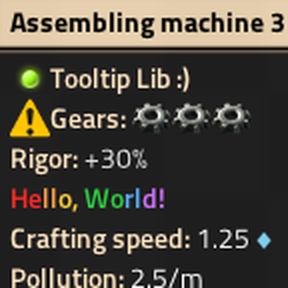
This mod adds a remote interface for adding custom tooltips and statuses to entities at runtime. Tooltip Library works by using LuaEntity.custom_status, and setting custom entity statuses using this mod will improve comaptibility; however, Tooltip Library automatically adapts to custom statuses set by other mods.
Set Status
To set the custom status of an entity, call the remote interface:
remote.call("tooltip-lib", "set_status", entity, custom_status)
Where:
entityis theLuaEntityfor which to set the custom status.custom_statusis aCustomEntityStatus, ornilto unset the custom status.
Set Tooltip
To add a custom tooltip to an entity, call the remote interface:
remote.call("tooltip-lib", "set_value_only_toolip_name", entity, name, value)
Where:
entityis theLuaEntityfor which to set the custom status.nameis astring, usually aLocalisedStringkey (e.g."mod-tooltip-name.my-tooltip"), that is the unique identifier for the tooltip. Unlessnameis registered as "value only," the localised value of this string will be displayed as the tooltip key.valueis aLocalisedStringthat is the value displayed for this tooltip, ornilto remove the tooltip.
By default, the localised text of name and value will be formatted and displayed in the standard way for tooltips (i.e. "name: value"), including with the standard font and text color. To display only the value, and without formatting, register the tooltip's name as "value only" (see next section). Note that you can add formatting, icons, and everything else supported by LocalisedString in tooltip text yourself.
Set Value Only Tooltip Name
To register a tooltip name as "value only," call the remote interface:
remote.call("tooltip-lib", "set_value_only_toolip_name", name, is_value_only)
Where:
nameis thestringtooltip name to set (or unset) as "value only."is_value_onlyis abooleanthat determines whether to set or unset thisnameas "value only."
Note that his interface only needs to be called once per name, and not once per entity.
Migrate Status and Tooltips to a New Entity
To migrate an entity's custom status and tooltips to a new entity (e.g. if "hot-swapping" entities by script), call the remote interface:
remote.call("tooltip-lib", "migrate_to_entity", old_unit_number, entity)
Where:
old_unit_numberis thenumberunit number of the old (source) entity."entityis theLuaEntitythat is the new (destination) entity."
More Information
Replacing a Mod's Existing Custom Status Logic with Tooltip Library
If your mod already uses custom entity statuses, and you want to replace the current implementation with Tooltip Library, you should add a Lua migration that unsets all entity custom statuses previously set by your mod. Without this migration, Tooltip Library will interpret any pre-existing custom status set by your mod as a "compatability status" set by a mod that doesn't use Tooltip Library, and fail to deduplicate it. Note that this is not an issue for new saves started after the Tooltip Library dependency is added, or for mods that never used custom entity statuses before adding the dependency.
For an example migration, see Rigor Module's v0.7.0 migration.
Implementation
Tooltip Library uses LuaEntity.custom_status under the hood for displaying all custom statuses and custom tooltips. There is almost no performance overhead in this mod; it is mostly event-driven, and at worst, it checks up to two entities per player each tick for entity status changes. Most of the complexity in the implementation comes from the compatibility logic required to work gracefully with other mods that set custom status but that do not use Tooltip Library.
Issues
This is a new mod, and should still be considered experimental. So far it has only been tested with Rigor Module. Use at your own risk.