
Too Many Buildables - (TMB)
Every building you own, one click away, without giving up your quickbar.
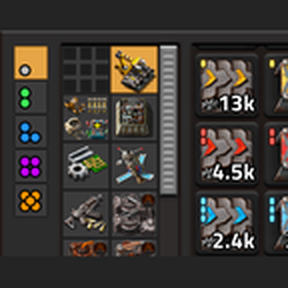
Big mod packs add hundreds of buildings, and the quickbar was never meant to hold them all. TMB adds a collapsible panel that drops down exactly over your quickbar. It's sorted like the crafting menu and shows everything you can build, with live counts. On top of that you get a Materials side panel, a "How many?" crafting popup that works anywhere, and two build trackers: Casper for ghosts and Ritual for upgrades.

Buildables panel
Click the ▾ tab above your quickbar to open the panel and ▴ to go back. Your quickbar stays as it is underneath.
- Fits over the quickbar. It matches your quickbar's size and position, follows your UI scale and resolution, and keeps its right edge flush with the shortcut bar.
- Every buildable in the game: buildings, vehicles, tiles, rails, plant seeds and modules. Researched or not, every item keeps its place; anything you don't have is greyed out.
- Crafting-menu categories, one tab per item group, taken from the game itself. Any mod list works, including mods TMB has never heard of.
- Crafting-menu layout: each subgroup gets its own row, in columns that line up with the quickbar's blocks of 5. Containers and storage tanks go to the bottom.
- Live counts that update as you build and pick things up.

"How many?"
Ctrl + click an item, in TMB's panels or in the vanilla crafting menu, and a small popup asks how many to craft.
- Drag Stacks (whole stacks, 0 to 10) and Singles (up to one stack), or just type a number and press Enter.
- Follows your stack sizes, including mods that change them.
- Shows how many you have on hand, and your inventory stays open.

Quality
- Quality buttons sit on the left of the panel. Pick a quality and the panel shows counts, badges and greyed slots for that quality only.
- Clicking picks up that quality; right-click ghosts it.
- The buttons only appear when the game has quality enabled. Modded qualities are supported.
- Hand-crafting always makes Normal quality, so crafting works on the Normal tab.
Materials panel
A side panel for intermediates and crafting materials, collapsible like the toolbelt.
- Custom bar: pin any item you like (pipes, ammo, anything).
- Track menu: pick exactly which materials to show, item by item or a whole subgroup at once.
- Grouped by crafting-menu tab, sorted by type, with collapsible sections and its own quality buttons.
- At most 10 rows tall, 6 to 9 slots wide (your choice); longer lists scroll.

Four positions: above the equipment panel (the default), on the left edge, under GUI Unifier (offered only when it's installed), or anywhere you drag it.

Casper: Ghost Tracking (built in)
Drag the Casper tool over a build to track every unbuilt ghost in it. Each ghost gets green brackets and a map mark, belts and pipes get one shared outline, and a bar at the top of the screen counts what's left. Ghosts tick off as they get built, and the bar disappears when the job is done.

- Job area: the boxes you drag are outlined in green. Shift-drag to add to the area. New ghosts placed inside it later are picked up too, whoever on your team places them.
- Guide arrow: hover an item on the bar to point to the nearest one; click to keep pointing.
- Craft from the bar: click the ghost icon to craft everything you're missing, Shift + click an item to craft what you're missing of it, Ctrl + click for "How many?" with the shortfall already filled in.
- Change type or quality: right-click an item to swap all its ghosts at once, like an upgrade planner: pick a new type and quality, then Confirm. Ctrl + Z undoes it.
- Exorcist: a companion tool to remove ghost types from the job.

Illustration

Illustration
Also available on its own as Casper: Ghost Tracking. If both are installed, the standalone mod takes over and TMB's copy switches itself off.
Ghost Project
When crafting for a job comes up short, the Materials panel gets a Ghost Project section listing every ingredient the job still needs that you don't have: plates, gears, circuits, pipes, other buildings, modded parts.
- The badge shows how many you're missing. The tooltip shows the total for every remaining craft, broken down per building.
- The missing slots blink red each time a craft fails because of them.
- If the Materials panel is closed, it opens for a few seconds to show you, then closes again. Hover it to keep it open.
- Items drop off once you have enough, and the section goes away when the job ends.

Illustration
Ritual: upgrade tracking
Ritual is Casper for upgrades. Drag it over an area to track every building that's marked for upgrade, with cyan brackets, a cyan area outline and its own bar, counted by what each building will become. Entries drop off when the robots finish the upgrade or it's cancelled.
- New upgrade orders placed inside the area by anyone on your team are picked up automatically.
- The same bar features as Casper: guide arrow, craft what's missing, "How many?", Ghost Project, and right-click to change the upgrade target or quality.
- Ghosts you change in Casper move to Ritual until they're built. Undo moves them back; redo moves them again.
- Overlapping areas from different players each track the overlap.

Illustration

Illustration

Illustration
Controls
Buildables and Materials panels
| Click | Action |
|---|---|
| Click | Pick up |
| Right-click | Ghost in hand |
| Shift + click | Craft 1 |
| Shift + right-click | Craft 5 |
| Ctrl + Shift + click | Craft as many as possible |
| Ctrl + click | How many? |
Casper and Ritual bars
| Click | Action |
|---|---|
| Click the tool icon | Craft everything you're missing |
| Right-click the tool icon | Hide or show the list |
| Hover / click an item | Point to the nearest one / keep pointing |
| Shift + click an item | Craft what you're missing |
| Ctrl + click an item | How many? (pre-filled) |
| Right-click an item | Change type or quality |
- Every panel also lists its clicks in a tooltip, so you never have to remember them.
- Optional hotkeys for the panels and for Ritual are in Settings → Controls, unbound by default. Casper and the Exorcist have shortcut buttons and default keys (Shift + Alt + G / Shift + Alt + E).
- Bars taller than 2 rows scroll.
Settings (per player)
| Setting | What it does |
|---|---|
| Quickbar rows | Match this to Interface → Active quickbars (the game doesn't let mods read it) |
| Quickbar width | Auto reads it from the game, or set it yourself |
| Fine-tune offsets | Nudge the panel a few pixels if your HUD is set up differently |
| Materials panel width | 6 to 9 slots per row |
| Materials panel position | Above equipment, left edge, under GUI Unifier, or free |
Compatibility
- Factorio 2.1 (2.1.22 or newer). Space Age is optional.
- Built for big mod packs such as Bob's and Angel's: categories, sorting and icons all come from the game, with no per-mod lists.
- Multiplayer-safe: every setting, panel and tracker is per player.
Credits & license
- Inspired by the ideas behind Placeables and Toolbars. No code from either mod is used; TMB is written from scratch.
- Licensed under MIT.
This mod was made with AI assistance (Claude by Anthropic).