
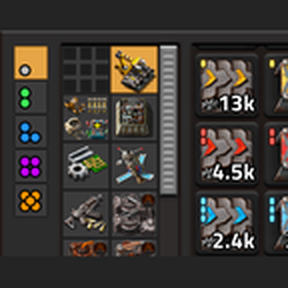
A collapsible panel that drops down exactly over your quickbar and shows every buildable in your inventory, sorted into the crafting menu's categories. Made for big mod lists.
Providing the player with new tools or adjusting the game interface, without fundamentally changing gameplay.
Version: 0.10.2
Date: 2026-11-16
  Features:
    - Pipette (Q, or whatever it's bound to) over a slot in the buildables bar, the Materials panel, the Ghost Project or Casper / Ritual's bars puts that item in your hand, or its ghost if you have none. Uses the slot's quality.
  Bugfixes:
    - Remote View: the buildables bar and its tab move up with the vanilla bars, inside the Remote View border, and move back when you leave.
    - Remote View: the Materials panel (Center and Equipment positions) moves in from the left border too. In Free position it stays where you put it.
    - With No Remote View Border installed there's no border, so nothing moves.
Version: 0.10.1
Date: 2026-11-16
  Changes:
    - Casper's bar, Ritual's bar and the Exorcist strip stay at most 2 rows tall; more rows scroll.
    - The bars update their counts in place, so a scrolled bar keeps its position while robots build. A bar is only rebuilt when a type appears or finishes.
Version: 0.10.0
Date: 2026-11-16
  Features:
    - Ritual: Casper for upgrades. Drag with the Ritual tool to track every built entity in the box that is marked for upgrade. Tracked entities get cyan brackets and map marks; the bar counts them by what they will become. An entity drops off when its upgrade is done or cancelled, and the job ends when the list is empty.
    - Ritual has its own shortcut button and a hotkey slot in Controls (unassigned). Alt-click with Ritual in hand cancels its job.
    - Ritual's bar sits right below Casper's and has the same features: hover/click guide arrow, Shift + click craft, Ctrl + click How many?, Craft all on the icon, Ghost Project, and right-click to change the upgrade target or quality.
    - Job areas: Casper and Ritual remember the boxes dragged for a job (shift-drag adds one) and draw them as one combined outline on the ground and the map, green for Casper and cyan for Ritual. New ghosts (Casper) or upgrade orders (Ritual) placed inside the area later are picked up, whoever on your team places them. Overlapping areas of different players each track the overlap.
    - Ghosts changed with Casper's "Change N ghosts to" move to Ritual until they are built. Undo moves them back to Casper; redo moves them to Ritual again.
    - The Ghost Project covers both trackers. A building needed by both is counted once against what you carry.
  Info:
    - Ritual is part of the built-in Casper, so it is switched off together with it when the standalone Casper mod is installed.
Version: 0.9.6
Date: 2026-11-15
  Changes:
    - Ghost Project tooltip: a divider, then the Materials click shortcuts (pick up, craft 1, craft 5, craft as many as possible, how many?).
    - Ghost Project timing is in plain game ticks: the auto-opened panel stays 240 ticks (4 s at normal speed) and each blink phase is 15 ticks. Following the game speed setting made it minutes long when a speed mod asks for more than the PC can run. Long timers saved by 0.9.4/0.9.5 are cut back.
  Bugfixes:
    - Removes leftover green ghost brackets: switching from the standalone Casper with a job running left its brackets in the world (the game removes a mod's drawings, not the highlight boxes it placed). Runs once per save, and again whenever the standalone Casper is removed. Only Casper-style boxes no tracked ghost uses are removed.
Version: 0.9.5
Date: 2026-11-15
  Bugfixes:
    - Fixed a crash when loading a save with the Materials panel open after updating to 0.9.4 ("attempt to index field 'gp'"). TMB's panels rebuild before the built-in Casper sets up its saved data; the Ghost Project now waits for it.
Version: 0.9.4
Date: 2026-11-15
  Features:
    - Ghost Project: when crafting for a Casper job comes up short (Shift + click, Craft all, or any TMB craft), the Materials panel gets a Ghost Project section listing every ingredient the job's buildings need that you're short of. The badge shows how many you're missing; the tooltip shows the total needed for every remaining craft, broken down per building, and what you have.
    - Ghost Project items drop off once you have enough; the section goes away when it's empty or the Casper job ends.
    - The missing slots blink red each time a craft fails because of them.
    - If the Materials panel was closed, it opens for 4 seconds to show the update, then closes again. Hovering or clicking it keeps it open. Timing follows the game speed, so it's 4 real seconds even when the game runs faster.
  Bugfixes:
    - Casper bar: right-click "Change N ghosts to" did nothing. Ghosts can't be looked up by unit number, so they're now found by position. If the ghosts are gone, it says so.
Version: 0.9.3
Date: 2026-11-15
  Info:
    - Code reorganised: control.lua is split into files under scripts/ (util, crafting, howmany, buildables, materials, and the built-in Casper). No gameplay changes.
Version: 0.9.2
Date: 2026-11-15
  Features:
    - Casper bar: Shift + click an item to craft what you're missing of it (minus what you carry and what's already queued). Normal quality only.
    - Casper bar: Ctrl + click an item to open "How many?" with the total already set to what you're missing.
  Changes:
    - Casper bar item tooltips list every click: hover / click guide, Shift + click craft, Ctrl + click how many, right-click change.
Version: 0.9.1
Date: 2026-11-15
  Features:
    - Casper bar: left-click the ghost icon to craft everything the tracked ghosts still need. It crafts only what you're short (minus what you carry and what's already in the crafting queue), normal quality only, and sums up in one flying text.
    - Casper bar: right-click an item to open "Change N ghosts to". Pick a new type (anything the upgrade planner allows, lower tiers included) and a quality in the title bar, then Confirm. Every tracked ghost of that item is swapped and stays tracked. Ctrl + Z undoes it.
  Changes:
    - Casper bar: folding the list moved to right-click on the ghost icon.
Version: 0.9.0
Date: 2026-11-15
  Features:
    - Casper: Ghost Tracking is now built in: the Casper tool, the Exorcist, green ghost highlights, map marks, the drag preview, the guide arrow and the "Ghosts left" bar. It works the same as the standalone Casper 0.8.0.
    - Casper and the Exorcist have their own shortcut buttons, and the same default keys as the standalone mod (Shift + Alt + G and Shift + Alt + E).
  Compatibility:
    - If the standalone Casper: Ghost Tracking mod is installed, it stays in charge and TMB's built-in copy is switched off, so there is only ever one Casper.
  Changes:
    - Requires Factorio 2.1.22 or newer (needed for Casper's drag preview).
Version: 0.8.3
Date: 2026-11-15
  Changes:
    - "How many?" popup is about half the size: no slider labels, total and Craft share the bottom row, and "On hand" with your count sits under the icon.
    - Tooltips on the stacks slider (stack size), singles slider, and total box.
  Bugfixes:
    - Opening "How many?" no longer closes your inventory. The popup closes with Craft, Enter, the close button, or when the inventory closes.
Version: 0.8.2
Date: 2026-11-15
  Bugfixes:
    - Fixed a crash when opening the "How many?" popup.
Version: 0.8.1
Date: 2026-11-15
  Changes:
    - "How many?" moved to Ctrl + click (Alt + click is the game's Factoriopedia shortcut).
    - With a chest or machine open, Ctrl + click on inventory items is left to the game's "transfer all"; recipes and TMB's own slots still open "How many?".
Version: 0.8.0
Date: 2026-11-15
  Features:
    - "How many?" popup: Alt + click an item in TMB's panels, a recipe in the crafting menu, or an item in your inventory to choose how many to hand-craft.
      - Stacks slider in whole steps from 0 to 10, singles slider from 0 to one full stack, and a total box you can type into. Stack sizes come from the game, so mods that change them are covered.
      - Craft (or Enter) queues exactly that many items in your normal hand-craft queue; recipes that make several items at once are rounded up to whole crafts. Esc closes.
      - Works for anything your character can hand-craft (buildings, intermediates, ammo ...). Machine-only items show "Can't be hand-crafted".
    - New control "How many?" (default Alt + left click), rebindable in Controls.
  Changes:
    - Tooltips list Alt + click.
Version: 0.7.2
Date: 2026-11-15
  Changes:
    - Materials panel sections are sorted by item type: plates together, coils together, circuits together and so on, then by crafting order within each type. The type is read from the item's internal name, so it works for any mod. Items with no type word keep their crafting-menu position.
Version: 0.7.1
Date: 2026-11-15
  Changes:
    - Materials panel: items pack into full rows inside each tab section (subgroups no longer start new rows). The Track menu keeps its subgroup strips and checkboxes.
    - Materials panel and Track menu stop growing at 10 rows, then scroll.
    - The panel no longer jumps when its content changes: above the equipment panel its bottom edge stays put; in the other modes its top edge stays put. In "Left edge, centred" the top sits where a full-height panel would be centred.
    - Materials panel width setting is now 6 to 9 slots.
Version: 0.7.0
Date: 2026-11-15
  Features:
    - The Materials panel has its own quality buttons in its title bar, independent of the buildables panel. Each panel remembers its own selection.
  Changes:
    - The panel tabs' tooltips list every click shortcut, one per line. The Materials tab has its own list (right-click removes from Custom).
    - When the quality buttons don't fit next to it, the Materials title is dropped; extra qualities from mods wrap onto a second title-bar row.
Version: 0.6.1
Date: 2026-11-15
  Graphics:
    - New mod thumbnail.
Version: 0.6.0
Date: 2026-11-15
  Features:
    - Quality buttons on the left of the buildables panel (20 px, stacked top to bottom; if a mod adds more than fit, they continue in a new column to the left). Normal is selected by default.
    - The selected quality applies to both panels: counts, greyed slots and quality badges show that quality only; clicking picks up that quality and right-click ghosts it.
    - The quality buttons only appear when the game has more than one quality (quality enabled).
  Changes:
    - Crafting (Shift+click) only works on the Normal tab, since hand-crafting makes normal quality from normal ingredients.
Version: 0.5.6
Date: 2026-11-15
  Bugfixes:
    - Items in the Custom bar that aren't materials (pipes, buildings, ammo and so on) now show their real count instead of being greyed out.
Version: 0.5.5
Date: 2026-11-15
  Bugfixes:
    - Above equipment panel: the Materials panel no longer overlaps the equipment panel.
    - Left edge, centred: the collapse tab no longer hides behind the open panel.
    - Below GUI Unifier: the panel and Track menu now fill in, tracking and collapsing work, and they keep their normal width instead of stretching.
    - Track menu keeps its scroll position when you track or untrack items.
  Changes:
    - The Materials panel and Track menu now have an exact size set on them instead of an estimated one, so anchoring and the attached tab line up precisely.
Version: 0.5.4
Date: 2026-11-15
  Changes:
    - The Materials panel collapses like the toolbelt: a small arrow tab stays attached to it and toggles it. Above the equipment panel the tab sits on top of the panel; centred on the left edge it sits against the panel's right side; in free placement it sits on top.
    - Removed the separate close button.
Version: 0.5.3
Date: 2026-11-15
  Changes:
    - The button that shows the Materials panel now sits where the panel lives: a small tab on the left edge above the equipment panel, on the left edge centred, at the panel's spot in free placement, or in the mod button bar in "Below GUI Unifier" mode.
    - The tab hides while the panel is open; the panel's title bar has a close button.
Version: 0.5.2
Date: 2026-11-15
  Changes:
    - Materials panel sections are grouped by crafting-menu tab instead of subgroup: one section per tab, with each subgroup starting a new row inside it, like the crafting menu.
Version: 0.5.1
Date: 2026-11-15
  Changes:
    - Removed the starting preset: the Materials panel no longer tracks what you carry automatically. It shows only the Custom bar and the items you pick in the Track menu.
    - Existing saves have their old preset tracking cleared once.
Version: 0.5.0
Date: 2026-11-15
  Features:
    - Materials panel position setting:
      - Above equipment panel (default): left edge, resting on the armour/weapons panel, grows upward.
      - Left edge, centred: grows up and down.
      - Below GUI Unifier: under the mod button bar, grows downward. Only offered when GUI Unifier is installed.
      - Free placement: unlock to drag, then lock (the lock button only shows in this mode).
    - Materials panel fine-tune X/Y offsets.
  Changes:
    - The panel re-anchors when sections expand or collapse, or the resolution or UI scale changes, and scrolls instead of running off screen.
    - The Track menu opens beside the panel and lines up with it (bottom-aligned above the equipment panel, top-aligned otherwise).
Version: 0.4.0
Date: 2026-11-15
  Features:
    - Materials side panel for intermediates and crafting materials, opened with the small button next to the quickbar tab (or an optional hotkey, unbound by default).
    - Custom bar at the top: add any item with [+] (the game's item picker) or Shift+click in the Track menu; right-click a Custom item to remove it.
    - Tracked items below, one collapsible section per subgroup in crafting-menu order; greyed when you have none.
    - Track menu: every material by group tab and subgroup; click an item to track/untrack it, or use a subgroup's checkbox to track all of it.
    - Docked at the left edge; unlock to drag it anywhere, then lock it again. Collapse/expand all from the title bar.
    - Same clicks as the buildables panel: click to pick up, Shift+click craft 1, Shift+right-click craft 5, Ctrl+Shift+click craft as many as possible.
    - New setting: Materials panel width (default 6 slots).
  Changes:
    - Crafting works for any item, not only buildables.
Version: 0.3.2
Date: 2026-11-15
  Changes:
    - Container subgroups (chests, logistic chests, warehouses, fluid storage tanks) are sorted to the bottom of their tab. Cargo and fluid wagons stay with the trains.
Version: 0.3.1
Date: 2026-11-15
  Changes:
    - Category tabs now show every buildable in the game, researched or not. Locked items can't be crafted ("Not unlocked yet") but can still be ghosted.
Version: 0.3.0
Date: 2026-11-15
  Features:
    - Category tabs show every buildable your force has unlocked by research, even if you have none. Items you have none of are greyed out.
    - "All" tab shows what you're carrying.
    - Right-click: put a ghost of the item in your hand.
    - Shift + click: craft 1. Shift + right-click: craft 5. Ctrl + Shift + click: craft as many as possible.
    - Clicking an item you have none of gives you a ghost, like the vanilla quickbar.
  Changes:
    - The panel updates when research finishes or is reversed.
    - Hidden and parameter items are no longer treated as buildables; hidden recipes (like recycling) don't count as unlocking an item.
Version: 0.2.0
Date: 2026-11-15
  Features:
    - Category tabs use a crafting-menu layout: each subgroup starts its own row, arranged in columns of 10 (lined up with the quickbar's blocks of 5) so the whole bar is used. A leftover block becomes a narrow last column; long subgroups wrap inside their column.
    - "All" tab is a packed overview in crafting-menu order.
  Changes:
    - Category tabs are bigger (28 px) and the selected tab is highlighted in orange.
    - Scrollbars are visible and have their own space, so no column is covered. The panel grows to the left; its right edge stays flush with the shortcut bar.
Version: 0.1.1
Date: 2026-11-15
  Bugfixes:
    - Fixed crash on load: a GUI element name clashed with a built-in GUI property. All element names are now prefixed.
Version: 0.1.0
Date: 2026-11-15
  Features:
    - Rough first build.
    - Collapsible panel that drops down exactly over the vanilla quickbar (▾/▴ tab, optional unbound hotkey).
    - Shows every buildable in your inventory with live counts: buildings, tiles, rails, plant seeds and modules (robots excluded).
    - Category tabs in the left column, taken from the game's item groups (works with any mod list), plus an "All" tab.
    - Items packed in crafting-menu order; tabs and grid scroll with the mouse wheel when they overflow.
    - Click to pick up into your hand like the vanilla quickbar; in remote view you get a ghost instead.
    - Quality is ignored for now (counts are summed, normal quality is picked first).