
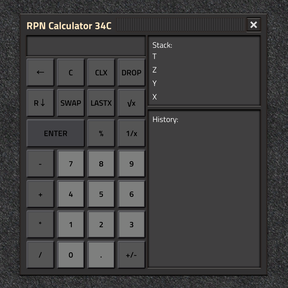
What is RPN?
Reverse Polish Notation, enter the numbers first, then apply the operation.
Instead of:
2 + 3
You enter:
2 ENTER 3 +
The calculator uses a stack rather than parentheses.
What stack does this calculator use?
It uses a 4-level stack:
T
Z
Y
X
- X is the displayed value
- Y is the next value used by binary operations
- Z and T hold older values
What does ENTER do?
ENTER pushes the current value onto the stack.
This is how you separate one entered value from the next in normal RPN use.
Example:
5 ENTER 8
After this, Y = 5 and X = 8 once the second value is entered.
How do +, -, *, and / work?
These operations use Y and X.
- + computes Y + X
- - computes Y - X
- * computes Y × X
- / computes Y ÷ X
The result is placed in X, and the stack drops accordingly.
Example:
6 ENTER 2 /
Result: 3
What does +/- do?
+/- changes the sign of the current entry or the X register.
Example:
5 +/-
Result: -5
What does CLX do?
CLX clears X to zero.
It does not clear the rest of the stack.
What does C do?
C clears:
- the full stack
- the current entry
- LASTX
- the history panel
Use it for a full reset.
What does DROP do?
DROP removes X and shifts the stack down.
That means:
- Y moves to X
- Z moves to Y
- T moves to Z
What does SWAP do?
SWAP exchanges X and Y.
This is useful when values were entered in the wrong order.
What does R↓ do?
R↓ rolls the stack downward.
The values rotate like this:
- T → X
- Z → T
- Y → Z
- X → Y
This is useful for cycling values already on the stack.
What does LASTX do?
LASTX recalls the previous value of X.
This is useful when you want to reuse the last operand after an operation changed X.
How does % work?
% calculates:
Y × X ÷ 100
Example:
200 ENTER 10 %
Result: 20
What does 1/x do?
1/x replaces X with its reciprocal.
Example:
4 1/x
Result: 0.25
What does √x do?
√x replaces X with its square root.
Example:
9 √x
Result: 3
Is there a backspace key?
Yes:
←
Backspace removes the last typed digit from the current entry.
It only edits the current number entry; it does not operate on the full stack.
Example workflow
To compute (2 + 3) × 4:
2 ENTER 3 + 4 *
Result: 20