
日本語の説明は下部にあります。
Quick Panel Tools Customize
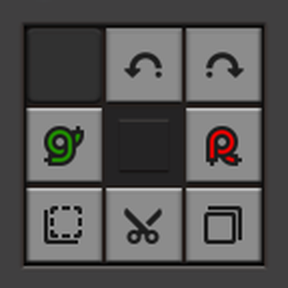
A Factorio mod that allows you to customize the Tools tab of the Quick Panel, which is primarily used when playing on Steam Deck or with a controller.
Features
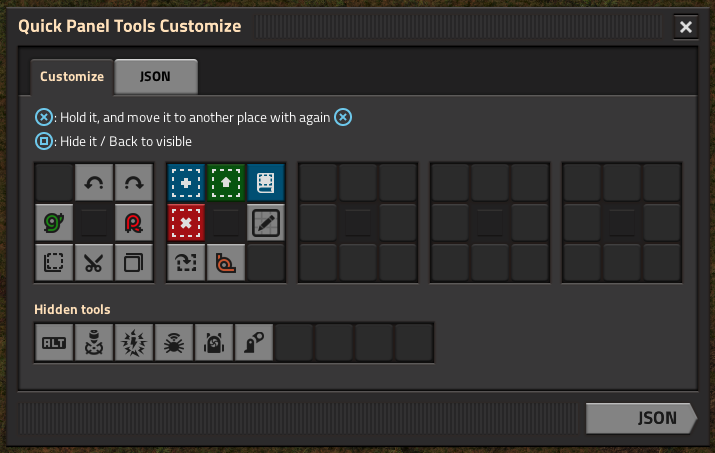
- Rearrange Tools: Change the order of tools to match your preference.
- Hide Tools: Hide specific tools that you don't frequently use.
Description
Ever feel "I want to install a new mod, but it adds a new tool... It pushes off every tool buttons! I can't use my favorite tools as same position!" -- I felt it too.
Quick Panel Tools Customize gives you the freedom to organize your tools exactly how you want it!
How to use
TL;DR: Open Customize GUI on Tools, customize, copy JSON, and paste it to Mod Startup settings.
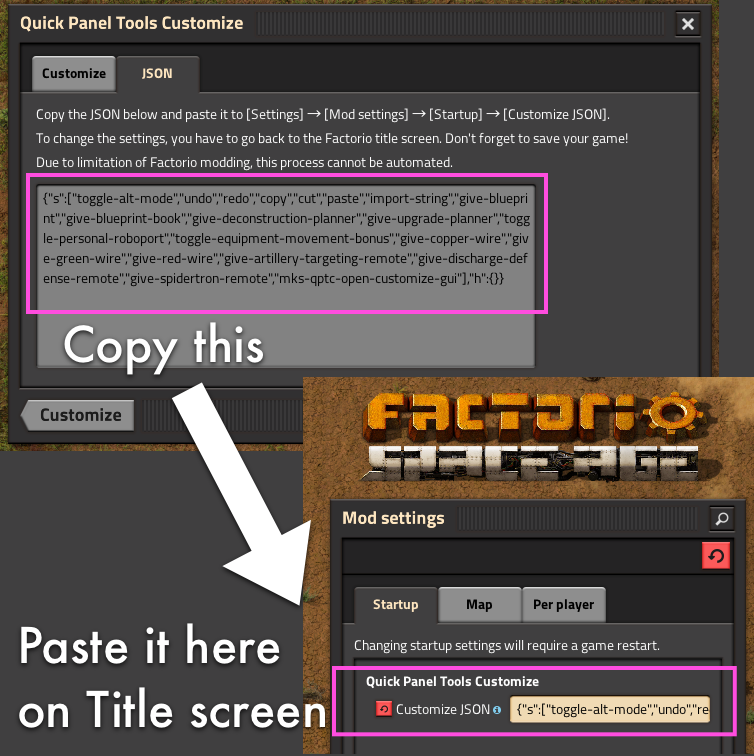
Because tool data cannot be changed in-game, you need to change Mod Startup settings on Factorio title screen.
- Install this mod.
- Load a game, or start a new game.
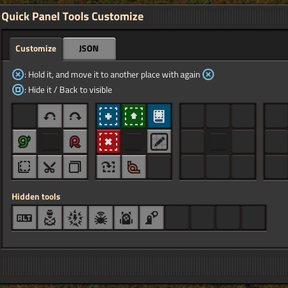
- Open Customize GUI on Tools tab in Quick Panel.
- Customize tools as you wish.
- Click
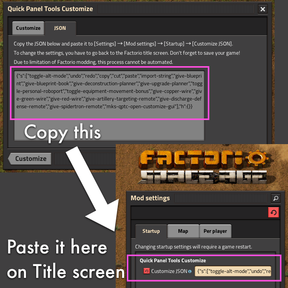
JSONbutton to see Customize JSON. - Copy the Customize JSON.
- On Steam Deck: Press
L4on selected text, the back side left-top button, which is assigned toCtrl+Cby default keymap.
- On Steam Deck: Press
- Close the Customize GUI.
- Save the game, and exit to the Factorio title screen.
- Open
Settings→Mod settings. - On
Startuptab, findQuick Panel Tools Customize. - Paste the Customize JSON into
Customize JSONtextbox.- On Steam Deck:
Pastebutton is on the keyboard in right-bottom.
- On Steam Deck:
Confirmto proceed. Factorio will restart.- Load the game. Factorio shows Confirmation, click
Loadto proceed. - and enjoy!
Compatibility
Because Factorio does not provide ways to hide tools, this mod uses a bit hacky way to customize the tools tab.
If you hide a tool, this mod will remove it from the game on startup. (Don't worry, it's restored if you unhide it)
So any other mod trying to modify that hidden tool during the game will throw an error.
Normally, a mod only modifies a tool to toggle it, or enable/disable it, so toggle tools cannot be hidden on Customize GUI. But it is still possible to throw an error if a mod to enable/disable hidden tools. So, I don't recommend to hide modded tools.
If error occurs, you have to reset your Customize JSON on Startup settings. Sorry for inconvenience.
Technical Details
- On startup:
- This mod overrides
ShortcutPrototype.orderto sort shortcuts (tools) by order. - This mod inserts a dummy shortcut for empty slots as a placeholder.
- To hide a shortcut, this mod removes its
ShortcutPrototypeby settingdata.raw["shortcut"][name] = nil. - This mod sets a metatable to
data.raw["shortcut"]to return a virtualShortcutPrototypefor removed keys. - Also, the metatable is used to detect a new shortcut added by other mods later.
- This mod overrides
日本語 (For Japanese users)
Factorio をコントローラでプレイする際に使う、クイックパネルのツールタブをカスタマイズする MOD です。
機能
- ツールの並び替え: クイックパネルのツールの並びを変更できます。
- ツールの非表示: あまり使わないツールを非表示にできます。
説明
「新しい MOD をインストールしたいけど、ツールが増えてしまう… ツールボタンがズレて、位置が変わっちゃう!」 -- そんな経験は?
Quick Panel Tools Customize を使えば、ツールの並びを自由に変更できます!
使い方
一行説明:「クイックパネルツール設定」ツールを開いて、カスタマイズして、JSON をコピーして、MOD のスタートアップ設定に貼り付けます。
ツールタブの情報はゲーム中の変更ができない仕様なので、Factorio のタイトル画面でスタートアップ設定を設定する必要があります。
- この MOD をインストールします。
- ゲームをロード、または、新しく開始します。
- 「クイックパネルツール設定」をクイックパネルのツールタブから開きます。
- 自由にカスタマイズします。
JSONボタンをクリックすると、「設定JSON」が表示されます。- 「設定JSON」をコピーします。
- Steam Deck の場合: 選択されたテキストに対して
L4ボタンを押します。L4ボタンは Steam Deck の背面にある左上のボタンで、デフォルトでCtrl+Cに設定されています。
- Steam Deck の場合: 選択されたテキストに対して
- 設定画面を閉じます。
- ゲームをセーブして、Factorio のタイトル画面に戻ります。
設定→MOD設定を開きます。スタートアップタブ内のQuick Panel Tools Customizeを探します。設定JSON欄に、コピーした JSON を貼り付けます。- Steam Deck の場合: キーボード右下に「貼り付け」ボタンがあります。
確認ボタンを押すと、Factorio が再起動します。- ゲームをロードします。確認が表示されるので
ロードを押します。 - 以上です!
互換性
Factorio がツールを隠す機能を提供していないため、この MOD は、ツールタブをカスタマイズするのに、少し 特殊 な方法を使っています。
この MOD でツールを非表示にすると、スタートアップ時にそのツールをゲームから削除しています。(非表示を解除すると復元されます)
もし他の MOD がゲーム中に非表示のツールを変更しようとすると、エラーが発生します。
MOD によるツールへの変更は「ON/OFF」の切り替えか「有効/無効」の切り替えなので、ツール設定画面では「ON/OFF」切り替えされるツールは非表示にできないようになっています。ただし、「有効/無効」の切り替えではやはりエラーが発生するため、MOD によるツールの非表示は推奨しません。
もしエラーが発生した場合は、スタートアップ設定の「設定JSON」をリセットする必要があります。ご不便をおかけします。
技術的詳細
- スタートアップ時:
ShortcutPrototype.orderを上書きして、ショートカット(ツール)を並び替えます。- 空の場所には、ダミーのショートカットを登録します。
- ショートカットを非表示にするために、
data.raw["shortcut"][name] = nilでShortcutPrototypeを削除します。 data.raw["shortcut"]に metatable を設定して、削除されたキーには仮想的なShortcutPrototypeを返すようにします。- また、metatable によって、後から追加されたショートカットも検知します。