
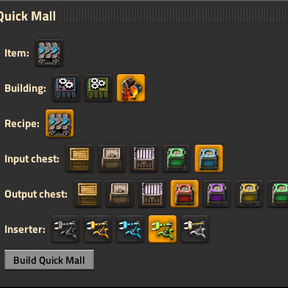
Create a quick mall blueprint: assembler + logistic chests (with requests) + inserters. Shortcut: Ctrl+Q
Providing the player with new tools or adjusting the game interface, without fundamentally changing gameplay.
Version: 1.3.2
Date: 2026-07-13
  Changes:
    - The menu now keeps a constant width instead of expanding and contracting to fit the
      longest row, and is sized so a full row of option icons is always shown without clipping
Version: 1.3.1
Date: 2026-07-13
  Bugfixes:
    - Modules are no longer dropped when an earlier module slot is left empty; each slot is
      independent, so filling only the second (or only the last) slot now works correctly
    - Fixed a crash when opening the menu after a previously-chosen item was removed (e.g. a
      mod that added it was disabled); the stale selection is now cleared instead
Version: 1.3.0
Date: 2026-07-13
  Features:
    - Module support: choose modules per slot for the crafting building, filtered to those
      allowed for the selected recipe and building; the built entity requests the modules
      from the logistics network
    - Module quality selection: pick the quality of each module (e.g. uncommon/rare), carried
      through to the logistic request and the module inventory
  Bugfixes:
    - Module picker no longer offers modules a recipe forbids (e.g. productivity modules on
      end-product recipes like inserters or belts)
    - Fixed horizontal GUI overflow: building/recipe/chest/inserter icon rows now wrap into a
      grid and scroll in place instead of extending past the window edge
Version: 1.2.0
Date: 2026-07-11
  Bugfixes:
    - Fixed undefined is_fluid check in the build path so fluid recipes reset quality to normal
    - Removed duplicate function definitions that shadowed the intended request-clearing behavior
    - Removed a dead ghost-tag request path that never executed
  Changes:
    - Split control.lua into focused scripts/ modules (constants, prototypes, storage, recipes, blueprint, gui)
    - Documented the codebase with a file header and per-function comments
  Minor Features:
    - Wrapped the selection rows in a scroll pane so the Build button is always reachable on small screens
    - Stack-limit field now treats empty or 0 input as "no limit" instead of silently keeping the old value
Version: 1.1.0
Date: 2026-01-25
  Changes:
    - Added changelog file
  Minor Features:
    - Added English locale file for proper UI translations
Version: 1.0.0
Date: 2026-01-22
  Major Features:
    - Remote interface for testing functionality
    - Output stacks limit control in GUI
  Changes:
    - Improved stack limit UI with horizontal flow layout
    - Enhanced error handling for missing tests module
Version: 0.1.1
Date: Unknown
  Bugfixes:
    - Fixed GUI button rendering to include player force for input/output chests
    - Fixed quality warning logic for fluid-only recipes
  Changes:
    - Improved README documentation
    - Added mod thumbnail
    - Enhanced GUI layout with better label centering and styles
Version: 0.1.0
Date: Unknown
  Major Features:
    - Initial release for Factorio 2.0
    - Quick Mall GUI for creating production blueprints
    - Support for assemblers, chemical plants, foundries, EM plants, and oil refineries
    - Dynamic building and chest discovery
    - Space Age quality support for items
    - Surface compatibility filtering (planet-specific recipes)
    - Fluid crafting support with quality warnings
    - Remembers last selected options
  Features:
    - Item picker filtered by researched recipes
    - Recipe selection with visual icons
    - Building type selection
    - Input/output chest type selection (including logistic chests)
    - Inserter type selection
    - Quality selection for crafted items
    - Automatic input chest request configuration
    - Blueprint placement with temporary cursor
  Quality Features:
    - Quality warnings for fluid-only input recipes
    - Quality warnings for fluid outputs
    - Proper quality handling for items vs fluids
  Surface Compatibility:
    - Filters buildings by surface properties
    - Filters recipes by surface compatibility
    - Auto-clears incompatible recipes when changing surfaces
    - GUI refreshes when player changes surface
  GUI:
    - Icon-based selection for buildings, recipes, chests, and inserters
    - Visual feedback with toggled buttons
    - Localized entity names in tooltips
    - Clear messages for unavailable options
  Keyboard Shortcut:
    - Control + Q to open Quick Mall GUI
  Technical:
    - Compatible with Factorio 1.1 and 2.0 APIs
    - Fallback prototype resolution for API changes
    - Optimized recipe filtering and building discovery
    - Proper handling of entity placement and validation