
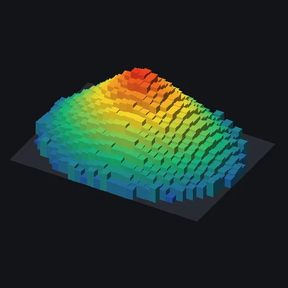
Select an ore patch and see it as a 3D bar graph you can rotate: one bar per tile, with height showing how much ore is left.
How to use
- Click the Ore mountain shortcut (or press Alt+M) to get the selector.
- Drag over any part of a patch to view the whole connected patch.
- Shift-drag to view only the tiles inside the box (useful for oil fields).
The viewer
- Rotation, tilt and height sliders, ±45° buttons and an auto-spin option.
- Height scale: linear, square root or logarithmic.
- Colour: heat map or the ore's own colour.
- View size: Small, Medium, Large or Extra large.
- Stats: total ore, tile count, average per tile, poorest and richest tile, and how much has been mined since you selected the patch. Infinite resources like oil are shown as yield %.
- Rescan re-reads the patch after mining. It follows the patch as it shrinks or splits, and keeps the footprint fixed so the view doesn't jump around.
- Auto-rescan repeats the rescan every 1, 5, 10, 30 or 60 seconds of game time while the window is open. Game time keeps it in step with a sped-up game.
- Very large patches are averaged into blocks to keep the view fast. The bar limit is a per-player setting.
- Orthographic view: bars don't change size with distance.
Advanced mode (timelapses)
Turn on Advanced mode in per-player mod settings to get a Peak value box. Whatever you enter becomes full height, instead of the richest tile. This keeps the scale and camera fixed while a patch is mined out, so depletion actually shows in timelapse recordings. Combined with auto-rescan and a large view size, a timelapse needs no clicking.
Settings (per player)
- Patch gap tolerance: how far apart tiles can be and still count as one patch.
- Maximum bars: the detail limit before tiles are averaged into blocks.
- Maximum tiles to scan.
- Advanced mode.
Languages
- English
- German (Deutsch), contributed by Eddy_Karacho
Want it in your language? Copy locale/en/locale.cfg from the mod zip, translate the text after each =, and send it to me in the discussion tab. I'll add it in the next update.
Works in multiplayer; each player sees only their own viewer. Safe to add to or remove from existing saves.