
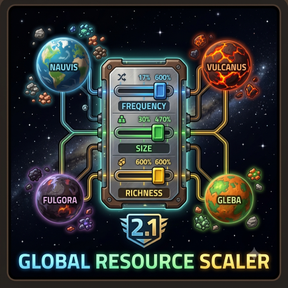
Global Resource Scaler
A lightweight, powerful, and crash-proof configuration mod for Factorio. This mod intercepts the generation algorithms for every planet across the entire galaxy—including Nauvis, Vulcanus, Fulgora, Gleba, Aquilo, and custom modded surfaces—to universally scale resource frequency, size, and richness straight from the loading screen.
Key Features
-
Complete Global Controls: Easily adjust three global configurations to change resource distribution galaxy-wide.
-
Starting Area Fixed: Unlike raw runtime scripts, this mod injects data directly into the planet blueprints, ensuring your initial starting patches are perfectly scaled right at your feet.
-
Map Preview Synced: Your custom resource layouts are clearly drawn in real-time on the standard New Game map seed preview.
-
No "Unknown Key" Errors: Includes full locale translation keys for a clean, vanilla-style configuration menu.
How to Configure (The Sliders)
Because Factorio requires these parameters to bake directly into the world map logic before a game begins, settings are managed through the Startup Mod Settings screen.
-
Launch Factorio and navigate to Settings -> Mod Settings -> Startup tab.
-
Locate Global Resource Scaler.
-
Adjust the three whole-number percentage inputs (from 17% up to 600%):
- Global Frequency: Controls how often resource patches spawn across the terrain.
- Global Size: Controls the physical radius and footprint of individual ore fields.
- Global Richness: Controls the literal density (ore count) packed into every individual tile.
Note: Changing startup settings will prompt Factorio to quickly restart for 2 seconds to rebuild the prototype map formulas. This is completely normal!
The Multiplier Interaction (17% to 600%)
A common question for users of this mod is: "Why do the visual sliders on the native 'New Game' map selection screen still say 100%?"
The map generator setup screen is hardcoded into Factorio's core C++ engine and cannot read mod adjustments dynamically. Instead, the engine treats the map screen sliders as a secondary modifier layered on top of this mod's custom parameters.
Note: Your custom-scaled patches (whether shrunk down to 17% for a challenge or boosted to 600% for abundance) will be clearly visible in the real-time map preview window! Only the text positions of the native screen sliders remain at 100%.
This gives you an insane amount of freedom to stack resource scaling to suit your playstyle:
Final Map Scale = Mod Startup Setting x Map Generator Screen Slider
Examples of how the math stacks:
- The Absolute Wasteland Challenge (17% x 17%): You push the Mod Startup config to its absolute minimum of 17% AND pull the native Map Generator screen sliders down to their absolute minimum of 17%.
0.17 (Mod) x 0.17 (Map Screen) = 0.0289 (Roughly 2.9% Overall Resources - practically nonexistent patches!)
- The Scarcity Run (17% x 50%): You want a brutal game, so you set the Mod Startup menu to 17% and lower the Map Generator screen slider to 50%.
0.17 (Mod) x 0.50 (Map Screen) = 0.085 (8.5% Overall Resources - ultra-rare fields)
- The Intentional Baseline (600% x 100%): You set the Mod Startup menu to 600% and leave the Map Generator screen at its default 100%.
6.00 (Mod) x 1.00 (Map Screen) = 6.00 (600% Overall Resources)
- The Overdrive Maximum (600% x 600%): You push the Mod Startup config to its maximum of 600% AND crank the native Map Generator screen sliders up to their maximum of 600%.
6.00 (Mod) x 6.00 (Map Screen) = 36.00 (3600% Overall Resources!)
If you like my work, you can Support me on Ko-fi!