
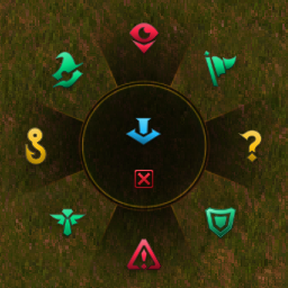
League of Legends style pings for Factorio: a radial wheel, animated markers, sounds and alerts. Fork of TriQ's original mod, maintained by Kogutei.
Providing the player with new tools or adjusting the game interface, without fundamentally changing gameplay.
Version: 1.0.0
Date: 2025-03-31
  Changes:
    - Initial release
Version: 1.0.1
Date: 2025-03-31
  Changes:
    - Fixed a bug with with multiplayer compatibility
    - Added Changelog
Version: 1.0.2
Date: 2025-03-31
  Changes:
    - Added Rate Limit
    - Fixed multiplayer ping removal
    - Fixed ping removal
  Notes:
    - Sorry for the buggy version 1.0.1 hopefully fixed all bugs
Version: 1.0.3
Date: 2025-03-31
  Changes:
    - Added More Pings
    - Added Ping Selector
    - Bug Fixed Pings are persistant after player leave
  Notes:
    - A known bug is that Pings doesnt get removed when saving directly when a ping is active
    - im onto it but at that moment you have to wait until all pings are removed after 5 sec.
Version: 1.0.4
Date: 2025-03-31
  Changes:
    - Added Close button icon
    - Added Close button vfx
Version: 1.0.5
Date: 2025-03-31
  Changes:
    - Added Single ping option
    - Added Single ping Keybind option
  Notes:
    - Single ping does not come with rate limiting in this version patch comes at later version
Version: 1.0.6
Date: 2025-03-31
  Changes:
    - Bug Fixed Tick error on Multiplayer
Version: 1.0.7
Date: 2025-04-02
  Changes:
    - Added categories for pings: Offensive, Defensive, and Information.
    - Reworked rate limiting.
    - Improved GUI with reworked buttons for better organization.
    - Fixed issues with ping removal in multiplayer.
    - Fixed crashes caused by invalid players or positions.
    - Fixed GUI selection wheel not closing properly.
    - Fixed synchronization issues with pings in multiplayer.
Version: 1.1.0
Date: TBD
  Changes:
    - Added the "Bait" ping.
    - Restored the missing "Assist Me" button in the ping menu.
    - Reworked pings limit: pings are never blocked and the chat warning is gone,
      up to 5 pings per player exist at once, the oldest one is removed first.
    - Ping state is now stored in the save file, so pings no longer stay on the map
      forever after loading a save.
    - The ping selector opens with the back side mouse button.
    - GUI texts are localizable; English and Russian are included.
  Notes:
    - Original mod by TriQ (supported up to 1.0.7). Continued by Kogutei and DeepSeek-V4.1-Flash-1017.
Version: 1.1.1
Date: TBD
  Changes:
    - Fixed pings having a small collision box: a ring of pings could trap the player.
    - Fixed the mod locale not being loaded, all texts moved to locale/<language>/ folders.
    - Mod info now credits the original author and the maintainers of the new versions.
Version: 1.2.0
Date: TBD
  Changes:
    - The ping menu is now a ring selector: 8 sectors around a center slot, drawn with the
      new circle art and placed at the aimed point instead of the middle of the screen.
    - The selector is kept on screen when the aimed point is near a screen edge.
    - Pressing the selector hotkey again closes the selector.
  Notes:
    - The layout of the 9 slots is still hardcoded, configurable through mod settings later.
Version: 1.2.1
Date: TBD
  Changes:
    - Selector slots are drawn as bare icons again: the button squares are gone.
    - Ping names are shown as tooltips when hovering a selector slot.
Version: 1.2.2
Date: TBD
  Changes:
    - Fixed a crash when opening the selector that was introduced in 1.2.1.
Version: 1.3.0
Date: TBD
  Changes:
    - Added mod settings: selector size and selector icon size, per player.
    - Removed the hover tooltips from the selector slots.
Version: 1.4.0
Date: TBD
  Changes:
    - All 9 selector slots are configurable in the mod settings, named by compass direction
      (north, north-east, ..., center). Any slot can be left empty.
    - Fixed the selector falling apart when the interface scale or screen resolution is changed
      while the selector is open.
Version: 1.5.0
Date: TBD
  Changes:
    - The whole sector of the selector is clickable now, not just the icon: invisible hit tiles
      fill every sector.
    - The mod settings dropdown shows readable ping names instead of internal ones.
    - Fixed the selector appearing right after loading a save, without the hotkey being pressed.
  Notes:
    - Ping types and their labels now live in lib/ping-definitions.lua and are shared by the
      prototype and the runtime stages.
Version: 1.5.1
Date: TBD
  Changes:
    - Fixed a crash when opening the selector caused by duplicated GUI element names.
Version: 1.5.2
Date: TBD
  Changes:
    - The center of the selector is clickable now: two wide hit areas above and below the icon.
    - Hit tiles inside a sector now overlap, so there are no dead spots in the middle of a sector.
    - The selector can no longer be opened by a click buffered during the loading screen.
Version: 1.6.0
Date: TBD
  Changes:
    - Fixed the selector coming back after loading a save where it was left open: script GUIs are
      stored in the save, so a leftover ring is now removed right after loading.
    - Mod settings moved to the startup tab: they now live in the player profile instead of the
      save file, so the values are the same in the main menu and in every save.
    - Selector hit areas now match the art: no more clicks inside the center disc that count as
      a sector click, and the center disc is fully clickable.
  Notes:
    - Startup settings require a game restart to apply.
Version: 1.7.0
Date: TBD
  Changes:
    - Added /league-ping-debug: draws the selector hitboxes so the clickable areas can be checked.
    - Added /league-ping-tune: temporary ring and icon size override for the current session, so the
      sizes can be tuned without restarting the game.
Version: 1.7.1
Date: TBD
  Changes:
    - Fixed multiplayer: a second player could not join a map, the game reported a
      script event mismatch for on_tick. The one-shot event handler is gone, the leftover
      selector is now removed by the regular cleanup tick.
    - The center slot of the selector is clickable over the whole disc: the two wide hit
      areas were replaced by a grid of small tiles, the same way the sectors work.
    - /league-ping-tune accepts an optional third value, the center disc radius, and
      reports the values it applied.
    - The tuning overrides and the hitbox debug flag are no longer written to the save
      file, they now last until the game is restarted.
Version: 1.7.2
Date: TBD
  Changes:
    - German, French and Chinese translations moved into locale/<language>/ folders, where the
      game actually reads them. They were stored in flat files that Factorio 2.1 ignores, so those
      languages showed english hotkey names.
    - Removed the unused [gui] translation section: the old category and ping name texts are no
      longer used by the selector.
    - Added /league-ping-probe: a research tool that prints the coordinates reported by vanilla map
      pings, dropped items and area selections. It is a step towards placing pings where the player
      aims, see task T-02.
  Notes:
    - The flat locale files (en.cfg, ru.cfg, de.cfg, fr.cfg, zh-CN.cfg) are empty now and should
      not be packed into the release archive any more.
Version: 1.7.3
Date: TBD
  Changes:
    - Debug commands (/league-ping-debug, /league-ping-tune, /league-ping-probe) now print plain
      text instead of translated messages: a missing locale file used to turn their output into
      "Unknown key", which made the state of a toggle impossible to read.
    - The position probe also reports chat messages, because vanilla map pings show up in the chat
      as location tags and may be visible to scripts that way.
    - Probe events are registered defensively: an event name that does not exist in the running game
      version is logged instead of crashing the mod.
Version: 1.8.0
Date: TBD
  Changes:
    - Pings can now be placed where you aim: ping a map location with Ctrl + Alt + Left click and
      the selector opens exactly at that point, so the type is chosen without aiming a second time.
      The cursor position is not available to scripts, but the ping writes its coordinates into the
      chat and the chat event carries them.
    - New setting "Open the selector on a map ping", on by default.
  Notes:
    - The ping is placed on the surface the player is currently on.
Version: 1.8.1
Date: TBD
  Changes:
    - Reverted the 1.8.0 behaviour: the selector no longer reacts to the vanilla map ping. Taking
      over the vanilla ping was rejected by the project owner - a mod must not replace a standard
      action the player already relies on.
    - The position probe now also reports what a custom input event carries, to find out whether
      the hotkey press itself can report the aimed point.
Version: 1.9.0
Date: TBD
  Changes:
    - Pings are now placed exactly where the mouse points. The selector opens right under the
      cursor instead of at the character, and the ping lands on the aimed point.
    - Direct ping hotkeys place the ping at the cursor as well.
  Notes:
    - A custom input event carries the cursor position (world and screen coordinates), which is
      what makes this possible; no vanilla action is taken over.
Version: 1.10.0
Date: TBD
  Changes:
    - New setting "Uniform ping sound": the whole force hears the ping at the same volume, no
      matter where the players are or how far the ping is. Switched off by default, which keeps the
      original positional sound that fades with distance.
  Notes:
    - Uniform sound is played to each player of the force separately without a position, which is
      what makes the volume independent of the listener.
Version: 1.11.0
Date: TBD
  Changes:
    - Pings now show up in the alerts panel ("Оповещения"): every player on the force gets an alert
      with the ping icon, and the alert disappears together with the ping. New setting "Show pings in
      alerts", on by default.
    - Uniform ping sound compensates the engine's zoom attenuation, so the volume no longer depends
      on how far the camera is zoomed out.
  Notes:
    - Alerts are attached to the ping entity itself, so the icon and the map preview come from it.
      If the game rejects this call, the reason is printed into the chat once.
Version: 1.12.0
Date: TBD
  Changes:
    - Reverted the volume compensation for zoom in the uniform sound mode: it made things
      worse, so the uniform mode only removes the distance attenuation and leaves the engine's
      zoom behaviour untouched.
    - Added /league-ping-alert-test: creates one alert of each candidate shape and reports which
      calls the game accepts. The alerts that are attached to a ping are accepted silently but
      never appear in the panel, so the shape has to be determined experimentally.
Version: 1.13.0
Date: TBD
  Changes:
    - /league-ping-alert-test now calls add_alert with every candidate second argument and
      prints the game's answer for each, because the method turned out to take two arguments.
Version: 1.14.0
Date: TBD
  Changes:
    - Pings are shown in the alerts panel properly now: the correct channel is
      add_custom_alert(entity, icon, message, show_on_map), not add_alert, which is the vanilla
      attack alert and takes an alert type instead.
    - Added one virtual signal per ping type, carrying the same art, because the alert icon has
      to be a signal.
    - /league-ping-alert-test now tries three custom alert variants instead of guessing the
      signature of add_alert.
Version: 1.15.0
Date: TBD
  Changes:
    - Fixed the alert text showing "Unknown key": the message key was missing from the Russian,
      German, French and Chinese locale files, and a missing mod locale key is not replaced by the
      english one.
    - Alerts are now removed together with their ping. They used to outlive the ping, and since the
      five ping limit does not cover alerts, spamming pings piled alerts up without limit.
Version: 1.16.0
Date: TBD
  Changes:
    - Fixed the "Unknown key" in alerts for real: locale keys are addressed with a dot
      ({"message.ping-alert"}), the mod used a dash, so the key was never found. The same mistake kept
      the old debug messages broken.
    - The alert removal is logged once per session, to tell whether the removal call runs at all.
Version: 1.17.0
Date: TBD
  Changes:
    - The alert removal reports itself in the chat instead of the log file, because the log line did
      not show up where expected.
    - Added /league-ping-alert-clear: removes the alerts of the player's own character, which shows
      whether remove_alert works for custom alerts at all.
Version: 1.18.0
Date: TBD
  Changes:
    - Fixed the alerts outliving their pings and piling up on spam: remove_alert takes an alert
      filter table, so it is now called as remove_alert{entity = ping} instead of being given the
      entity directly.
    - The debug chat line about the removal attempt is gone again, it did its job.
Version: 1.19.0
Date: TBD
  Changes:
    - Alert diagnostics now work on a real ping entity instead of the character, and they count the
      remaining alerts after every removal filter (entity, position, icon) instead of relying on what
      is visible. Test alerts collapse, alerts of real pings did not, on the same build.
    - The ping alert removal reports itself once per session, the same way, to show whether that code
      path runs for real pings at all.
Version: 1.20.0
Date: TBD
  Changes:
    - /league-ping-alert-clear now also tries combined filters (entity+icon, surface+position+icon)
      and the blunt "every custom alert of this player", because no single-field filter removed the
      alert of a ping entity.
Version: 1.21.0
Date: TBD
  Changes:
    - /league-ping-alert-clear now filters by alert type: the filter field "type" expects a number
      from defines.alert_type, a string was rejected. Three variants of the type filter are tried.
Version: 1.22.0
Date: TBD
  Changes:
    - The ping entity no longer carries the "not-on-map" flag. Alerts attached to entities with that
      flag cannot be removed by any alert filter and even survive the entity, which is why ping alerts
      lingered and could be spammed. This is the hypothesis being tested.
    - Alert creation is capped at the ping limit as a safety net, so the panel never holds more
      entries than the five allowed pings, whatever the engine does with removals.
Version: 1.23.0
Date: TBD
  Changes:
    - Alert control moved fully into the mod, because alerts of ping entities cannot be removed by
      the engine at all: the removal call is gone, and instead the mod decides what to create.
    - Repeated pings of the same type within one second do not create a second alert.
    - The alerts panel never holds more entries than the ping limit: new alerts are skipped while
      the panel is full.
    - The "not-on-map" flag is back on the ping entity, it made no difference for alerts.
  Notes:
    - A ping alert still disappears on its own timer of about ten seconds, not together with the
      ping. Fixing that would need a HUD of our own instead of the vanilla alerts panel.
Version: 2.0.0
Date: 2026-11-09
  Major Features:
    - Pings land exactly where you point: the selector opens right under the cursor and the ping is
      placed at the aimed point, in the open field as well as on entities.
    - Ring selector with nine slots around a center disc, placed at the aimed point and kept on
      screen near the edges. Size, icon size and the layout of all nine slots are mod settings.
    - The whole sector is clickable, not just the icon.
    - Pings show up in the alerts panel with the icon of the ping type, who pinged and a map preview
      on hover.
    - Optional uniform ping sound: the whole force hears the same volume instead of the sound fading
      with distance.
  Changes:
    - Up to five pings per player, the oldest one is replaced silently; nothing is ever blocked and
      nothing is written to the chat.
    - Pings no longer block the player, no longer stay on the map after loading a save and no longer
      survive the player who placed them.
    - German, French and Chinese localisation loads now and covers the hotkeys, the settings and the
      alert text; the selector hotkey defaults back to Ctrl + Shift + R.
    - The selector is dismissed by clicking anywhere off the slots, by the cross or by the hotkey.
  Notes:
    - Multiplayer is fixed: a second player can join a map again (script event mismatch on join).
    - Alert entries still disappear on the engine's own ten second timer rather than with the ping;
      the mod limits how many of them exist at once.
    - Published as a separate mod, league-ping-upgraded, so the original page stays with its first
      author. Prototype names are unchanged, so pings placed by the old version keep working; both
      versions must not be enabled at the same time.
    - Maintained by Kogutei and DeepSeek-V4.1-Flash-1017 since 1.1.0.
Version: 2.1.7
Date: 2026-11-19
  Major Features:
    - Pings are animated the way the reference game does it: a soft white flash that fades in and out, two
      rings in the colour of the ping type that grow out of the point, and the icon itself pops up and then
      drifts upwards with a slow tail. At the end of its life the whole ping collapses into one point.
    - The ping selector is set up in game: a gear in the corner of the ring opens a draggable panel with the
      nine slots, the palette of all thirteen pings and two size sliders. Everything applies instantly, while
      the game is running, with the ring still on screen.
    - The selector no longer needs a restart: the slot layout, the ring size and the icon size are per-player
      runtime settings.
  Changes:
    - The selector close sound is personal now: closing your ring is no longer heard by the other players, and
      theirs is not heard by you.
    - Debug and tuning state is per player: /league-ping-debug, /league-ping-tune and /league-ping-offset only
      affect the player who ran them, instead of the whole map.
    - A ping snaps to the centre of the tile under the cursor, so pointing at different corners of the same tile
      always leaves the ping in exactly the same place and the rings line up with the map grid.
    - Tuning the selector in game costs no performance: changes are collected and the ring is rebuilt at most
      once every three ticks, and a setting is only written when its value really changes.
    - The lower part of the centre disc now closes the selector, so the small cross is only a picture.
    - Added the "Generic" ping; thirteen types in total.
    - The long "Unknown key: entity-name.custom-ping-..." texts are gone from the chat and from the signal
      icons, all five languages were updated, and the two missing setting descriptions in English and Russian
      are fixed.
    - New default layout of the nine slots.
  Notes:
    - Uniform ping sound and the alerts panel are still startup settings: they apply to the whole force and
      need a game restart.
    - Known limitation: a ping placed a moment before saving comes back after loading without its visuals
      (the engine does not store script rendering objects); it still lives out its five seconds and the alert
      is unaffected.
    - Debug helpers: /league-ping-debug (visible hit boxes), /league-ping-tune (session-only sizes) and
      /league-ping-offset (where the ping visuals sit relative to the tile centre, calibrated in game).