

Kanbantorio
A collaborative Kanban-style task manager mod.
Features
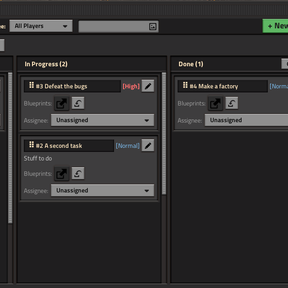
- 3 Kanban Columns (
To Do,In Progress,Done): - Create tasks via the Quick-Add bar or the full + New Task window, new tasks default to the To Do column.
- Drag-and-Drop Tasks: Drag a task's header handle (
⠿ #id Title) across columns to change its status, or drop it onto another card in the same column to reorder it (click-to-pick-up and click-to-drop is also supported). - Share Tasks in Chat: Drag a task outside the Kanbantorio window to post a clickable link in chat. Clicking the link opens a Read-Only Task View where players can inspect the task details, grab attached blueprints, or jump into editing.
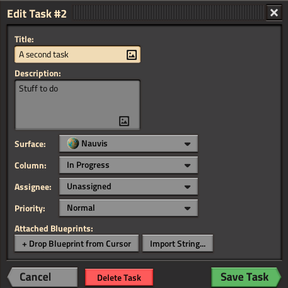
- Edit & Delete Tasks: Click the edit button on any task card to open the Edit Task window, where you can modify details, manage attached blueprints, or delete the task. Completed tasks on the active surface view can also be bulk-removed with Clear Done.
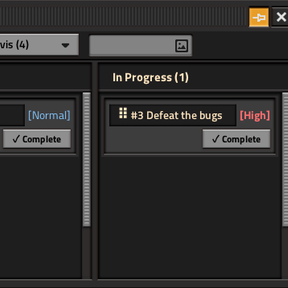
- Compact Pinned Mode:
- Click the Pin button in the window titlebar to toggle a compact, streamlined view for gameplay.
- Automatically filters the board to show only tasks assigned to you, hides the Done column and editing/creation clutter, and adds a
✓ Completebutton to the bottom-right of each task card to move completed tasks directly to Done. - Accessible Per-Surface Board Pages:
- Switch between surfaces using the Surface dropdown in the toolbar, or view tasks across all surfaces with All Surfaces.
- Dynamically filters surfaces so only currently accessible ones are listed.
- Multiplayer & Player Assignments:
- Synchronized in Real Time: All task data is stored and synchronized across all connected clients in multiplayer. Edits, moves, and completions immediately update every teammate's open board.
- Blueprint Attachments (Cursor Drag-and-Drop + Blueprint Strings):
- Attach from Cursor: Hold a Blueprint, Blueprint Book, Upgrade Planner, or Deconstruction Planner (from your inventory or the Blueprint Library) and click the blueprint attachment slot on a task card (or
+ Drop Blueprint from Cursorin the task modal). - Attach from String: Click the Import String button (or click the attachment slot with an empty cursor) to paste any Factorio blueprint string.
- Use Attached Blueprints:
- Left-click an attached blueprint icon to load a temporary copy directly into your cursor (
Qclears it without cluttering your inventory). - Right-click an attached blueprint icon to view/copy its blueprint string (and rename its label when not in read-only/pinned mode).
- Shift + Right-click an attached blueprint icon (in standard mode or the edit modal) to remove it from the task.
- Left-click an attached blueprint icon to load a temporary copy directly into your cursor (
Controls
- Toggle Board:
Ctrl + K(configurable in Settings → Controls → Mods), the Kanban button in the top-left GUI bar, or the Kanbantorio shortcut in the shortcut toolbar. - Move / Reorder / Share Task: Hold left-click on a task header (
⠿) and drag to another column, another card, or outside the window (or click once to pick up and click again at the destination).
AI Disclosure
All the code and some of this readme were written by Gemini