
External Remote Link
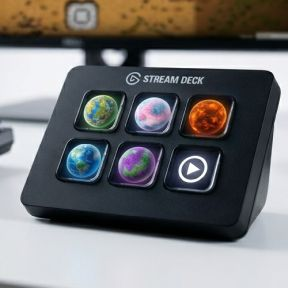
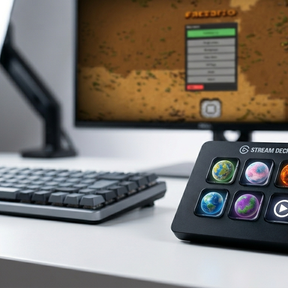
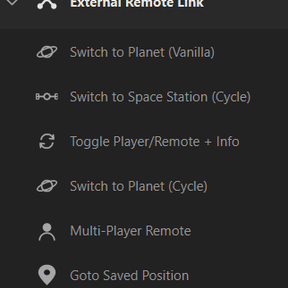
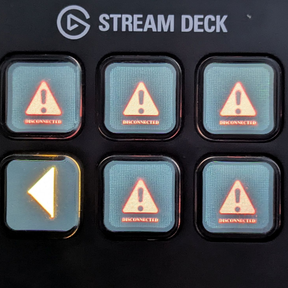
This is the updated Version to SD-Bridge for Factorio 2.1 . You can now use your second screen instead of a StreamDeck device or even an external device like a tablet. It shall also be used with a Factorio server, where you can just not interact, but see all the stats.
Testing is very limited in local game, you are welcome to check and submit bugs. I have some features in my backlog, but wanted to have feedback first.
Factorio Remote View + Stream Deck Integration
A three-component bridge between Factorio and the Elgato Stream Deck. Provides live game-state data (production, alerts, research, circuit networks) and remote-view control directly from your Stream Deck buttons.
Disclaimer: External Remote Link is an independent, fan-made companion and is not affiliated with, endorsed by, or sponsored by Wube Software. "Factorio" is a trademark of Wube Software.
Architecture
┌─────────────────────────────────────────────────────────────────┐
│  Factorio                        RCON (TCP port 25575)          │
│  ┌──────────────┐    ┌──────────────────────────────────────┐   │
│  │ ext-remote-  │───>│  Middleware (Node.js)                │   │
│  │ link mod     │    │  ws://localhost:8080  (StreamDeck)   │   │
│  │ (control.lua)│    │  http://localhost:8081 (Dashboard)   │   │
│  └──────────────┘    └──────┬───────────────────────────────┘   │
│                             │                                   │
│                             ▼                                   │
│                     Stream Deck Plugin                          │
│                     (TypeScript / Elgato SDK)                   │
│                     9 action buttons                            │
└─────────────────────────────────────────────────────────────────┘
Three components
| Component | Location | Role |
|---|---|---|
| Factorio Mod | mod/ |
Registers 12 RCON commands (/sd-data, /sd-view, /sd-toggle, etc.). Reads game state, controls remote view, handles alerts. |
| Middleware | middleware/ |
Node.js relay: connects to Factorio via RCON, polls /sd-data every second, broadcasts JSON to WebSocket clients (port 8080) and web dashboard (port 8081). |
| Stream Deck Plugin | com.robsomania.ext-remote-link.sdPlugin/ |
9 action buttons that connect to the middleware, render live data on key images, and send commands back through the middleware to Factorio. |
Prerequisites
- Windows 10+
- Node.js 20+ (
npm,npxonPATH) - Factorio (legally owned) — base game required, Space Age DLC recommended
- Elgato Stream Deck (hardware + software)
- PowerShell 5.1+ (ships with Windows)
Quick Start
1. Enable RCON in Factorio
Edit %APPDATA%\Factorio\config\config.ini:
local-rcon-socket=127.0.0.1:25575
local-rcon-password=YourPassword
2. Clone and build
build-and-run.bat
This single command:
- Installs npm dependencies for both middleware and plugin
- Compiles TypeScript
- Deploys the plugin to %APPDATA%\Elgato\StreamDeck\Plugins\
- Generates Factorio-derived graphics (planets, alerts, icons)
- Starts middleware, StreamDeck, and Factorio
3. Configure
Middleware (middleware/.env)
Edit ext-remote-link/middleware/.env to match your RCON setup:
RCON_HOST=127.0.0.1
RCON_PORT=25575
RCON_PASSWORD=YourPassword
WS_PORT=8080
WEB_PORT=8081
READ_ONLY=false
| Field | Default | Description |
|---|---|---|
RCON_HOST |
127.0.0.1 |
Factorio RCON host (local game = localhost) |
RCON_PORT |
25575 |
RCON port (must match config.ini) |
RCON_PASSWORD |
— | Must match config.ini → local-rcon-password |
WS_PORT |
8080 |
WebSocket port for Stream Deck plugin |
WEB_PORT |
8081 |
HTTP port for web dashboard |
READ_ONLY |
false |
Set to true to disable remote-view control commands |
Stream Deck Actions
In the Stream Deck app, add any of the 9 actions and set:
- RCON host — 127.0.0.1
- RCON port — 25575
- RCON password — your chosen password
- WebSocket port — 8080 (default)
Button Reference
All buttons show their current state live on the key image. Short-press and long-press have distinct actions.
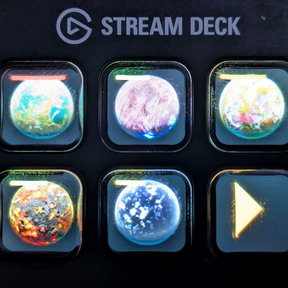
Planet Button (Vanilla — com.robsomania.ext-remote-link.planet-button)
| Property | Value |
|---|---|
| Display | Planet icon, evolution factor, red/yellow alert counts |
| Short-press | Switch remote view to the selected planet; cycle alerts (red → yellow → hub/origin) |
| Long-press | Jump to planet origin {0,0} |
Configure the planet name in the Property Inspector.
Planet Button (Cycle — com.robsomania.ext-remote-link.generic-planet-button)
| Property | Value |
|---|---|
| Display | Planet icon, evolution factor, red/yellow alert counts |
| Short-press | Cycle alerts on the current planet |
| Long-press | Next planet (all discovered planets, including modded) |
No configuration needed — automatically discovers all planets.
Space Station Button (com.robsomania.ext-remote-link.platform-button)
| Property | Value |
|---|---|
| Display | Platform icon, platform name, alerts, background planet |
| Short-press | Jump to the selected platform |
| Long-press | Next platform |
Configure the platform index (1-based) in the Property Inspector.
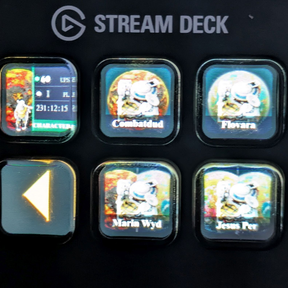
Player Button (com.robsomania.ext-remote-link.player-button)
| Property | Value |
|---|---|
| Display | Character icon, UPS, player count, playtime, background planet |
| Short-press | Jump to the selected player |
| Long-press | Next connected player |
Configure player index in the Property Inspector.
Remote Toggle (com.robsomania.ext-remote-link.remote-toggle)
| Property | Value |
|---|---|
| Display | Character icon, remote/character mode indicator |
| Short-press | Toggle between remote view and character controller |
Goto Button (com.robsomania.ext-remote-link.goto-button)
| Property | Value |
|---|---|
| Display | Pin icon |
| Short-press | Teleport remote view to saved position |
| Long-press | Save current view position (stores in Property Inspector) |
Production Button (com.robsomania.ext-remote-link.production-button)
| Property | Value |
|---|---|
| Display | Gear icon, item icon, production/consumption numbers |
| Short-press | Cycle through tracked items/groups |
| Long-press | Cycle surfaces |
Shows production and consumption statistics from all surfaces.
Circuit Network Button (com.robsomania.ext-remote-link.circuit-button)
| Property | Value |
|---|---|
| Display | Signal icon + name, signal count |
| Short-press | Refresh circuit data |
| Long-press | Cycle through available circuit channels |
Reads signals from radar-based circuit networks (wireless, per-channel). Configure channel name, type (virtual/item/fluid), and wire color (red/green/both) in the Property Inspector.
Research Button (com.robsomania.ext-remote-link.research-button)
| Property | Value |
|---|---|
| Display | Tech icon (or Erlenmeyer flask fallback), tech name, progress bar, time remaining, SP cost |
| Short-press | Open technology GUI |
| Long-press | Jump to nearest active lab/biolab |
Shows current research status with live progress updates.
RCON Commands (for reference)
The mod registers these commands (usable via middleware or direct RCON):
| Command | Purpose |
|---|---|
/sd-data |
Full game state JSON (planets, platforms, alerts, production, research, players) |
/sd-view <planet> |
Switch remote view to planet + cycle alerts |
/sd-toggle |
Toggle remote/character view |
/sd-origin <planet> |
Jump to planet origin {0,0} |
/sd-platform-view <index> |
Jump to space platform by index |
/sd-player <index> |
Jump to connected player |
/sd-goto <surface> <x> <y> |
Jump to arbitrary coordinates |
/sd-circuit <channel> |
Read circuit network signals from radar |
/sd-circuit-list |
List available circuit channels |
/sd-research-action <open\|close\|goto> |
Research GUI control |
/sd-diag |
Diagnostic output (API probing) |
Development
Repository layout
.
├─ build-and-run.bat / .ps1    One-click: build + deploy + start (fresh clone ✔)
├─ start.bat / .ps1            Quick-launch middleware + Factorio (daily use)
├─ install-dev.bat / .ps1      Full install (stops everything first, copies mod)
├─ pack-mod.bat / .ps1         Build Factorio mod .zip
├─ .env                        Local paths (not tracked in git)
├─ ext-remote-link/
│  ├─ com.robsomania.ext-remote-link.sdPlugin/    Stream Deck plugin source
│  │  ├─ src/                   TypeScript source (9 actions + renderer)
│  │  ├─ ui/                    Property Inspector HTML pages
│  │  ├─ imgs/                  Icons (own artwork tracked, Factorio-derived gitignored)
│  │  ├─ install-assets.bat/.ps1    Generate Factorio graphics locally
│  │  ├─ reset-assets.bat/.ps1      Restore shippable placeholders
│  │  └─ pack.bat/.ps1              Build .streamDeckPlugin package
│  ├─ middleware/               Node.js middleware (WebSocket + web dashboard)
│  │  ├─ src/                   TypeScript source (index.ts, rcon-client.ts, web-server.ts)
│  │  └─ public/                Web dashboard static files
│  └─ mod/                     Factorio mod (control.lua, info.json)
Scripts reference
| Script | What it does |
|---|---|
start.bat |
(Daily use) Start middleware + Factorio if not already running |
build-and-run.bat |
(Recommended) npm install → TS build → deploy plugin → install assets → start all |
install-dev.bat |
Full dev cycle (stops SD & middleware first, copies mod too) |
pack-mod.bat |
Creates ext-remote-link_<version>.zip in project root |
ext-remote-link/.../pack.bat |
Builds shippable .streamDeckPlugin (without Factorio graphics) |
ext-remote-link/.../pack-marketplace.bat |
Builds Marketplace variant with own artwork |
ext-remote-link/.../install-assets.bat |
Copy/generate Factorio graphics from local installation |
ext-remote-link/.../reset-assets.bat |
Restore placeholder graphics for redistribution |
ext-remote-link/build-dev.bat |
Legacy: TS build + assets only (called by other scripts) |
First-time setup (fresh clone)
build-and-run.bat
The script auto-detects Factorio and handles npm install. No manual steps needed.
After code changes
build-and-run.bat
This stops and restarts everything, rebuilds TypeScript, and deploys the updated plugin.
Packing the mod for Factorio
pack-mod.bat
Output: ext-remote-link_0.1.0.zip — ready for the mods folder or mod manager.
Building the StreamDeck plugin
cd ext-remote-link\com.robsomania.ext-remote-link.sdPlugin
pack.bat -Zip
Output: dist-package\com.robsomania.ext-remote-link.streamDeckPlugin
Environment variables (.env)
Create .env in the project root to override defaults:
FACTORIO_DATA_DIR=C:\Program Files\Factorio\data
FACTORIO_MODS_DIR=%USERPROFILE%\AppData\Roaming\Factorio\mods
FACTORIO_EXE=C:\Program Files\Factorio\bin\x64\factorio.exe
SD_PLUGIN_DST=%USERPROFILE%\AppData\Roaming\Elgato\StreamDeck\Plugins\com.robsomania.ext-remote-link.sdPlugin
SD_EXE=C:\Program Files\Elgato\StreamDeck\StreamDeck.exe
Missing keys fall back to auto-detection (Factorio) or defaults.
Copyright Notes
- Planet/alert/item graphics are taken from Factorio (© Wube Software). They are not stored in this repository. Each user generates them once from their own, legally owned installation (via
install-assets.ps1). A build that includes those graphics is for personal use only. - Own artwork (action icons, plugin icon, category icon, research button images) is original and shipped in the repository.
- Middleware and mod code are original.
Links
- GitHub: https://github.com/robsomania/ext-remote-link
- Factorio: https://factorio.com
- Stream Deck: https://www.elgato.com/us/en/s/downloads