
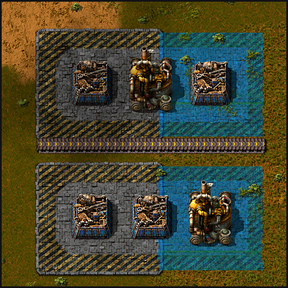
Scans your factory and queues tile ghosts around your machines, so construction robots pave the ground for you. The ghosts go down at a rate you choose, the same way a blueprint places them. Nothing is rewritten instantly.
How to use
- Install the mod and load a save with construction robots.
- Open Settings > Map and check which building types should be paved. Assemblers, furnaces, mining drills, labs, beacons, the rocket silo, centrifuges, reactors and roboports are on by default.
- Type
/auto-paver-scanin chat. The mod scans every building on your current surface and queues tile ghosts around them. - Make sure your robots can reach the ghosts and have tiles to build with.
To pave around new buildings as you place them, turn on Auto-scan when buildings are placed in the map settings.
What it paves
Each building gets its footprint plus some padding. The mod merges all footprints into one area first, so hazard concrete only goes on the outer edge of a dense block of machines, not in the gaps between neighbouring ones. The inner tile and the border tile are both mod settings.
Belts, underground belts, splitters, pipes, poles, rails and ghosts are never paved, and you cannot turn that on.
Liquid and unbuildable ground (water, lava, oil and ammonia oceans, brash ice, Gleba lakes and wetlands) gets the planet's foundation first: landfill on Nauvis and Gleba, foundation on Vulcanus and Fulgora, ice platform on Aquilo. The mod only places it once you have researched the matching technology. The paving ghost goes on top after the foundation is built.
Progress window
While a pave runs, a window shows the stage (scanning, placing ghosts, waiting for robots), a progress bar and how many tiles are done. It stays open after the pave finishes until you close it.
- Cancel stops the scan and queue and removes the pave's tile ghosts. Tiles already built stay.
- Undo pave does the same, then orders robots to deconstruct the tiles this pave built.
If a pave is already running when you load a save or join a game, the window picks it up. It has no record of what that pave built, so Undo can only remove its ghosts. Progress counts every tile ghost your force has, including ones you placed some other way.
Commands
| Command | What it does |
|---|---|
/auto-paver-scan |
Scan your current surface and queue paving ghosts. |
/auto-paver-scan-all |
Do the same for every surface in the save. |
/auto-paver-preview |
Toggle a preview around the selected building, or around a 3x3 spot at your position. |
/auto-paver-remove-all-tile-ghosts |
Remove every tile ghost your force has on all surfaces and clear Auto Paver's queue. Entity ghosts stay. |
/auto-paver-fix-landfill-ghosts |
Add missing foundation ghosts under paving ghosts that sit on water. |
/auto-paver-fix-duplicate-ghosts |
Remove stacked duplicate tile ghosts and repair paving ghosts on water. |
Settings
All settings are runtime map settings, so you can change them mid-game.
| Setting | Default | What it does |
|---|---|---|
| Paving padding (tiles) | 2 | Extra tiles around each building before paving. |
| Hazard border width (tiles) | 1 | Width of the border on the merged outer edge. 0 turns the border off. |
| Tile ghosts placed per second | 60 | How fast ghosts appear. Robots still build at their own pace. |
| Buildings scanned per tick | 25 | Scan speed. |
| Tiles checked/queued per tick | 250 | Lower this if a scan makes the game stutter. |
| Auto-scan when buildings are placed | off | Scan around each new building. |
| Scan space platforms | off | Let scans include space platform surfaces. |
| Inner paving tile | concrete | Stone path, concrete or refined concrete. |
| Border paving tile | hazard-concrete-left | Left or right hazard concrete, regular or refined. |
There is also one toggle per building type, named Pave: <type>. Storage, power, chests, pumps, trains, lamps, turrets and walls are off by default.
Limits
- Tiles are only as fast as your robots and your tile supply.
- The list of building types is fixed.
License
MIT.