

Fork of Transport Drones (Continued).
Transport Drones (Continued, Fixed)
A ground-based logistics system for Factorio 2.1. Transport drones haul items and fluids between depots connected by road networks - a flexible alternative to belts and trains for mid-to-late game logistics.
This is a full rewrite of Klonan's Transport Drones for Factorio 2.1. It adds active provider, storage and dispatcher depots, fluid buffer depots, priority routing, load balancing, channel segregation, a road-graph router, a custom per-depot settings panel, Factorissimo 3 cross-surface support, and compatibility with Nullius, AngelBob and Maraxsis.
Graphics by Bubbles from the Factorio discord.
Playing with Bob's, Pyanodon or SeaBlock? Install DronePatching by Sgamez for recipes and research costs tuned to those overhauls. Since 2.1.1 that tuning lives there; this mod keeps only a Pyanodon science-pack swap on its research and the SeaBlock road recipe.
How it works
- Build roads to connect your production areas.
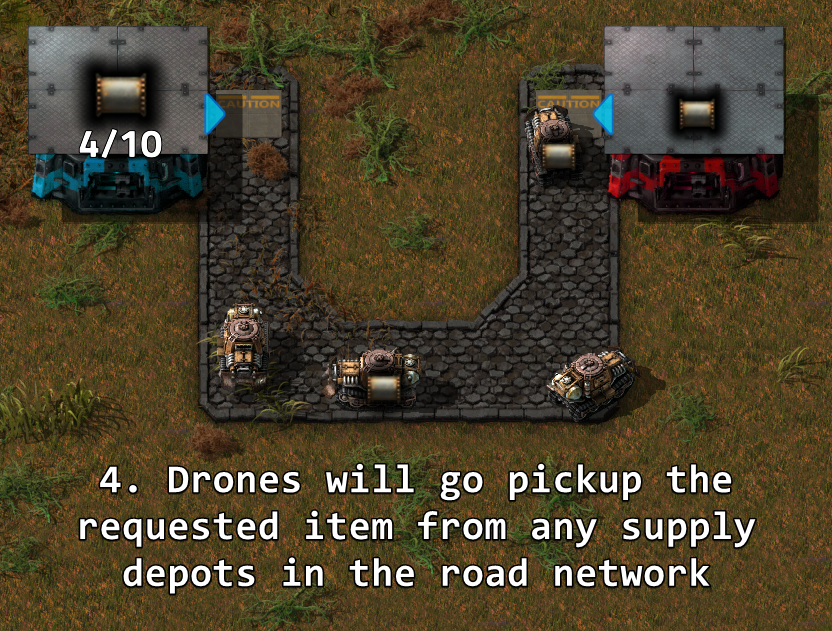
- Place depots on the road network: passive provider depots offer items, requester depots collect them.
- Insert transport drones into depots. Drones autonomously pick up items from passive provider depots and deliver them to requester depots.
- Fuel the network with fuel depots - drones consume fuel proportional to travel distance.

Technology tree
Engine
  +-- Basic drone transportation -> drones, roads, fuel depot, drone dispatcher
        |-- Drone deliveries (requires Fluid handling) -> passive provider depot, fluid depot, requester depot (items + fluid)
        |   |-- Advanced drone transportation -> buffer depot (items + fluid), active provider depot, storage depot
        |   |-- Faster roads (researched by crafting 1000 roads) -> fast road
        |   +-- Road network reader (requires Circuit network) -> road network reader
        |-- Transport drone speed 1-4 (+15% each)
        |   +-- Speed 5+ (infinite research, +15% per level)
        +-- Transport drone stack capacity 1-4 (+1 stack each)
            +-- Stack capacity 5+ (infinite research, +1 stack per level)
Roads
- Road - Standard tile. Walking speed bonus: 1.5x.
- Fast Road - Upgraded tile. Walking speed bonus: 2.0x. Drones are ~33% faster on fast roads.
Any connected road tiles form a road network. Disconnected road areas are separate networks.
Diagonal crossing prevention (enabled by default) stops drones from connecting road networks diagonally through non-road corners.
Roads can also be placed on space platform foundations (Space Age).
Depot types
Listed in the order the research unlocks them. Inventory and drone slots grow with the depot's quality; see Quality support.
Fuel depot
Delivers fuel to all depots on the road network. Fuel type is configurable (petroleum gas by default).
- Fuel depot drones are the only way other depots get fuel: pipe raw fuel into a Fuel Depot and it supplies the rest.
- Unlocks with Basic drone transportation.
Drone dispatcher
Holds transport drones and distributes them to other depots on the road network.
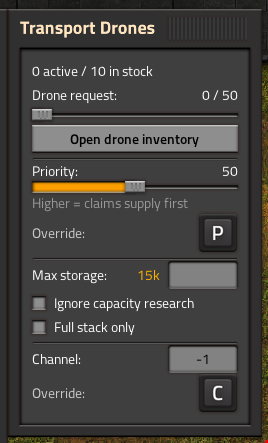
- Drone request slider: each depot can request a specific number of drones from the dispatcher.
- Priority-based distribution: higher-priority dispatchers distribute drones first.
- Return slots: locked inventory slots collect excess drones when a depot's slider is reduced. Drones are returned automatically.
- Central dispatch mode: the dispatcher sends its own drones to serve requester, buffer and storage depots that have no idle drones and fuel of their own. It picks up from any depot supplying the item, and moves active provider surplus into storage depots (a passive provider is never drained into storage). Channels must match on both ends. A drone allocation slider (default 50%) caps how many of the dispatcher's drones, in its inventory and out on trips together, can be out on central deliveries at once. Each depot has an "Allow central dispatch" toggle to opt in or out.
- Unlocks with Basic drone transportation.
Passive provider depot
Makes its inventory available to the road network. Other depots dispatch drones to collect from it.
- Unlocks with Drone deliveries.
Fluid depot
Makes fluid available to the road network. Connect it to pipes - requester depots can request fluids just like items.
Every fluid depot has pipe connections on three sides.
- Unlocks with Drone deliveries.
Requester depot / Requester fluid depot
Dispatches drones to collect a selected item - or fluid - from passive provider depots. The number of drones controls throughput - more drones means more concurrent deliveries.
- Two separate buildings. The Requester Depot takes item requests only; the Requester Fluid Depot takes fluid requests only and delivers into pipes on its three non-road sides. The fluid version is drawn as a tank, tinted to match its item counterpart.
- Max storage cap (Request limit on the fluid version), plus two trip controls: a Payload override (type the base stack size to ignore capacity research) and Full loads only.
- Both unlock with Drone deliveries.
Buffer depot / Buffer fluid depot
Acts as both a requester and a provider. Use it to collect resources from distant outposts and redistribute them locally.
- Two separate buildings, like the Requester Depot, with the fluid version drawn as a tank.
- The same Max storage, Payload and Full loads only controls as the Requester Depot.
- Both unlock with Advanced drone transportation.
- Can be disabled via startup setting.
Active provider depot / Active provider fluid depot
A push-based supplier for mixed item output. Automatically offers whatever items it contains to the network - suits an assembler that makes more than one product.
- Payload override and Full loads only size what it pushes; a target with Full loads only set is sent nothing short of a whole payload.
- Unlocks with Advanced drone transportation.
- Can be disabled via startup setting.
Storage depot / Storage fluid depot
A passive warehouse for the drone transport network. Accepts overflow from active provider depots and serves items back when requested.
- Starts at priority 75 (every other depot starts at 50), so requester depots draw from it before passive providers. Lower its priority, or raise the Priority weight setting, to change that.
- A storage depot pinned to one item keeps showing that item at zero in the road network GUI when it runs empty.
- Payload override and Full loads only, honoured by central dispatch and by active provider pushes.
- Unlocks with Advanced drone transportation.
- Can be disabled via startup setting.
Removing a depot returns its contents to the player's inventory.
Quality support
Depot quality scales inventory size. Each row is a startup setting that takes five sizes (Normal to Legendary) or a formula in q, the quality level. The defaults:
- Depot inventory (passive provider, active provider, storage, and the stock of requester and buffer depots): 80 / 100 / 125 / 175 / 250 slots
- Depot drone slots (requester, buffer, fuel, active provider): 5 / 6 / 7 / 8 / 10
- Drone dispatcher inventory: 20 / 24 / 28 / 32 / 40 slots
- Drone dispatcher player slots (the part you fill; the rest hold returning drones): 10 / 12 / 14 / 16 / 20
A list is five comma-separated sizes, like the default 80, 100, 125, 175, 250. A formula uses q = 0, 1, 2, 3 and 5 for Normal to Legendary, and each result is rounded to a whole slot. For example, 80 * 1.25 ^ q gives 80 / 100 / 125 / 156 / 244 depot inventory slots, and the default drone slots are the formula 5 + q.
Drone quality scales performance:
- Speed bonus: +15% / +30% / +50% / +80% (Uncommon to Legendary)
- Fuel savings: 10% / 20% / 30% / 45% (Uncommon to Legendary)
Any quality drone can be used in any quality depot. Drones are stored in a separate drone inventory, filled through the depot window or by an inserter into a Drone Dispatcher. Higher-quality drones are dispatched first (legendary before epic, etc.).
Priority system
Every depot has a priority slider (0-100). Depots start at 50, storage depots at 75.
- Passive provider/fuel depots: higher priority = collected from first, even if farther away.
- Requester/buffer depots: higher priority = claims scarce supply first.
Priority can be overridden via circuit network using signal [P].
Load balancing
Two runtime settings fine-tune supply selection:
- Load balance threshold (default: 20) - when greater than 0, passive provider depots with similar scores are treated as equivalent and one is chosen randomly, spreading load across nearby depots.
- Priority weight (default: 0) - replaces the absolute priority system with a weighted bias, making priority a soft preference that can be outweighed by distance.
Channel segregation
LTN-style bitmask channels let you run multiple independent logistics networks on the same physical roads.
- Default: -1 (all channels - everything interacts). The map setting Default channel for new depots changes the channel newly placed depots start on.
- Assign channels like 1, 2, 4, 8... to segregate traffic.
- Depots only interact when their channels share at least one bit (bitwise AND != 0).
- Fuel depots respect channels - they only fuel depots on matching channels.
- Overridable via circuit network using signal [C].
Circuit network integration
Every depot takes a red or green wire directly - there is no combinator to build. Both wire colours are read and written together, except on a Requester Depot: like a vanilla requester chest, its Read contents and Set requests tickboxes and its per-colour input and output choices let it read its contents on one colour and take requests from the other.
Reading the wire
- Enable/disable condition: switch a depot on or off on a signal comparison. On a Requester or Buffer Depot it is in the Configure requests window; on a Passive Provider, Active Provider, Storage or Drone Dispatcher it is behind the Enable/disable condition button in the depot's panel; on every other depot it is in Factorio's own circuit window.
- Requests from the wire: a Requester or Buffer Depot can take the item it requests, and how much of it, straight from the wire.
- Priority and channel via signals [P] and [C]. Both signals can be changed in the depot's window.
Writing to the wire
The readout section of the depot's window decides what it writes: its own contents, the network's totals, or extra signals. The drone signals - drone count [D] (on by default), active drone count [A] and fuel level - appear only on depots that own drones: Requester, Buffer, Fuel and Active Provider, plus the Drone Dispatcher, which adds a returning-stacks signal [R] of its own.
Road network reader
Unlocked by the Road network reader research. Set one or more item or fluid signals in its slots - it continuously outputs the total supply of each across the entire road network. Useful for enabling or disabling production based on network stock levels.
Road network GUI
Press Ctrl+T (or use the toolbar shortcut) to open the road network overview:
- Surface/planet selector to filter depots by world (Factorissimo factory surfaces resolve to their parent planet).
- Item filter and channel filter in the title bar to narrow results.
- Contents tab: all items across the network with supply/request progress bars and capacity labels.
- Depot tabs (Passive Provider, Mining, Active Provider, Storage, Dispatcher, Fuel, Requester, Buffer): minimap + structured depot info panel side by side.
- Item names with capacity progress bars.
- Inline priority sliders (edit in real-time).
- Editable channel fields.
- Drone progress bars with per-quality breakdown.
- Circuit override indicators when priority or channel are set by signals.
- Depot status dot (green = enabled, red = disabled).
- Click minimap buttons to teleport directly to any depot.
- Tabs for depot types the network does not have are greyed out. The Mining tab appears only with Mining Drones installed.
Blueprint support
Blueprints preserve:
- Requests (items, amounts and quality)
- Per-quality drone counts
- Priority, channel, storage limit, payload override, and all toggle settings
- Circuit conditions and readout settings
Blueprint parameters work on depot requests too.
Spoilable items
Spoil timers are preserved through drone transport. Items like nutrients and biter eggs maintain their freshness - no spoilage reset on delivery.
Factorissimo 3 integration
Road networks bridge across Factorissimo 3 factory building surfaces. Place road tiles at both sides of a factory door to connect inside and outside networks. Drones automatically teleport through factory entrances.
- Cross-surface distance estimation: depot scoring accounts for travel distance through factory portals, preferring closer factories.
- Visual indicators: "Road connected" / "Road disconnected" floating text appears when factory portals activate or deactivate.
- Road network GUI minimap navigates to the correct surface when clicking a depot inside a factory.
Mining Drones integration
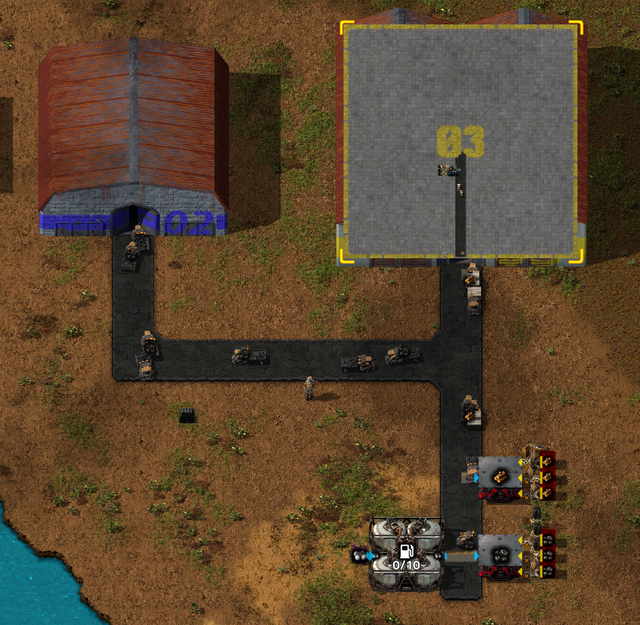
Works with Klonan's Mining Drones and Mining Drones Remastered. Mining depots automatically connect to the transport drone road network when placed adjacent to road tiles - mined resources become available to transport drones with no extra setup. Roads placed after the depot trigger auto-connection too.
Third-party road compatibility
Built-in support for road tiles from:
- Asphalt Roads (AsphaltRoadsPatched)
- Dectorio (concrete grid)
- PyIndustry (all py-tiles)
Custom tiles from any mod can be whitelisted via the Road tile whitelist startup setting (comma-separated Lua patterns or @subgroup matches).
Other mods can also register tiles programmatically by setting is_road_tile = true on their item prototype.
Migrating from other Transport Drones forks
Switching from the Meglinge Fork or any other Transport Drones fork? Disable it first (the forks share building names, so only one can be enabled), then load your existing save - a "Recover unregistered depots" button appears automatically when orphaned depot entities are detected.
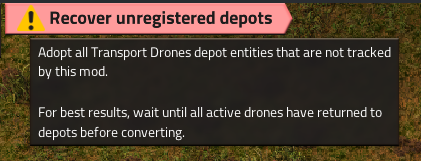
Click it to open a confirmation dialog explaining what will be preserved and what will be lost:
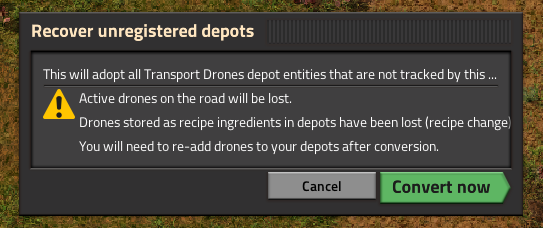
The migration adopts all depot entities, preserves recipes, items, fuel, and circuit connections. Drones out on the road are recovered and spread across the adopted depots, though whatever they were carrying is lost. Drones stored as recipe ingredients are lost.
Configuration
Settings are sorted into groups, and each name starts with its group, such as Fuel, Road or Dispatch.
Startup settings:
- Fuel type (petroleum gas, water, steam, crude oil, light/heavy oil, sulfuric acid, lubricant)
- Fuel per drone and fuel consumption per meter
- Drone fluid capacity
- Drone pollution per second
- Drone sound volume (0-100%, default 80%)
- Fluid depot storage capacity (default 25,000)
- Requester depot fluid output capacity (default 25,000)
- Depot inventory, depot drone slots, dispatcher inventory and dispatcher player slots per quality (see Quality support)
- Road tile whitelist and blacklist (third-party mod compatibility)
- Diagonal corner-cutting prevention
- Space platform roads (default: enabled)
- Enable/disable buffer depot, active provider depot, storage depot (all default: enabled)
- Roads to craft for the Faster roads research (default 1000)
Runtime settings:
- Depot update interval (default 30 ticks - lower = more responsive, higher = better UPS)
- Load balance threshold (default 20 - randomize among similarly-scored passive provider depots)
- Priority weight (default 0 - blend priority with distance instead of absolute priority)
- Item availability bonus (default 50 tiles - how much a full supplier is preferred over a nearly empty one)
- Max dispatches per depot per tick (default 100)
- Redispatch interval (default 10 ticks)
- Drone launch burst limit (default 1.5 - how far above the recent average one tick's launches may go before the rest wait a few ticks; 0 turns it off)
- Pathfinder tuning (max steps, max work, path cache)
- Drone router (default: Graph, which plans each route over the road's junctions and takes the fastest way, so a fast road is worth laying; Engine is the game's pathfinder; Route cache is similar to path cache but uses a different method.)
Remote interface
The mod exposes a "transport_drones" remote interface with 25+ functions for mod-to-mod integration:
- Query networks, depots, and drones
- Read/write priority, channel, storage limit, payload override, full-loads-only
- Diagnostics and debugging tools
- Force depot updates and bucket recalculation
- Read the transport drone fuel configuration (fluid, requested fluid, per-drone amounts)
Usage: remote.call("transport_drones", "<function_name>", ...)
See reference/remote-interface.md in the repository for the full function list.
Localization
Fully translated in 9 languages: English, French, German, Spanish, Russian, Japanese, Korean, Chinese (Simplified), Polish.
Credits
- Original mod: Klonan - Transport Drones (Factorio 1.1)
- Graphics: Bubbles (Factorio Discord)
- Factorio 2.0 port: Shadoxa
- Cross-fork migration bridge: MoSII2710
- Nullius integration: andrevdm Built on the base Nullius integration.
- Mod tutorial: Nilaus on YouTube