

Server Control Enhancement
Server Control Enhancement is a tool for Factorio server administrators that automates server pausing based on custom criteria. No more wasted game time, unnecessary pollution evolution, or biter attacks while your server is empty!
All configurations can be managed in real-time straight from the game via an intuitive graphical user interface (GUI).
Features
- In-Game GUI: Manage all pause settings on the fly without editing config files or restarting the server.
- Player Count Control: Define the minimum number of online players required to keep the server running.
- Specific Player Tracking: Keep the factory running only when a player (or players, e.g., a streamer, host, or admin) are online.
- Custom Timers: Add a delay before the server pauses. The timer can trigger either from the moment conditions are met or from the world start.
- Flexible Combine Modes:
- Pause the server if ANY enabled condition is met.
- Pause the server only when ALL enabled conditions are met.
- Admin-Only Access: Secure your settings by restricting GUI access to server administrators only.
- Pause Notifications: Broadcast clear server pause/unpause messages and visual effects to all connected players.
- Auto-Kick Feature: Automatically kick all connected players once the server goes into pause mode.
Interface Breakdown
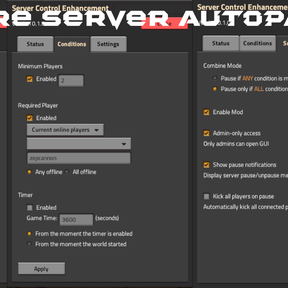
The intuitive layout is split into three easy-to-use tabs:
1. Status
- Displays the live state of your server (
RUNNING/PAUSED). - Lists all currently active conditions affecting the server status (e.g., current player count or tracked player presence).
2. Conditions
- Minimum Players: Enable this to set a threshold (e.g., pause if the online count drops below 2 players).
- Required Player: Specify a player's username whose presence is mandatory. Choose whether to pause when they go offline or when all specified players are offline.
- Timer: Set a countdown in seconds before the pause sequence initiates.
3. Settings
- Combine Mode: Switch between "Pause if ANY condition is met" and "Pause only if ALL conditions are met".
- Enable Mod: Master toggle to quickly turn the automation on or off.
- Admin-only access: Restrict settings modifications to admins only.
- Show pause notifications: Enable or disable chat alerts and screen effects for pause events.
- Kick all players on pause: Automatically clear the server of idle players during a pause.
Usage
- Open the GUI using the button on the shortcut bar or the console command
/sce-gui(this does not disable modded achievements). - Adjust the settings.
Headless Servers & RCON
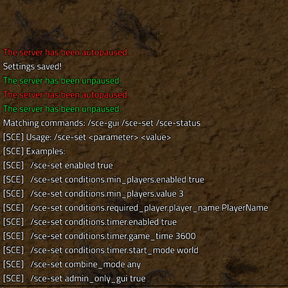
For headless servers or automation via RCON, you can modify any mod setting remotely without launching the game client. Use the console command /sce-set to change parameters programmatically.
Full documentation and command references can be found inside the mod folder in the README_Commands.md file.
Enjoy your game, and let your factory grow only when you are there to see it!