
Project Notepad

by Cygin

Highly customizable in-game notepad.

Utilities
8 days ago
2.0
317
Owner:
Cygin
Source:
N/A
Homepage:
N/A
License:
MIT
Created:
30 days ago
Latest Version:
1.0.6 (8 days ago)
Factorio version:
2.0
Downloaded by:
317 users

About This Mod :

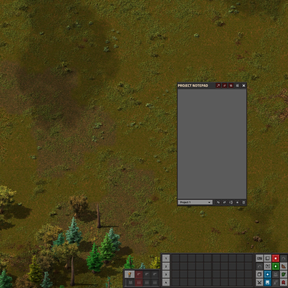
This in-game notepad lets you jot down notes without leaving the game, keeping track of current and future tasks hassle-free. You can create unlimited projects and pin up to two for quick access. It offers customization options like font size, font type, window size, and text or background colors. Supporting resolutions of 2160p, 1440p, 1080p, and Ultrawide, it’s designed to be compatible with any UI size. You can move the window anywhere, pin it, and collapse it to save screen space while keeping it handy.


Note : this video showcase an older version of the mod.


How to Use and Additional Informations :

  • Open the notepad window via Ctrl + N (customizable) or the shortcut bar icon at the bottom of the screen.
  • Pin a project by right-clicking its name while selected.
  • Full text wipe prevention (toggleable) limits all text deletion to 150 characters at a time to protect against accidental right-clicks. An undo button is also available as an extra safeguard.
  • Project names are limited to 14 characters to ensure they fit the UI.
  • You can swap the title and edit bars positions to choose whether the window collapses upward or downward.
  • Hover over any button to learn more about what it does.
  • Type /notepad-reset-position in the console if somehow the window gets stuck off-screen.

Known Issues :

  • No issues reported.

Patch Notes :

1.0.5 - 1.0.6 (February 15, 2026)

Bugfix

  • Fixed various issues related to resolution and UI scale.

User Experience

  • In an effort to enhance the immersion, overall user experience and to prepare for future plans, I added a startup animation that will play once per playthrough. You'll never see this animation again unless you create a new game, to not hinder the gameplay.

Interface

  • Mirror mode added to automatically flip the title bar buttons depending on the window location (left or right half of the screen.)
  • Updated the collapse logic to support mirror mode and reduced the title bar size when collapsed.
  • New icons have been added to indicate the direction of window collapse and expansion.
  • Some settings now use sliders.
  • Added a default location setting letting you choose where the default window anchor point should be located. Centered, bottom left or right.
  • Made centered position the default to improve immediate visibility.
  • Window width and height now adjust based on the screen position. The window will expand inward relative to the edges or remain perfectly centered if the "centered" setting is selected as the default.
  • Changed how the default window sizes are calculated based on resolution + UI scale instead of being hardcoded presets.
  • Added more width and height sizes to accomodate with the previous change.
  • Made various UI elements scale better when using higher resolutions combined with smaller UI scales.
  • Max project name character length increased to 14.
  • Red and Magenta vibrancy reduced to improve visibility.
  • (1.0.6) Reverted the project deletion method.

Audio

  • New sounds have been added for the boot sequence, text box clicks, project deletion and sliders.
  • Full audio pass to set the RMS to be between -25db and -35db depending on the sounds, should result in more audible interface sounds and less punchy keyboard sounds.

1.0.3 - 1.0.4 (February 8, 2026)

Bugfix

  • Fixed an issue where the edit bar wouldn't immediately register as out of bounds when uncollapsed close to the screen edge in the default orientation.
  • Fixed various window positioning issues on non 100% UI scale. (Thanks to Mattias1172 for their help on that matter).

Q.O.L

  • Right-click prevention is now toggleable, allowing confident engineers to delete any number of characters at once.

Interface

  • Added ultrawide to the resolution presets.
  • The window default position now uses a margin that takes into account the UI scale, replacing the previously introduced fixed 12px offset. The notepad should now align with the remote view border at any resolution and scale. Note : there's a 1px gap that persists between the window's right side and the remote view border, testing showed that a 1px overlap was more noticeable, I choosed to leave the gap while I find a fix.
  • Added a new font type setting alongside three new fonts: Inter, SFMono and Monofonto.
  • Added two new Fallout™ inspired text colors: Mint (FO3) and Amber (FNV). Tweaked blue to be readable.
  • Changed how the font values are handled, added smaller increments and changed the setting display to show pixel size instead of index numbers.
  • The edit bar is now draggable, improves the UI feel when bars are inverted.

Optimization

  • Various functions, helpers and constants have been added/cleaned up.

Audio

  • Miscellaneous tweaks to sound files.

1.0.1 - 1.0.2 (February 6, 2026)

Bugfix

  • Fixed an edge case where moving the window off-screen and clicking the swap bar button caused it to get stuck. The window is now clamped to the play area and resets automatically.
  • Fixed the reset default window position button placing the window incorrectly when using non-default sizes, now it dynamically positions the window to the bottom-right corner with a 12px margin from the screen edges and works with any combination of width/height modes.

Console

  • Added a new console command, /notepad-reset-position, as a manual failsafe to restore the window to its default coordinates.

Interface

  • Updated the UI by moving the top-left notepad icon to the shortcut bar, matches the default Factorio aesthetic better.

1.0.0 (January 23, 2026)

  • Initial release.

Feedback & Suggestions :

If you have any feedback or ideas you want to share, feel free to do so in the discussion tab.


Special Thanks :

Thanks to all the engineers out there who decide to try out this mod, may your factory never stop growing!
Thanks to www.iconarchive.com an amazing website for free icons.
Thanks to www.rsms.me/inter & www.github.com/supercomputra/SF-Mono-Font & www.typodermicfonts.com/monofonto for their fonts.