Toolbars


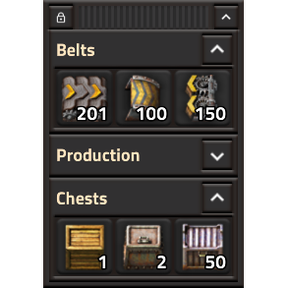
If the Quickbar is not enough, create toolbars that can hold items and tools and be positioned anywhere you like.

Utilities
a month ago
1.1 - 2.1
8.88K

i [PoC] I have a forked version that adds significant features, would you like it?

a month ago

I got tired of waiting for a new version, so I vibe coded my own fork of this that adds several key features:

  1. The ability to save and load profiles (Sort of, it generates a blueprint string that you can save to a file).
  2. Popup menus, so you can add, for example, different inserters or different assembler levels to the same button, just right-click to choose a different version.
  3. The ability to add blueprints to buttons.

I don't plan on sharing this-- since I didn't code it, I am not comfortable supporting it-- but I would love to share it with you, and you can take some of the ideas that it implements. It actually was pretty creative at solving some problems, for example it had a great workaround to allow adding blueprints to buttons, something that I think you had concluded wasn't possible. It's solution was not ideal-- it creates a copy of the blueprint string on the button, so it is no longer linked to the original blueprint-- but it is better than not being able to add blueprints at all. If this sounds like something that you would like to check out, let me know. I'm not sure how I can send it to you anonymously, but I'm sure we can figure something out.

a month ago
(updated a month ago)

Sure,
1. I'm curious how it imports a profile.
2. I wonder how it looks like and how it solves hiding a menu when you click something else.
3. I have the same idea as a fallback. Does it draw an icon properly? Can you edit this blueprint?

You can just uploaded it somewhere and share an anonymous link.

I'm considering creating a public repo for this project and accepting PRs because of a lack of time and the fact that I haven't played Factorio since I started creating this mod.

a month ago

Here's the link to a zip file. https://www.dropbox.com/t/DQKgFO45BA4IhWZw Hopefully Factorio lets me share a link.

  1. Essentially, it imports and exports exactly as blueprints do. It has a textbox to allow you to paste a string , and it populates the toolbars as appropriate. It's not quite as elegant as a true import/export routine, but it works given Factorio's limitations.
  2. Getting it to properly hide the menu took several iterations, but it did eventually work.
  3. Unfortunately, no, Factorio does not let you access the blueprint icon, so it only shows the generic blueprint icon. It does show the blueprint name, though. You can edit the blueprint by Shift-right-clicking on it, but you are editing a copy of the original blueprint, not the blueprint itself.

A couple other features/bugs:

Right clicking on a populated button pops up a menu with the existing item at the top, and an empty button below that. You can add additional items as desired. The last used item will be the item displayed and selectable by an ordinary left-click the next time.

Once a button has more than one item on it, a + icon is shown in the top corner. In theory you can left click on that + to pop the menu up alsom, but it is not working at present.

Dropping a blueprint book onto a button creates a pop up with all included blueprints. Unfortunately this only works one level deep, so no nested books.

Clicking the P button in the top bar of the toolbar window opens the profile manager.

I think that is the main things, but let me know if you have questions.

2 days ago

Unfortunately, no, Factorio does not let you access the blueprint icon, so it only shows the generic blueprint icon.

I came up with a method to render blueprint icons that I've used in Compact Recipe Pins, which may interest you. This implementation also creates a copy of the blueprint.

However, in Factorio 2.1, you can create "inventory" LuaGuiElements, which you could use to display an item from a script inventory.

2 days ago

Thanks for sharing your solution. It might save me a lot of time figuring it out by myself. I'm really surprised that you need to create a temporary inventory to open the editor of a record. Wouldn't it open if you set player.opened = stack at cursor? According to the documentation it accepts LuaItemStack. Have you tried it?

2 days ago
(updated 2 days ago)

So I only implemented pins for LuaRecord, that is, planners from the Blueprint Library. I didn't bother with the LuaItemStack version of them because they aren't used as frequently, and I don't want to keep track of when items are disappearing into chests etc.

Also I use Z as the main hotkey for the mod. If I'm holding the blueprint item, I'll drop it. If I'm hovering the blueprint item with an empty hand, the CustomInput event doesn't tell me which slot I was hovering over. So there's a design conflict there.

Blueprints aren't really a focus of my mod, it's just something I tried as an experiment. :P

player.opened does not accept LuaRecord, which is why I need the temporary inventory.

EDIT: And LuaRecord::label has been added in 2.1, so I can start reading from that.

New response