
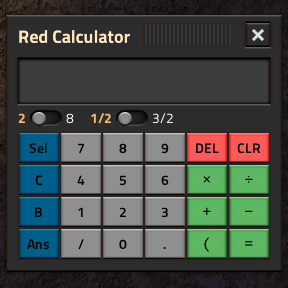
Red Calculator
To open the calculator, you can use the shortcut button or the Ctrl + Shift + C keybind.
Numbers
Aside from the usual 0-9 and [.] button, this calculator also features a [/] button for typing in fractions directly:
1 / 2 / 3
-> 1 2/3/ 8
-> 1/8
or for automatic decimal to fraction conversion:
3.1415 /
-> 333/106-1.125 /
-> -9/8
Operations
Double click [×] for exponentiation:
2 × × 3 =
-> 8.0027 × × 1/3 =
-> 3.00
Double click [÷] for swapped division:
2 ÷ ÷ 3 =
-> 1.50
Brackets
Normally all calculations are performed as you type them in:
1 + 2 * 3
-> 3 * 3
But you can change that by opening a bracket with [(]:
1 + ( 2 * 3
-> 1 + ( 2 * 3
And then closing it using the [=] key:
1 + ( 2 * 3 =
-> 1 + 6
Memory
There are 3 memory arrays, containing the 11 most recent results:
| Button | Stores all: |
|---|---|
| Ans | final Answers. |
| B | results from closing a Bracket. |
| C | Intermediate Calculations. |
Auto Clear
When opening the calculator window, previous calculations are cleared but can be brought up with the CLR button.
Future Plans
- Proper fraction support.